
Yes, eSIM foreign transaction fees can apply when your card issuer treats the purchase as a foreign-currency or international transaction, even if you buy the plan before leaving Canada. The fee is separate from your eSIM service charge, and paying in Canadian dollars does not necessarily remove it: your card agreement and the merchant’s payment arrangements determine what applies.
- eSIM foreign transaction fees depend on your payment method and transaction details, not where you use mobile data.
- Canadian-dollar billing does not guarantee that your card issuer will waive international transaction charges.
- A-sim travel eSIMs suit travellers who want app-based usage management and top-ups.
- Check the checkout currency, card agreement and posted transaction before treating an unexpected charge as a roaming fee.
Can eSIM billing include foreign transaction fees?
Yes. Buying mobile data and paying for it are separate transactions with separate rules. An eSIM provider supplies the plan; your card issuer determines whether the payment attracts a foreign transaction fee under your card agreement.
You can explore travel eSIMs through A-sim, but assess payment charges separately from destination coverage. Neither the country you visit nor the country covered by a plan establishes how your bank will classify the purchase.
Use this breakdown to identify the charge before contacting support:
| Charge or adjustment | What triggers it | Where to check | What it is not |
|---|---|---|---|
| Foreign transaction fee | A payment that meets your card agreement’s definition of a foreign transaction | Card agreement and posted transaction | A charge for using mobile data abroad |
| Currency conversion | A purchase settled in a currency different from your card account’s currency | Receipt, original currency and statement | Necessarily a separately listed fee |
| Checkout conversion | A checkout offers to convert the payment into your home currency | Currency choice and conversion disclosure | Proof that your issuer will charge nothing extra |
| Taxes | Applicable tax rules for the purchase | Itemized checkout and receipt | A bank’s foreign transaction fee |
| Roaming charge | Usage billed under a mobile carrier’s roaming terms | Mobile account and carrier bill | A payment-processing charge |
For a 2026 purchase, read the current card agreement rather than relying on what happened on an earlier trip. A previous fee-free payment does not establish the treatment of a different merchant, currency or card.
Why this matters
An unexpected statement amount can send you to the wrong support team. Your eSIM provider can explain its receipt; your bank can explain its conversion and card fees. Your home carrier handles charges on your existing mobile account.
That distinction also changes how you prevent a repeat. Turning off mobile data cannot prevent a payment fee, and changing cards cannot stop roaming usage on your home line. Match the fix to the source of the charge.
Foreign-currency billing: check your card’s conversion terms
When an eSIM checkout charges a currency other than your card account’s currency, conversion is part of the payment. The conversion rate and any applicable foreign transaction fee affect the amount that reaches your statement.
The original receipt and bank statement can therefore show different currencies without either document being wrong. Compare the original transaction amount, its currency and the posted amount together—not just the merchant name.
Best for: travellers who can review their card’s foreign-currency terms before paying. The benefit is a clear understanding of who performs the conversion; the drawback is that the checkout amount alone does not establish the final account-currency amount.
For your 2026 travel budget, keep the original receipt. A screenshot of a browsing page is less useful than the completed order confirmation because the confirmation records the transaction you actually authorized.
Canadian-dollar billing: check international transaction rules
A Canadian-dollar checkout removes the need to convert a Canadian-dollar payment into your account currency. It does not, by itself, establish where the merchant or transaction is treated as being located.
Some card agreements distinguish foreign-currency transactions from international transactions. If your agreement applies a charge based on a merchant’s location or another transaction characteristic, the currency displayed at checkout is not the whole answer.
Best for: travellers who want a checkout amount expressed in their account currency. The benefit is easier budgeting; the limitation is that a familiar currency is not a guarantee against an issuer’s international transaction charge.
Ask your issuer a precise question: does this card charge for Canadian-dollar purchases from foreign merchants? That is more useful than asking whether the card works overseas.
Checkout conversion: review the choice before accepting it
Some payment checkouts offer to convert a foreign-currency transaction into your home currency. This is commonly called dynamic currency conversion. Where offered, it changes who provides the conversion rather than making conversion disappear.
Read the displayed exchange rate and conversion disclosure before choosing. Do not assume that a home-currency option is the cheaper route, or that declining it guarantees a lower final amount; the comparison depends on the checkout terms and your card agreement.
Best for: travellers who specifically want a disclosed home-currency amount before authorizing payment. The advantage is visibility at checkout; the drawback is that the offered conversion needs its own assessment.
Choose the payment currency deliberately. A familiar currency symbol is not evidence of better payment terms.
Why eSIM foreign transaction fees vary
The same destination plan can produce different payment outcomes for different customers. These are the factors to check:
- Card agreement. The issuer’s definition of a foreign transaction determines which purchases qualify for a fee.
- Account currency. A payment in a different currency requires conversion before it appears in your account currency.
- Settlement currency. The currency actually charged matters more than a browsing display that only estimates a local equivalent.
- Merchant classification. A merchant’s recorded location can matter when your card agreement covers international purchases in your home currency.
- Conversion choice. Accepting checkout conversion changes the conversion arrangement; it does not rewrite your card’s terms.
- Separate purchases. A later top-up is another payment to assess, not simply more data attached to the original receipt.
Your physical location when pressing the purchase button does not settle these questions. Buying from your sofa in Canada is not proof that a transaction is domestic.
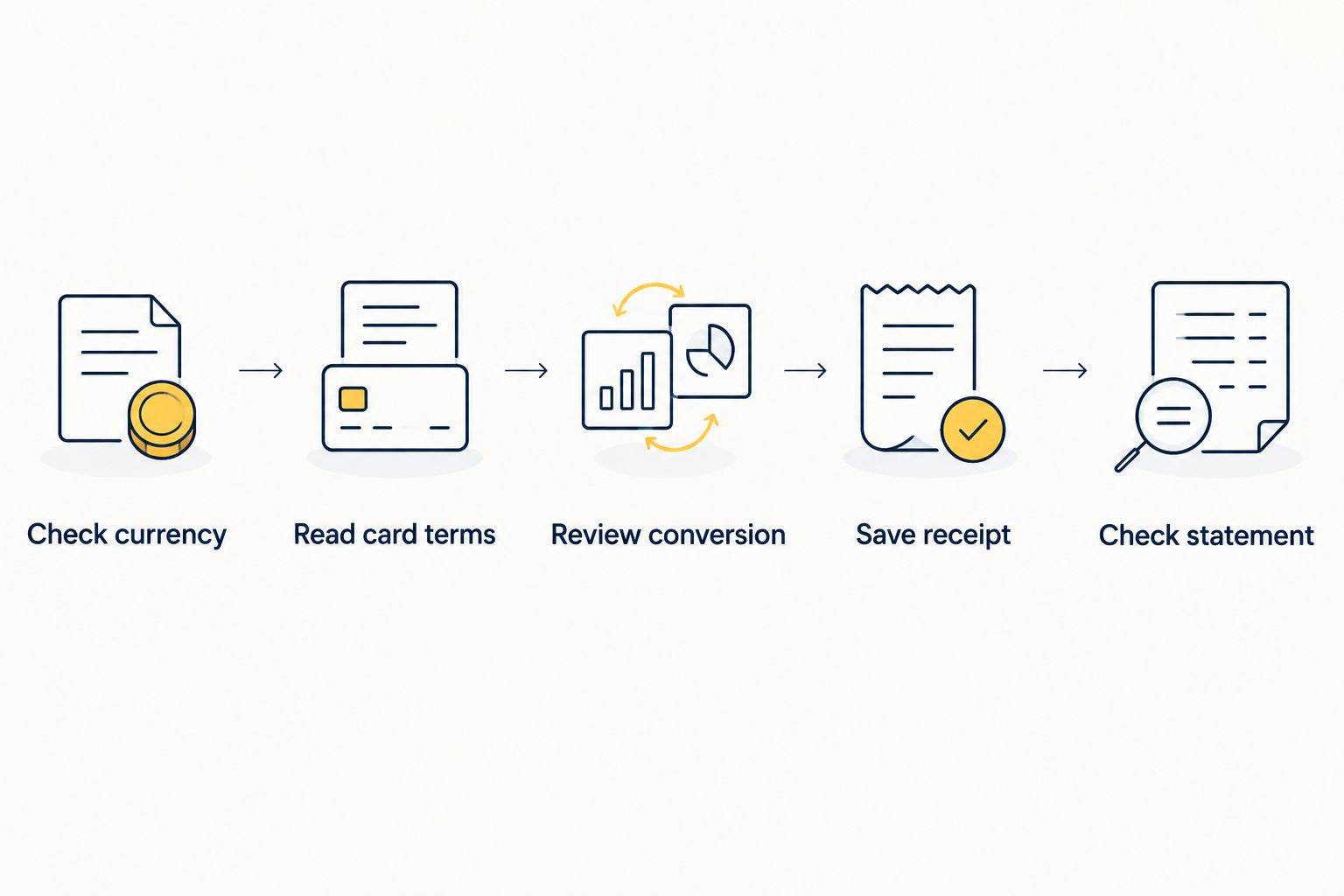
How do I check for fees before buying an eSIM?
Use this sequence for your first purchase and again when changing payment methods. It puts the important checks before authorization, when you still control the choice.
- Check currency. Identify the currency at the final payment stage. Distinguish an estimated browsing display from the currency the checkout says it will charge.
- Read card terms. Find the foreign-currency and international transaction sections. Check whether the wording covers foreign merchants charging in Canadian dollars.
- Review conversion. If checkout offers home-currency conversion, read its terms before accepting. Compare the arrangement with your card’s conversion terms.
- Save receipt. Keep the order confirmation showing the merchant, currency and amount. Preserve any conversion disclosure you accepted.
- Check statement. Review the posted transaction and any related fee. A pending authorization is not a substitute for the completed statement entry.
Keep those records together. They let you ask a focused billing question instead of trying to reconstruct the checkout after a trip.
A-sim travel eSIMs suit travellers who want app-based usage management and top-ups. That convenience addresses managing your data; it does not establish your bank’s fee treatment. Keep the service decision and payment decision separate.
Can buying an eSIM before travelling avoid the fee?
Buying an eSIM before travelling does not automatically avoid foreign transaction fees. Your issuer assesses the payment under its terms, not simply according to whether you have crossed a border.
Advance purchase still gives you time to review the checkout and resolve billing questions before departure. Use that time to check compatibility, plan terms and payment details rather than treating an at-home purchase as proof of domestic billing.
For a 2026 departure, confirm the terms that apply when you purchase. Travel preparation and payment classification solve different problems.
Can an app top-up trigger another foreign transaction fee?
An app top-up can attract a foreign transaction fee if the new payment meets your card issuer’s criteria. The original installation does not give later purchases a permanent payment classification.
A-sim supports top-ups and usage management through its app. Before authorizing additional data, review the payment currency and selected payment method rather than assuming every top-up will match the first purchase.
Checking your remaining data helps you decide whether another purchase is necessary. It does not change how the bank treats that purchase; the guide to checking how much eSIM data you have left covers the usage side.
Does an eSIM refund reverse the bank’s fee too?
An eSIM refund does not guarantee reversal of a bank’s foreign transaction fee. The merchant’s refund and the issuer’s fee adjustment are separate matters governed by their respective terms.
If a foreign-currency purchase is refunded, currency conversion can also affect the amount credited in your account currency. Do not assume that the account-currency credit will exactly match the original debit.
Ask the merchant about the service refund and ask your issuer about conversion and fee treatment. Keep the refund confirmation alongside the original receipt so both sides can identify the relevant transaction.
What should you do about an unexpected charge?
Start by identifying where the charge appears. A card statement, an eSIM receipt and a home-carrier bill describe different parts of your travel spending.
- Receipt mismatch: ask the eSIM provider to explain the order, currency, taxes or additional purchase recorded on the receipt.
- Bank fee: ask your issuer which agreement provision applies and whether the fee relates to currency or transaction location.
- Conversion difference: compare the receipt currency with the account currency and request the applicable conversion details.
- Carrier charge: check usage on your home mobile line instead of treating the amount as an eSIM checkout fee.
For a disputed 2026 transaction, provide the order reference, receipt and posted statement entry through the provider’s or issuer’s secure support channel. Never send a full card number or security code in an ordinary support message.
If you do not recognize the underlying purchase at all, contact your card issuer promptly. That is a different problem from recognizing a purchase but questioning its conversion or fee.
FAQ
Can I get eSIM foreign transaction fees while I’m still in Canada?
Yes, eSIM foreign transaction fees can apply while you are in Canada if the purchase meets your card issuer’s foreign transaction criteria. Your location at checkout does not establish the merchant’s location or settlement currency.
Does paying in Canadian dollars mean there won’t be a foreign transaction fee?
No, Canadian-dollar billing does not guarantee that an international transaction fee is excluded. Check whether your card agreement covers home-currency purchases from foreign merchants.
Is a foreign transaction fee the same as an eSIM roaming charge?
No, a foreign transaction fee concerns payment processing under your card agreement, while a roaming charge concerns mobile service usage. Check the card statement and mobile bill separately.
Will a card with no foreign transaction fee remove every extra charge?
No, a foreign transaction fee waiver only addresses the charges covered by that card’s terms. Currency conversion, checkout conversion and applicable taxes remain separate considerations.
Can I avoid a foreign transaction fee by using a digital wallet?
A digital wallet does not automatically remove foreign transaction fees. When it uses your underlying card, review that card’s terms and the transaction details rather than assuming the wallet changes them.
Can topping up my travel eSIM lead to another bank fee?
Yes, a top-up can lead to another bank fee if the payment qualifies under your card agreement. Check the currency and payment method for each new purchase.
Who should I contact if the statement amount is different from my eSIM receipt?
Contact your card issuer about conversion or a bank fee, and contact the eSIM provider about the purchase recorded on its receipt. Compare currencies before treating different displayed amounts as an error.
One last thing
The country your eSIM covers is not the country your payment necessarily comes from. A destination name describes mobile coverage, not the merchant’s banking arrangements.
Before your next 2026 trip, save the receipt and check your card’s international transaction wording. Those documents answer the billing question more reliably than the destination, your location or the currency symbol alone.