
No—data used through a separate travel eSIM does not count against your home plan when that travel eSIM is selected for mobile data. Your home carrier can still bill separately for calls, texts, or data routed through your home line. The distinction is which plan carries the connection, not whether the SIM is digital or physical.
- Does esim data usage count against home plan allowances? No, when a separate travel eSIM carries the connection.
- Select the travel eSIM for mobile data and disable automatic data switching to protect your home allowance.
- Keeping your home number active does not make calls, texts, or roaming free.
- A-sim travel eSIMs suit travellers who want to manage international data and top-ups through an app.
Does eSIM data usage abroad count against my home plan?
A separate travel eSIM uses its own data allowance, not your home allowance. An eSIM supplied by your home carrier, however, remains part of that carrier's service. Replacing a physical home SIM with an eSIM does not create a separate travel plan.
If you want both lines available, start with the guide to keeping your home number active with a dual-SIM setup. Your phone must support the combination you intend to use.
| Connection carrying your traffic | Which allowance applies? | Best for | Main limitation |
|---|---|---|---|
| Separate travel eSIM | The travel plan's data allowance | Keeping travel data separate from home service | Does not automatically cover home-number calls or texts |
| Home carrier's SIM or eSIM abroad | Your home carrier's roaming arrangements | Using your existing carrier relationship | International use follows your carrier's terms |
| Wi-Fi with mobile data disabled | Neither mobile data allowance for internet traffic over Wi-Fi | Conserving mobile data where trusted Wi-Fi is accessible | Carrier calls and Wi-Fi Calling require separate consideration |
The same app can use different allowances at different times. A map download uses the travel allowance while the travel eSIM carries data; it uses the home carrier's service if your phone switches to that line.
Why this matters in 2026
Installing a travel eSIM is not the same as selecting it for data. You can have the correct plan installed while your phone still sends traffic through the home line.
You also need to separate internet activity from phone-number activity. Browsing, app messages, and internet calls use the active internet connection, while ordinary carrier calls and SMS follow the line used for those services.
Control the data line and the calling line separately. That is the practical difference between protecting your home data allowance and preventing every possible home-carrier charge.
How to keep travel data off your home plan in 2026
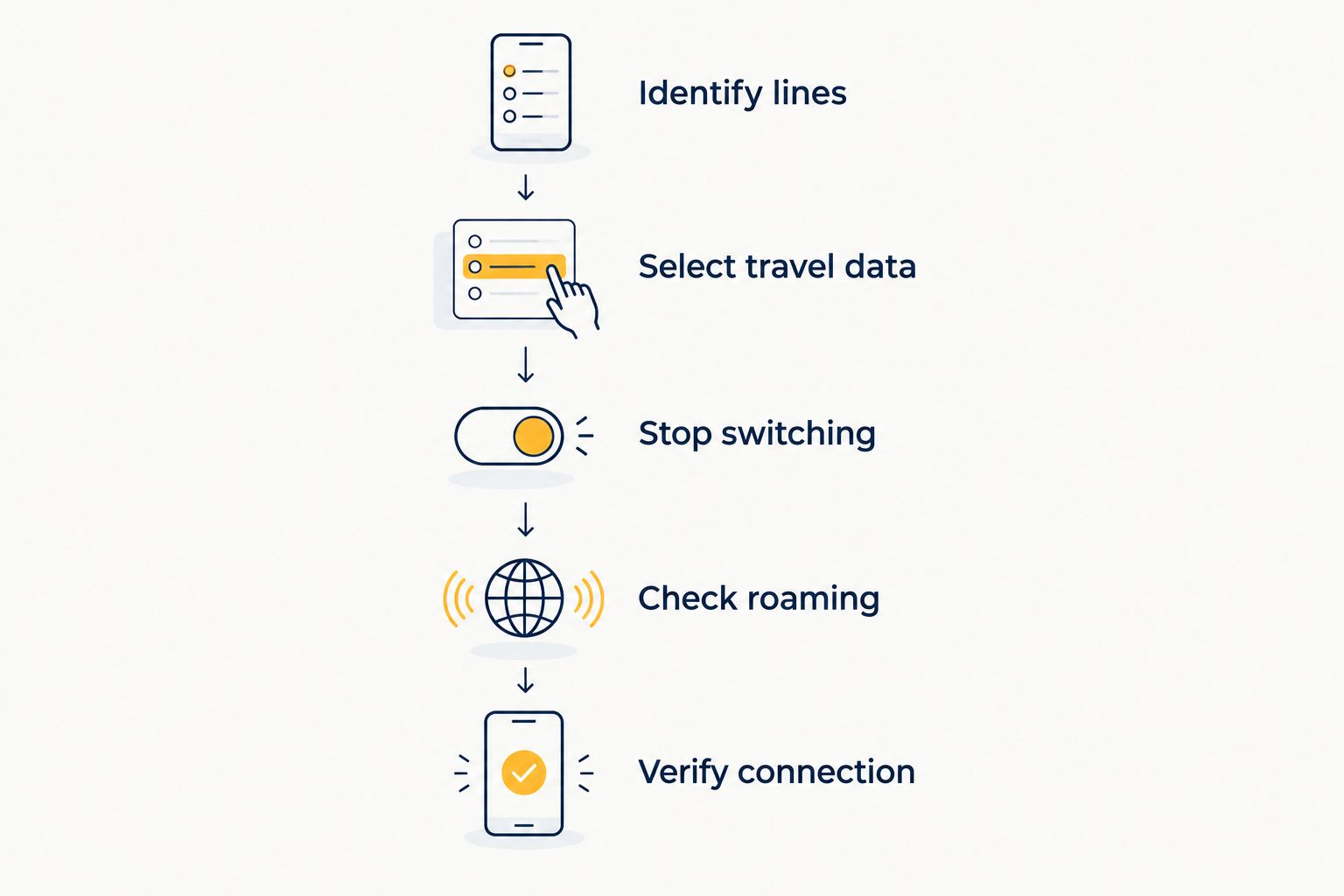
Use this sequence before you start browsing abroad. Menu names vary by operating system, handset manufacturer, and software version, so check the line names rather than relying on a particular screen layout.
- Identify lines. Give your home line and travel line distinct labels. Confirm which installed profile belongs to which provider before changing settings.
- Select travel data. Choose the travel eSIM under Mobile Data, Cellular Data, or the equivalent SIM settings. Installing the profile alone does not establish this choice.
- Stop switching. Disable automatic cellular data switching or the equivalent backup-data feature. This reduces the risk of the home line carrying data when the travel connection is unavailable.
- Check roaming. Turn data roaming off for the home line. For the travel line, follow the travel provider's instructions; some travel eSIMs need roaming enabled to connect to partner networks.
- Verify connection. Turn Wi-Fi off briefly and open a webpage. Then inspect the selected data line and its usage counter rather than treating a signal icon as proof.
After setup, decide whether you need your home line enabled at all. Turning the home line off removes that line's normal cellular connection, but it also prevents ordinary calls and SMS from reaching it through the mobile network.
Do not delete your home eSIM just to disable it. Switching a line off and removing its profile are different actions; restoring a deleted profile follows your carrier's replacement process.
iPhone: check the data line, not just the signal bars
On an iPhone, open Settings and look for Cellular or Mobile Service. Select the travel line under Cellular Data or Mobile Data, then review Allow Cellular Data Switching if that option appears.
Open the home line's settings separately and disable Data Roaming. Review Default Voice Line as well: choosing a travel eSIM for data does not automatically change the line used for ordinary calls.
For your 2026 trip, repeat this check after making a deliberate line change. A successful connection confirms internet access, but the selected line tells you which provider carries it.
Android: review SIM preferences and backup data
On Android, look under settings such as SIMs, SIM Manager, or Mobile Network. Choose the travel eSIM as the mobile-data SIM and inspect any automatic switching or backup-data options your handset provides.
Check the home SIM's roaming setting independently. Android menus differ across manufacturers, so there is no single path that applies to every handset.
A work-managed phone can have restrictions on adding profiles or changing network settings. Resolve those restrictions before departure rather than assuming an installed travel profile can carry data.
Why your home-plan exposure varies
Your home allowance and your home bill are different questions. These factors determine whether the home carrier remains involved:
- The selected data line. Internet traffic sent over the home line follows the home carrier's terms, even when a separate travel profile is installed.
- Automatic switching. A backup-data setting can allow another line to provide data when the preferred connection is unavailable or under certain calling conditions.
- Home-line activity. Ordinary calls, outgoing messages, and other carrier services remain subject to the home plan's international rules.
- Roaming settings. Disabling home-line data roaming addresses roaming data; it does not switch off the line or disable every other service.
- Wi-Fi Calling terms. Billing depends on your home carrier, the destination called, and its international-use rules—not simply whether the phone shows Wi-Fi.
- Destination coverage. A travel plan must cover your destination. A coverage gap does not make the home line a safe fallback unless you accept its roaming terms.
Do not use automatic fallback as your safety net unless you understand the home carrier's rules. A paused connection is easier to diagnose than unexpected home-line activity.
Can I keep my home number active without using home data?
Yes—you can keep your home number active while selecting a separate travel eSIM for mobile data on a compatible dual-SIM phone. The home line remains responsible for its own carrier services.
This setup is useful when you need messages sent to your existing number. It does not guarantee that receiving every type of message, answering a call, or using voicemail is included under your home plan.
Before leaving, read your carrier's international terms for the services you intend to keep using. Pay particular attention to any activity that activates a roaming pass or other billing arrangement.
Does turning off home-line data roaming prevent every charge?
No—turning off home-line data roaming does not disable ordinary calls or SMS on that line. It is a data control, not a complete billing block.
If your priority is preventing home-line cellular activity, switch the home line off and use the travel eSIM for internet access. Arrange another verification method first if an important account depends on SMS to your home number.
Do WhatsApp and other internet calls use my home plan?
Internet calls use the connection carrying the app's traffic. With Wi-Fi off and the travel eSIM selected for data, those calls consume the travel plan's allowance rather than your home data allowance.
An app account associated with your home number does not force its traffic through your home carrier. Your account identity and your mobile-data connection serve different purposes.
A call made through your phone's normal dialler is different. Check the selected calling line instead of assuming that every call follows the travel data setting.
How to confirm which plan is being used
Check both the phone settings and the provider's usage record. The phone helps identify the active line; the provider's account helps track the allowance attached to that plan.
A-sim offers travel eSIMs with app-based usage management and top-ups. That is useful for monitoring travel data, but it does not control your separate home-carrier settings.
For a clear check in 2026:
- Note each line's usage reading before testing.
- Disable Wi-Fi so the test uses a mobile connection.
- Confirm that the travel eSIM is the selected data line.
- Load a webpage, then check the relevant line's usage again.
- Review the provider's usage display, allowing for reporting delays.
A-sim travel eSIMs are best for travellers who want international data with app-based usage management and top-ups. The trade-off is that you still need to configure your phone correctly and review home-number calling separately.
You can explore A-sim after checking your phone's eSIM support, carrier-lock status, and destination requirements. None of those checks is replaced by the presence of an eSIM menu.
What if my home carrier shows usage anyway?
First, distinguish data use from another kind of account activity. A carrier record for a call, SMS, or roaming arrangement does not prove that your travel eSIM data was deducted from your home allowance.
Next, compare the activity timestamp with when you changed your settings. Usage before the travel line became the selected data connection belongs to a different part of your trip.
If the record shows home-line data, inspect automatic switching and your current data selection. Save the relevant settings and usage details, then ask the home carrier to identify the recorded service and explain how its terms apply.
Do not assume a large travel allowance prevents home-line usage. The phone's routing settings determine the connection; the unused balance on another plan does not.
FAQ
Will a travel eSIM use up my Canadian home data allowance?
A separate travel eSIM does not use your Canadian home data allowance when it carries your mobile-data connection. Data routed through your home line follows your home carrier's international terms.
Is an eSIM from my home carrier a separate travel plan?
No—an eSIM from your home carrier is not automatically a separate travel plan. Converting your existing physical SIM to an eSIM does not change which carrier provides or bills the service.
Can I leave my home SIM switched on while using travel data?
Yes, on a compatible dual-SIM phone you can leave the home line enabled and select the travel eSIM for data. Calls, SMS, and other home-line services still follow your home carrier's rules.
Should data roaming be on or off for a travel eSIM?
Follow the travel provider's instructions for the travel eSIM, because some plans need data roaming enabled. Configure the home line separately and turn its data roaming off if you do not want home-carrier roaming data.
Will A-sim data usage appear in my home carrier's allowance?
Data carried by a separate A-sim travel eSIM uses that travel plan rather than your home allowance. Your phone must have the travel eSIM selected for mobile data.
Does using my usual WhatsApp number consume home-plan data?
No—your WhatsApp number does not determine which mobile plan supplies internet access. WhatsApp uses the active internet connection, including travel eSIM data or Wi-Fi.
What happens when my travel eSIM runs out of data?
A depleted travel allowance does not itself authorize home-carrier data use. Your provider's plan rules determine what happens to the travel connection, while enabled switching features can allow your phone to use another line.
One last thing
A familiar phone number does not identify the data connection. You can keep the same messaging account while its internet traffic runs entirely over a separate travel eSIM.
Before your 2026 departure, save a screenshot showing the selected data line and your switching settings. If connectivity changes abroad, that reference gives you a concrete starting point without deleting profiles or changing several settings at once.