Yes, you can switch eSIM plans mid-trip by topping up your existing plan, adding another plan, or selecting a different installed eSIM for mobile data. A switch does not automatically transfer unused data, extend your current plan’s validity, or change which countries it covers; those details depend on the provider’s terms.
- Can I switch eSIM plans mid trip? Yes, but topping up and changing your active eSIM are different actions.
- Keep your existing eSIM installed until the replacement connects and you have checked its terms.
- Choose country coverage and remaining validity before adding more travel data.
- A-sim offers travel eSIMs with usage management and top-ups through its app.
Why this matters
Changing your itinerary does not always require changing your eSIM. Running low on data, extending your stay, and entering another country are different problems. Choose the action that fixes your actual problem, not just a larger data allowance.
A-sim offers single-country, regional, and global travel eSIMs, with usage management and top-ups through its app. That makes it relevant when you need to manage travel connectivity, but you still need to check the selected plan’s destination coverage and terms.
For travel in 2026, separate the service you bought from the line selected in your phone. Buying another plan and telling your phone to use it are not necessarily the same step.
Can I switch eSIM plans mid-trip?
Yes. You can change your travel connectivity while abroad, provided your phone supports the replacement eSIM, any carrier-lock restrictions permit it, and the plan covers your location. The right method depends on whether you need more data or a different service.
An installed eSIM profile is the connection stored on your phone. A plan supplies the service attached to that connection. Your provider determines whether another purchase updates an existing profile or requires a new installation.
| Action | Best for | Main advantage | Main limitation |
|---|---|---|---|
| Top up an existing plan | More data where your current service already works | Keeps you managing the existing service | Does not automatically add countries or extend validity |
| Add another plan with your provider | A changed itinerary or different allowance | Lets you choose terms that fit the remaining trip | The provider determines whether another profile is required |
| Install another provider’s eSIM | Moving to a different service | Lets you select different coverage and conditions | Requires compatibility checks and setup |
| Select another installed eSIM | Using a replacement already on your phone | Changes the line used for mobile data | Does not move unused data between plans |
Changing the active data line changes which service your phone uses; it does not rewrite either plan’s terms. Keep this distinction clear before you buy anything or remove an installed profile.
Top up your existing plan when you only need more data
A top-up is the first option to check when your destination has not changed and your existing connection works. It addresses an allowance problem without necessarily requiring a different eSIM profile.
Check what the top-up actually changes. An added allowance and an extended validity period are separate benefits; do not assume you receive both. Also check whether the provider applies the addition immediately or attaches separate activation conditions.
Best for: travellers staying within their existing coverage who need more data. The advantage is continuity. The limitation is that extra data does not solve an unsupported destination, a compatibility problem, or an expired service unless the terms explicitly address it.
Before choosing a top-up in 2026, compare your remaining allowance with your remaining travel needs. A phone’s usage counter and the provider’s allowance display can cover different reporting periods, so check which period each screen describes.
Add a different plan when your itinerary changes
A new country changes the coverage question. Before adding another plan, check whether your existing plan already includes that destination. Country names matter more than a broad regional label.
If you need another plan, confirm whether it uses your installed eSIM or requires a new profile. Follow the provider’s instructions rather than assuming every purchase appears automatically in your phone’s mobile-data menu.
Best for: travellers whose remaining route falls outside their current plan. A different plan can match the new itinerary. Its limitation is a separate set of coverage, activation, and validity conditions to manage.
For a multi-country itinerary in 2026, compare the actual destination list with every planned stop. Include transit stops where you intend to use mobile data outside the airport’s Wi-Fi. A regional or global label is not a substitute for that check.
Select another installed eSIM when the replacement is ready
If the replacement profile is already installed, switch your phone’s mobile-data selection to that line. On iPhone, look under Cellular or Mobile Data; on Android, look for SIMs, SIM manager, or the equivalent mobile-network settings. Menu names vary by device and software version.
With 2 installed lines, give each a clear label before switching. Labels such as Home and Travel help you identify the intended connection, but installing 2 profiles does not prove your phone can keep both active simultaneously.
Best for: travellers who have already prepared a compatible replacement. The advantage is a direct change in settings. The limitation is that the replacement still needs an active plan and supported network coverage.
Check the calls and messages settings separately. On a dual-SIM setup, selecting 1 line for mobile data does not necessarily select the same line for voice calls or texts. Automatic data switching also deserves attention if you do not want your home line supplying data abroad.
How to switch without losing track of your connection
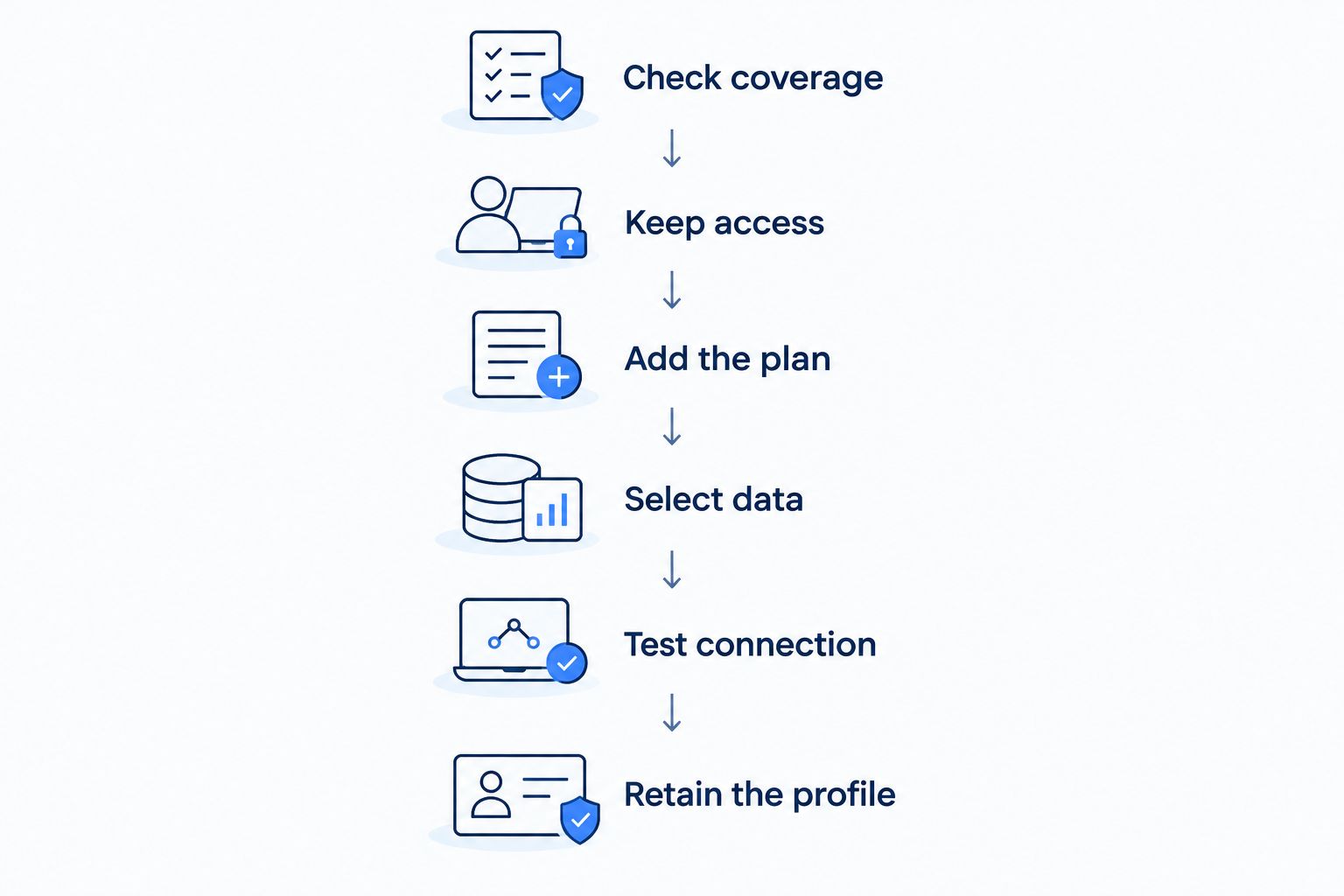
Complete the setup while you still have working internet. That gives you access to installation instructions, account details, and support if the replacement does not connect as expected.
- Check coverage. Confirm that the replacement includes your current location and the rest of your route. Check validity and activation conditions before proceeding.
- Keep access. Stay connected through your existing service or trusted Wi-Fi while downloading a replacement profile or completing account steps.
- Add the plan. Follow the provider’s installation or top-up instructions. Do not assume a purchase and an installation are interchangeable.
- Select data. Choose the intended travel line for mobile data. Apply data-roaming and network settings as instructed for that plan.
- Test connection. Turn Wi-Fi off temporarily and open a webpage. Confirm that mobile data works before relying on it for directions or bookings.
- Retain the profile. Leave the previous eSIM installed until you have checked whether you still need it and whether reinstalling it is permitted.
Installing a profile is not proof that its service is working. Your phone still needs to register on a supported network, and the plan must meet its activation conditions. Keep installation confirmation and a successful mobile-data test as separate checks.
For a 2026 trip, save the provider’s setup instructions somewhere you can access without mobile data. That is more useful during a failed connection than relying on a webpage you can no longer open.
Why switching eSIM plans varies
The basic decision is simple, but the details depend on your phone and the service you selected. Check these factors before treating a switch as complete:
- Phone compatibility: Your device must support the replacement eSIM. Model, regional variant, and software can affect available features.
- Carrier lock: A carrier-locked phone can restrict service from another provider. Adding an eSIM does not remove that restriction.
- Profile handling: A top-up, another plan, and another provider’s eSIM can require different installation steps.
- Destination coverage: More data is useful only where the plan provides service. Verify each destination rather than relying on the plan label.
- Activation and validity: Check what starts the validity period and when it ends. Installation and activation are not universally the same event.
- Line selection: Your phone’s data, voice, messaging, and automatic-switching settings determine which line handles each task.
Do not delete an eSIM to troubleshoot a connection unless the provider directs you to do so. Some profiles have installation restrictions. Removing a profile can turn a settings problem into a reinstallation problem.
What should you check if the replacement has no data?
Start with the selected mobile-data line. An installed replacement can remain unused if your phone is still sending data through the previous line. Then check whether the replacement line is enabled and whether the plan is active.
Follow the provider’s instructions for data roaming. Travel eSIMs can require roaming to connect through a partner network; that setting is separate from whether your home line should roam. Apply instructions to the intended line, not indiscriminately to every SIM.
Next, check any supplied access-point settings and network-selection instructions. Avoid guessing configuration values. If the provider requires a particular setting, copy it from the instructions for that plan.
Test with Wi-Fi off. A working messaging app over hotel Wi-Fi does not establish that your replacement mobile-data connection works. If the checks fail, use Wi-Fi or your previous working connection to contact support without deleting either profile.
Will I lose unused data when I switch eSIM plans?
Selecting another data line does not transfer the old plan’s remaining allowance. The unused data stays governed by the original plan’s validity and usage terms, even while you use another connection.
If you expect to return to the first destination, check whether the old plan will still be valid then. Keep the profile installed if you intend to reuse it and the provider’s terms allow that use. Switching away does not automatically pause its expiry.
Can I keep my home number while changing travel eSIMs?
Yes, a compatible dual-SIM setup can keep your home line enabled while a travel eSIM handles mobile data. The number remains attached to your home service, not to the travel data plan.
Check calls, texts, and data separately. Keeping a number active does not establish that every service works abroad or that every travel plan includes a phone number. Your home carrier’s roaming conditions still apply to the home line.
Do I need Wi-Fi to change my active eSIM?
No, selecting an already installed line is a phone-settings action. Working service still depends on that line having an active plan and access to a supported network.
Downloading another profile or completing a purchase requires internet access. If your current data still works, preserve it through setup; if it has stopped, use trusted Wi-Fi or another working connection rather than deleting the existing profile.
Where A-sim fits
A-sim is for travellers who want travel eSIMs with app-based usage management and top-ups. Its stated offering includes single-country, regional, and global options, accessed through the app or website.
The practical benefit is managing travel data in the app. The boundary is plan-specific: do not assume every option covers your next country, extends an existing allowance, or uses the same installed profile. Match the selected service to your route before switching.
Choose coverage for your remaining trip
Check travel eSIM options for a single country, a region, or a wider itinerary.
FAQ
Can I switch eSIM plans halfway through my holiday?
Yes, you can top up, add another plan, or switch to another installed eSIM while travelling. Check destination coverage, validity, phone compatibility, and the provider’s setup instructions first.
Is topping up better than buying another eSIM?
Topping up fits a data-shortage problem when your existing service still covers your location. A replacement fits a different coverage or service requirement; neither action automatically changes every term of the original plan.
Can I switch travel eSIMs without deleting the old one?
Yes, on a phone that supports the required installed profiles, you can select another line without deleting the previous profile. Active-line limits depend on the device, and the old plan’s validity continues under its terms.
Does switching eSIMs move my remaining data to the new plan?
No, switching the active line does not transfer unused data between plans. Any transfer or account adjustment needs explicit support from the provider.
Will changing my travel eSIM change my home phone number?
No, changing a separate travel data line does not itself change the number attached to your home service. Keep your home line and your voice, messaging, and mobile-data selections distinct.
Can I install a different provider’s eSIM while abroad?
Yes, if your phone is compatible, carrier-lock restrictions permit it, and you have internet access for setup. Confirm that the replacement covers your current country before installing it.
Can I top up an A-sim travel eSIM through the app?
A-sim supports travel eSIM top-ups and usage management through its app. Check the selected plan’s top-up conditions, coverage, and validity before adding data.
One last thing
A data switch is not a pause button. Your previous plan can reach its expiry while another eSIM supplies your connection. Before switching for the rest of your 2026 trip, check whether you will need the old plan again and whether its validity reaches that date.
Leave yourself a useful record: label the lines, save the setup instructions, and note which plan covers the next destination. These details help you return to the right service without guessing in the mobile-data menu.