eSIM activation takes about 2 to 5 minutes to install on your phone, but the data itself doesn't switch on until the eSIM registers with a local network — that step can take anywhere from a few seconds to roughly 15 minutes depending on signal and device settings. The install step needs an internet connection of its own, so you can't download a fresh eSIM profile with zero Wi-Fi or data already running. In 2026, most travelers install before departure on airport or home Wi-Fi, then let the network handshake happen automatically the moment they land.
- eSIM installation takes 2 to 5 minutes on iPhone and Android when done over Wi-Fi.
- Network activation after landing runs seconds to 15 minutes once data roaming is switched on.
- You need internet access to install the profile — a phone with zero connectivity can't download it.
- A-Sim eSIM profiles install in one tap through the app, cutting the manual QR-scan step travelers usually get stuck on.
- How long does eSIM activation take in 2026 depends more on when you install than on the eSIM itself.
Why this matters
A slow or confusing activation ruins the first hour of a trip — no maps, no ride-share, no way to confirm a hotel address. The delay almost never comes from the eSIM provider; it comes from installing at the wrong time, skipping a restart, or forgetting to turn on data roaming for the new line. Knowing which step actually takes time means you install before you board instead of standing in a foreign airport hunting for Wi-Fi to install a-sim.io.
How long does eSIM activation take?
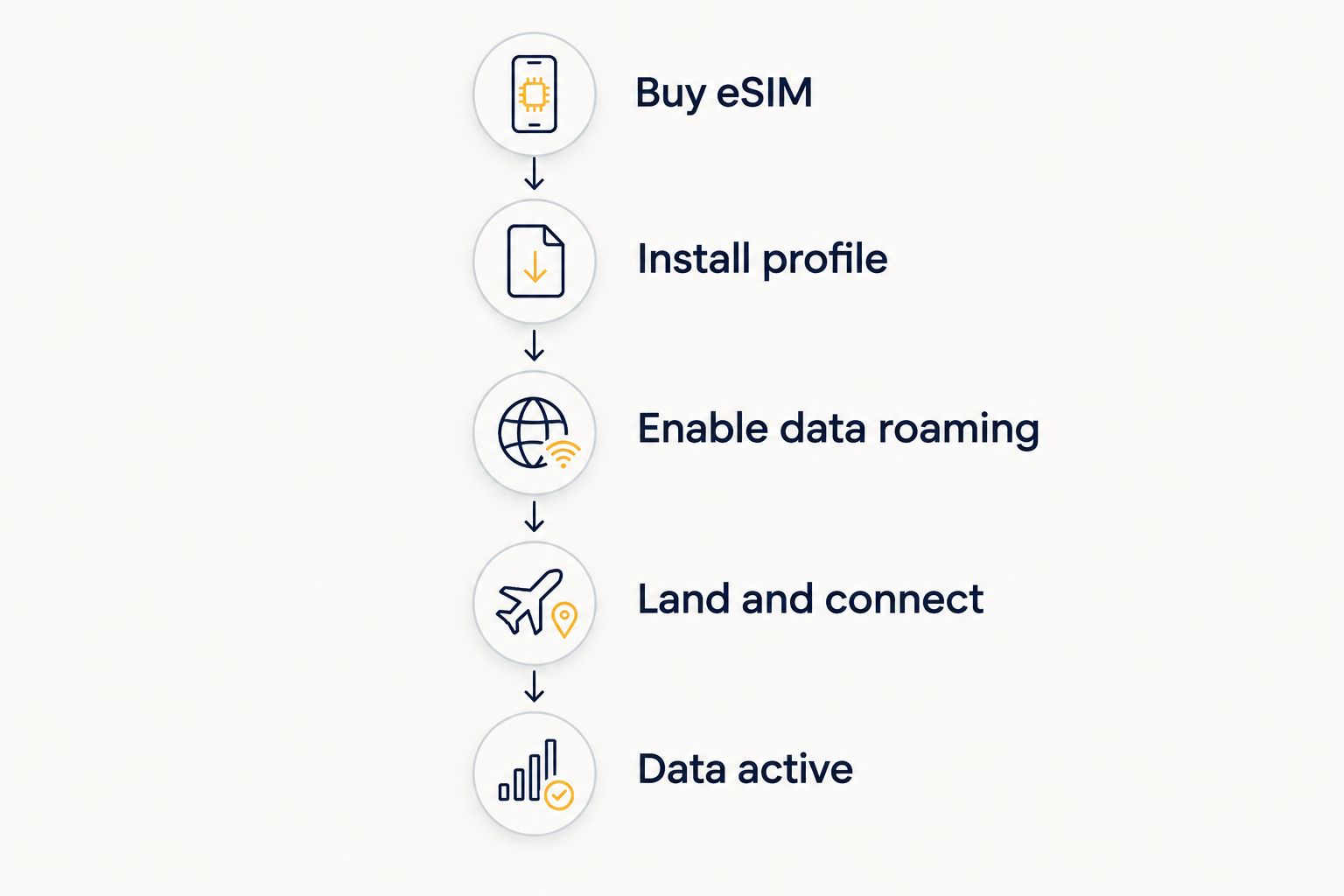
Break it into the three things that actually happen, because "activation" gets used loosely for all of them.
| Step | Typical time | What's happening |
|---|---|---|
| Buy and receive the eSIM | Instant | Profile or QR code delivered by app or email |
| Install the eSIM profile | 2-5 minutes | Phone downloads and stores the profile — needs Wi-Fi or existing data |
| Enable data roaming / set as data line | Under 1 minute | You toggle the new line on in phone settings |
| Network registers at destination | Seconds to 15 minutes | Phone connects to a local partner tower on arrival |
Installing is the fast, predictable part. Network registration is the part that varies, because it depends on the carrier tower you land near, not on the eSIM file sitting on your phone.
iPhone eSIM install: under 5 minutes
iPhones running recent iOS versions install an eSIM profile through Settings or, with A-Sim, directly through the app in one tap — no QR scanning required. The how to connect A-Sim to your iPhone in one tap guide covers the exact taps, but the short version is: open the app, confirm the destination plan, and the profile installs itself in the background.
Buy: install ahead of departure on iPhone. Doing it at home on Wi-Fi means the 2-5 minute install happens with zero pressure and zero risk of a bad airport connection stalling it.
Android eSIM install: under 5 minutes, method varies by brand
Android install times land in the same 2-5 minute range, but the menu path differs by manufacturer — Samsung, Pixel, and other brands each bury eSIM settings slightly differently. The how to connect A-Sim to your Android phone in minutes walkthrough maps the exact settings for the major brands so you're not hunting through menus at the gate.
Buy: same rule as iPhone — install before you fly, not after you land.
Network activation after landing: seconds to 15 minutes
Once the profile is installed, nothing else happens until you land and turn on data roaming for that line. At that point the phone searches for a partner network, and registration usually completes in under a minute. On a slower handoff — thick airport concrete, a weak signal area, or a phone that hasn't fully restarted since a flight in airplane mode — it can stretch to 15 minutes. If it's still not connected past 15 minutes, toggle airplane mode on and off rather than waiting longer.
“If your eSIM hasn't connected 15 minutes after landing, toggle airplane mode before assuming it's broken.”
Why eSIM activation time varies
- Wi-Fi vs. cellular during install — installing on weak airport Wi-Fi is slower than installing at home the night before.
- Phone model and OS version — older Android builds and some budget models take longer to register a new profile.
- Airplane mode habits — a phone left in airplane mode through a long flight sometimes needs a manual toggle to force network search.
- Local network congestion — busy airport towers on arrival day can slow the handshake even after installation is done.
- Installing after landing instead of before — the single biggest cause of a "slow" activation is starting the install step with no connectivity at all.
- Multiple SIMs active at once — running a physical SIM and an eSIM together can slow registration on some devices; see can I use two eSIMs at once on my phone for how that setup behaves.
Install your eSIM before you fly
One-tap setup through the A-Sim app, ready before you board.
Can I install an eSIM before I leave home?
Yes — installing days or weeks ahead is the recommended move in 2026, since the 2-5 minute install step doesn't need to happen anywhere near your destination. The plan stays dormant on your phone until you land and switch on data roaming for that line, so early installation costs you nothing in usage.
Does eSIM activation happen automatically when I land?
Data activation triggers automatically once your phone finds a partner network and data roaming is turned on for that line, typically within a minute of landing. You still need to confirm the new eSIM is set as your active data line in phone settings — it won't switch itself on top of an existing plan.
What do I do if my eSIM won't activate?
Restart the phone, toggle airplane mode off and back on, and confirm the eSIM line has data roaming enabled — this resolves most stalled activations within a couple of minutes. If it's still not registering after 15 minutes, check that the eSIM line (not your home SIM) is set as the active data line for that trip.
FAQ
How long does eSIM activation take on average?
Installing an eSIM profile takes 2 to 5 minutes; the phone then activates data automatically within seconds to 15 minutes once it connects to a local network on arrival.
Can I activate an eSIM without Wi-Fi?
No — installing a new eSIM profile requires an existing internet connection, either Wi-Fi or another active data line, so you can't set one up with zero connectivity.
Does eSIM activation take longer than a physical SIM?
No, eSIM installation at 2 to 5 minutes is generally faster than sourcing and swapping a physical SIM card, since there's no store visit or physical swap involved.
Why is my eSIM stuck on 'not activated'?
This usually means data roaming isn't enabled for that specific line or the phone hasn't refreshed its network search — restarting the device or toggling airplane mode fixes it in under a minute.
Can I install an eSIM and activate it later?
Yes, installing ahead of time and activating on arrival is standard practice in 2026 — the profile sits dormant until you switch on data roaming for it.
Does eSIM activation time differ between iPhone and Android?
Not meaningfully — both install in roughly 2 to 5 minutes, though the settings path to get there differs by device brand.
How do I check if my eSIM has activated?
Check the signal bars and data icon for that line in phone settings; if data usage starts moving on a quick page load, the eSIM has activated.
What happens if I turn my phone off during eSIM install?
Turning the phone off mid-install can interrupt the download; finish the 2-to-5-minute install process with the phone on and connected before powering off.
One last thing
The part travelers get wrong most often isn't the eSIM — it's the timing. Installing at the departure gate on shaky airport Wi-Fi is the single most common reason "activation" feels slow; installing the night before at home turns the same 2-to-5-minute process into a non-event. Set it up early, confirm data roaming is on for the new line, and the network handshake on landing takes care of itself in under 15 minutes.