Yes, you can top up an eSIM without wifi in 2026 — the requirement is any active internet connection, not wifi specifically. Cellular data, a personal hotspot, or a hotel network all work exactly the same way. The catch nobody mentions: if your current plan has already hit zero data and no wifi is in range, the top-up won't go through until you find some connection, wifi or not.
- You can top up an eSIM without wifi using cellular data, a hotspot, or any wifi network — wifi itself isn't required.
- A-Sim lets you top up through the app or website in one tap once any connection is active.
- Zero remaining data plus zero wifi means the top-up stalls until you find a network.
- Auto top-up settings refill an A-Sim eSIM before the balance hits zero, avoiding the problem entirely.
Why this matters
Travelers hit this question mid-trip, usually at the worst moment — landing in a new country, phone at 2% data, hotel wifi password buried in an email you can't load. The confusion is understandable: some travel forums repeat "you need wifi to activate or top up an eSIM," which was closer to true a few years ago when app stores gated purchases more tightly. In 2026, most eSIM providers, including A-Sim, process top-ups over whatever data connection is active, cellular included. The real constraint isn't wifi versus cellular — it's whether you have any internet at all when the top-up request fires.
Can I top up my eSIM without wifi?
Yes, and the method that works depends on what connection you still have. Here's how the options compare:
| Method | Works when | Best for | Verdict |
|---|---|---|---|
| Remaining cellular data on the eSIM | Plan still has some data left | Anyone mid-trip with a live connection | Buy — fastest, no setup |
| Public wifi (cafe, hotel, airport) | Free or paid network in range | Data fully depleted | Buy — reliable fallback |
| Personal hotspot from a companion's phone | Traveling with someone on a different network | Groups, families | Buy — quick backup |
| Home wifi before departure | Still at home or in an area with your own network | Pre-loading a top-up before a flight | Hold — plan ahead instead |
The short version: does eSIM work without wifi covers the broader connectivity question, and the answer for top-ups specifically is the same — cellular data does the job just as well as wifi.
Topping up over your remaining eSIM data
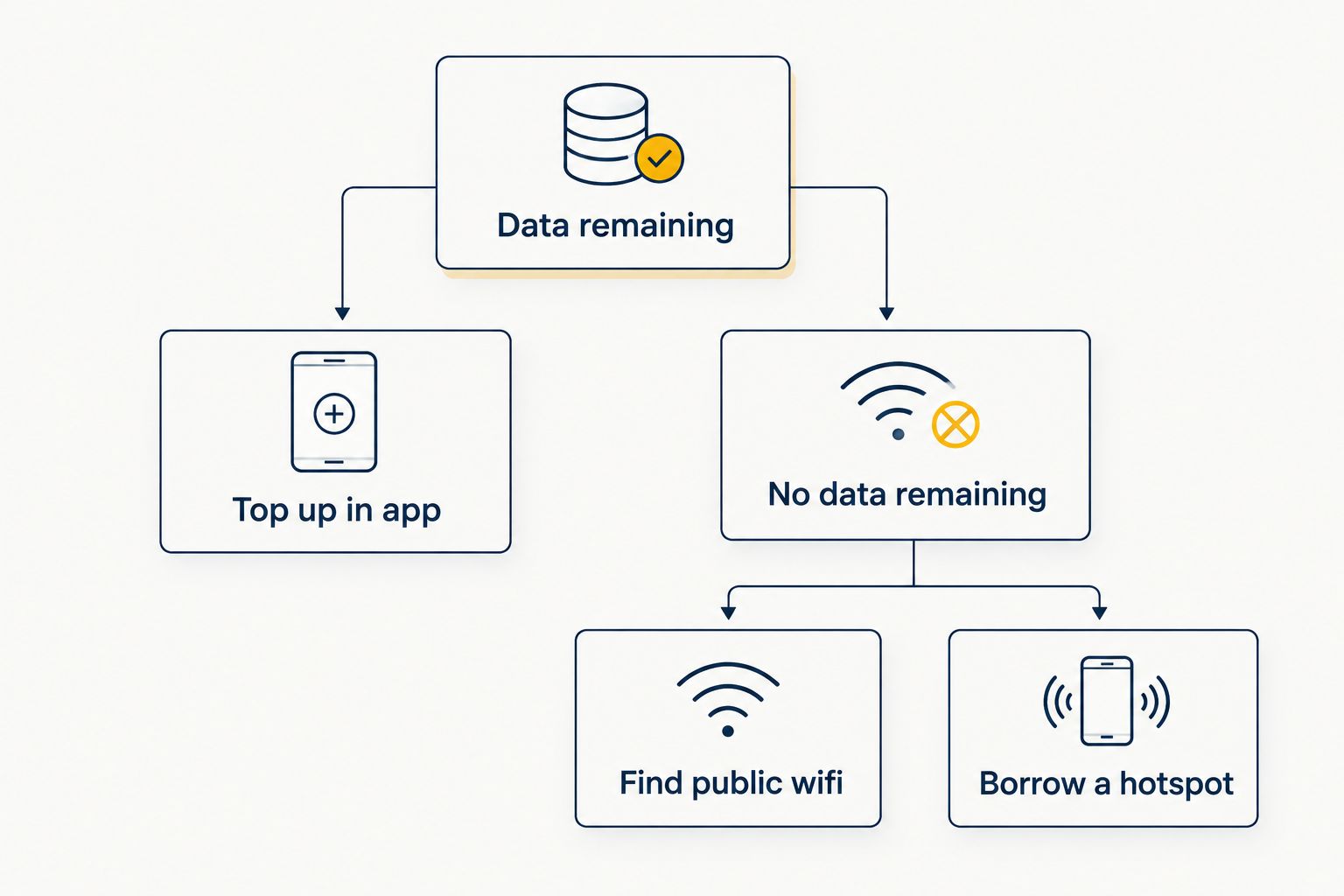
If your A-Sim eSIM still shows any data balance at all, that's the easiest path. Open the app, tap top up, pick a new data package, confirm — the transaction rides on the same cellular connection your eSIM is already using. No wifi search, no password typing, no waiting for a hotel network to authenticate. This is the scenario most travelers land in, since a plan rarely drops to exactly zero without warning.
Topping up when your data has already run out
Once the balance hits zero, the eSIM itself has no way to reach the internet, and that's when wifi (or a borrowed connection) becomes necessary — not because wifi is special, but because it's the only signal left. Options at that point:
- Public wifi — airports, cafes, hotel lobbies. Most arrival halls in major hubs offer free wifi specifically for this kind of gap.
- A companion's hotspot — if you're traveling with someone on a different carrier or eSIM, their connection completes your purchase.
- A second SIM or physical SIM slot — if your phone supports using an eSIM and a physical SIM at the same time, the physical SIM can carry the top-up traffic.
- A shared or borrowed device for a few seconds, just to trigger the purchase from your account.
Why you might not be able to top up right now
A handful of factors turn "top up without wifi" from simple to frustrating:
- Zero data balance — the eSIM has no signal of its own to reach A-Sim's servers.
- Roaming restrictions in some countries limit which networks a phone can briefly latch onto for data.
- Airplane mode left on — an easy miss after landing, and it blocks every connection type equally.
- Weak public wifi that connects but times out before the purchase confirms.
- App store or payment verification delays, which occasionally need a stronger connection than a flaky cafe network provides.
- Carrier blackout zones — remote regions with no cellular coverage and no public wifi nearby.
Setting an automatic top-up before your A-Sim data runs out sidesteps almost all of this — the refill fires while you still have a live connection, so you're never the traveler standing outside a locked hotel hunting for a signal.
Set up auto top-up before you fly
Avoid the zero-data scramble entirely with one setting in the app.
Does eSIM work without wifi at all?
Yes, an eSIM works without wifi for browsing, maps, and messaging the same way a physical SIM does, using cellular data instead. Wifi only becomes necessary for the initial install step on some phones, not for day-to-day use, and not for most top-ups either.
What happens if my eSIM runs out of data with no wifi around?
Nothing loads until you find a connection — the eSIM itself can't reach A-Sim's servers with zero balance and zero signal. The fix is finding any wifi network, a hotspot from another device, or a physical SIM slot, then completing the top-up in seconds once connected.
Can I turn my phone into a hotspot to help someone else top up?
Yes, if your device has active data, you can turn your phone into a hotspot and let a travel companion use that connection to complete their own top-up. This works the same whether the other person is on A-Sim or another provider, as long as their app or browser can reach the internet through your shared connection.
FAQ
Can I top up my eSIM without wifi?
Yes, you can top up an eSIM without wifi as long as you have cellular data, a hotspot, or another active internet connection in 2026. Wifi is only one option among several, not a requirement.
Do I need wifi to activate an eSIM before I travel?
Most phones need some internet connection to download the eSIM profile, and wifi is the most common choice before departure. Once installed, [can I install an eSIM before I travel](https://blog.a-sim.io/can-i-install-an-esim-before-i-travel) covers timing in more detail.
How much data do I need before I run out and have to find wifi?
That depends on the plan size you chose and how much you use maps, streaming, and messaging day to day. Setting an auto top-up removes the guesswork by refilling before the balance drops to zero.
Is public airport wifi reliable enough to top up an eSIM?
Most major airport and hotel wifi networks are stable enough to complete a top-up purchase in seconds. Weaker or overloaded public networks can occasionally time out mid-transaction, so a second attempt usually clears it.
Can I top up while my phone is in airplane mode?
No, airplane mode blocks every connection type, cellular and wifi alike, so no top-up can complete until it's switched off. [Does eSIM work in airplane mode](https://blog.a-sim.io/does-esim-work-in-airplane-mode) explains what does and doesn't function while it's on.
Will my eSIM top up automatically without me doing anything?
Only if you've turned on auto top-up in the app; otherwise every refill is a manual one-tap purchase. Auto top-up still needs an active connection to process, the same as a manual one.
Can I use a companion's phone to top up my own eSIM?
Yes, borrowing a hotspot from another device works fine since the top-up just needs internet access, not a specific source. Log into your own A-Sim account on that connection and the purchase applies to your eSIM.
One last thing
The travelers who never run into this problem aren't the ones with the biggest data plans — they're the ones who turned on auto top-up before boarding. It's a single toggle in the app, and it means the refill happens quietly on whatever connection is available, long before the balance ever reaches zero. Worth doing once, before your next trip, rather than mid-layover with 1% battery and a hotel wifi form that won't load.