Yes, you can send and receive texts abroad on an eSIM if the active plan supports SMS. A data-only travel eSIM does not provide SMS by itself, but you can use it for internet-based messages while your home line handles ordinary texts. In 2026, check which line owns your phone number before you travel.
- Can I send and receive texts abroad on an esim? Yes, if the active line supports SMS.
- A data-only travel eSIM carries internet messages, not ordinary SMS on its own.
- Keep your home line active if you need texts sent to your existing number.
- A-sim is an option for app-managed travel data; check the chosen plan for SMS support.
Why this matters
A message that looks like a text can travel by SMS or over the internet. That distinction matters when a bank sends a sign-in code to your home number, someone texts you from a basic phone, or you message through an app. If you need your existing number abroad, start with the guide to keeping your home phone number with an eSIM.
The practical question for your 2026 trip is not just whether your phone has an eSIM. It is which line receives SMS, which line supplies mobile data, and whether both can stay active on your phone. Check those settings before relying on a verification code overseas.
Can I send and receive texts abroad on an esim?
Yes, but the answer depends on the service attached to the eSIM, not the eSIM itself. An eSIM replaces a removable SIM as the way a mobile plan is installed on your phone; it does not automatically add a phone number or SMS service. A plan that includes SMS can carry ordinary texts. A data-only plan cannot carry SMS on that line, though its data connection can support messaging apps.
| Your setup | Ordinary SMS | Internet-based messages | Best for | Main limitation |
|---|---|---|---|---|
| eSIM plan with SMS service | Send and receive through that plan, subject to its terms and coverage | Use mobile data or Wi-Fi | Travelers who need texts on the eSIM's own number | The number and SMS terms depend on the plan |
| Data-only travel eSIM plus an active home line | Home line handles SMS if your carrier supports it abroad | Travel eSIM supplies data for apps | Travelers keeping their existing number | Home-carrier roaming terms still matter |
| Data-only travel eSIM without another active SMS line | No ordinary SMS through the data-only plan | Use apps over data | Travelers who do not need carrier texts | Codes sent by SMS to a phone number will not arrive on that plan |
A data-only eSIM does not turn SMS into an app message. Your bank or contact sends to a phone number, and that number must remain on a working SMS-capable line. If you need to reply using your home number, check that your home carrier permits sending texts from abroad as well as receiving them.
What changes when your travel eSIM is data-only?
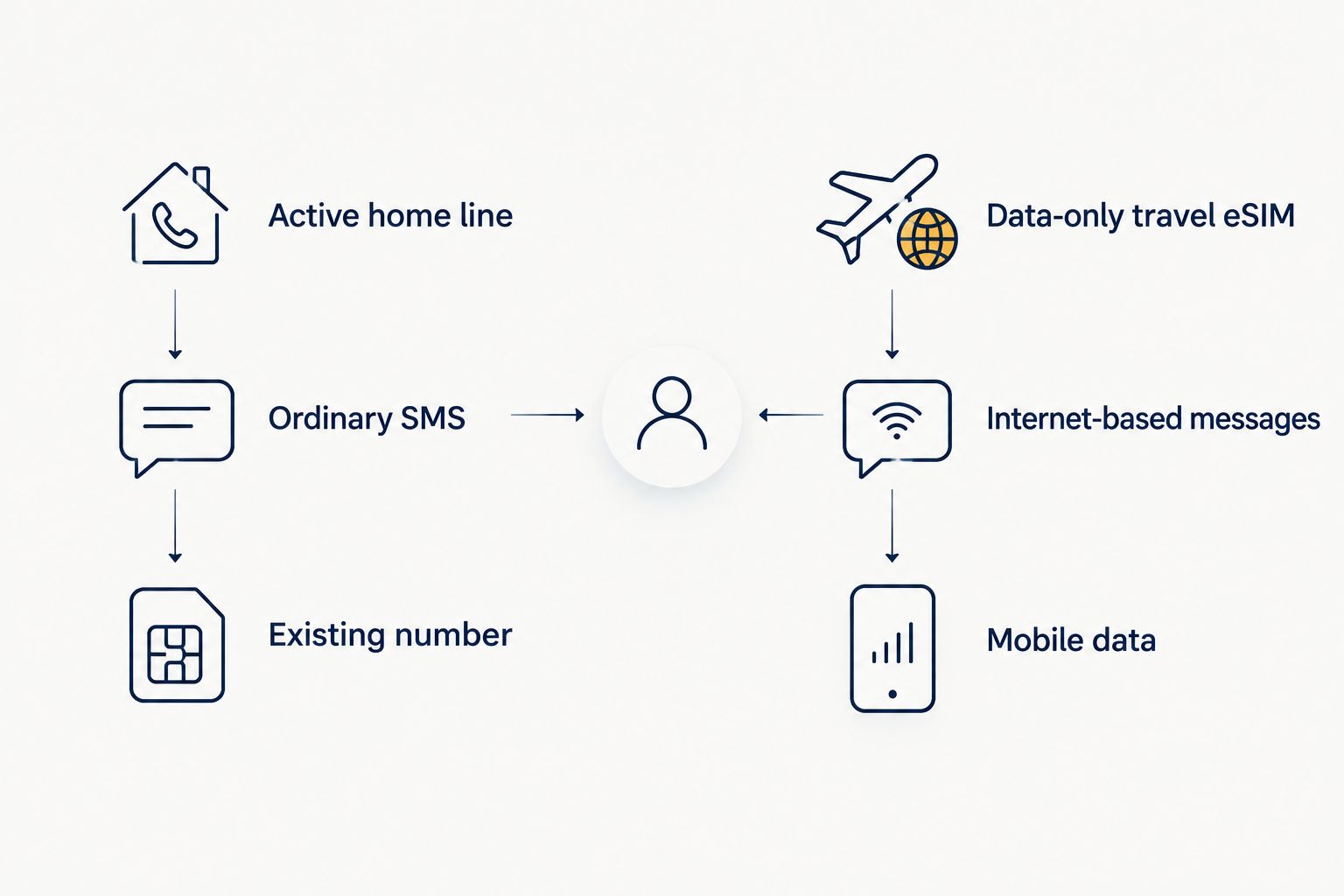
A data-only travel eSIM gives your phone an internet connection where the plan has coverage. You can use that connection for messages in apps, email, and other online services. It does not give the data-only line the ability to receive an ordinary SMS addressed to your home number.
That leaves you with a clear choice. Keep an SMS-capable home line active if you need messages to your existing number, or plan to use internet-based messaging when a phone number is unnecessary. Neither choice guarantees that a bank will offer an app-based alternative to its SMS codes; check the account's available sign-in methods before departure.
Messaging apps also have their own identity settings. A conversation in an app can continue over travel data, but that does not prove your carrier's SMS service is working. Test an ordinary text to and from your number separately from an app message. It is the simplest way to spot a line-selection problem while you can still change your settings.
How do you keep receiving texts on your home number?
Keep the home line enabled and assign mobile data to the travel eSIM, provided your phone supports using the lines together. Your carrier must also support the home line's SMS service at your destination. Check its roaming and Wi-Fi calling terms rather than assuming that choosing a travel data line disables every charge on the home line.
- Confirm your home line works abroad. Ask your carrier whether your number can receive and send SMS at the destination and what conditions apply.
- Confirm your phone supports the setup. Check eSIM support, carrier-lock status, and whether the phone can keep the required lines active together.
- Install the travel eSIM before you need data. Follow its installation instructions while you have a reliable connection. Installation and activation are not always the same event.
- Choose the travel eSIM for mobile data. Leave the home line enabled for its phone number and SMS. Check the phone's calling and messaging line selections separately.
- Test both directions. Receive an ordinary SMS on the home number, then send one from that number. Test an app message over the travel data connection as a separate check.
Phone menus differ by device and software version. Look for your SIM or cellular settings and confirm the selected line by its displayed name or number, not by where it appears in a list. If your phone asks whether to allow mobile-data switching between lines, read what that setting will do before turning it on.
For a 2026 trip, set up both lines before a verification code becomes urgent. If you turn off the home line entirely, messages addressed to its number will not reach that line while it is off. Turning it back on only helps if the carrier can connect at your location.
Which messages use SMS, and which use data?
An ordinary SMS is a carrier text sent to a phone number. A message sent through an internet-based app uses Wi-Fi or mobile data instead. They can look similar on your screen, so check how the conversation is being sent before treating a successful app message as proof that SMS works.
Apple's iMessage and Android's RCS can use a data connection when their services and conversation settings support it. Their behavior can change if a recipient is not using the same service or a conversation falls back to carrier messaging. If a message must arrive at your home number as an SMS, test that exact path.
Photos and group conversations add another distinction: MMS is a carrier messaging service, not simply ordinary SMS with an attachment. Support depends on the active line, carrier, and phone configuration. Do not assume that receiving a plain text proves picture messages will work abroad.
| Message you need | Check this first | Sensible fallback |
|---|---|---|
| Code sent by SMS to your home number | Is the home line active and able to receive SMS abroad? | Set up another account-approved sign-in method before travel |
| Message in an internet-based app | Does the phone have working travel data or Wi-Fi? | Connect to another available data network |
| SMS reply from your home number | Is the home line selected to send and permitted to send abroad? | Use an app only if the recipient can use it too |
| Picture or group message through your carrier | Does the carrier support the required messaging service abroad? | Send through an internet-based app if appropriate |
Why texting abroad varies
Your result depends on specific settings and services, not the word eSIM on the plan page:
- Plan features: An eSIM plan can include SMS or provide data only. Read the exact plan details before counting on carrier texts.
- The number receiving the message: An SMS sent to your home number goes to the service associated with that number, not automatically to the line supplying data.
- Home-carrier support: Your carrier's international SMS and roaming rules determine what your home line can do abroad.
- Phone support: The phone must support your chosen eSIM setup and, if you keep your home line active, the required combination of lines.
- Line selection: A phone can use one line for data and another for messaging. Selecting the wrong sending line changes which number your recipient sees.
- Message type: SMS, MMS, iMessage, RCS, and app messages do not all use the same route. Test the route you actually need.
These factors apply in 2026 whether you are taking a short trip or moving between several destinations. Coverage and plan terms can change by destination, so check them for every place on your itinerary.
Where does A-sim fit?
A-sim is best for travelers who want app-managed travel eSIM data while they check SMS support separately for the chosen plan and their home line. A-sim offers travel eSIMs for single countries, regions, and global travel, with usage management and top-ups through its app. Those features address the data side of staying connected; the provided information does not establish that every A-sim plan includes an SMS-capable number.
If keeping your existing number matters, pair the travel-data decision with a check of your home carrier's international texting terms. If you need a new number that can send and receive SMS, verify that the specific plan provides one before choosing it. Browse A-sim travel eSIMs to match your destinations, then confirm the plan's messaging features rather than inferring them from eSIM compatibility.
There is a trade-off: a data-focused setup keeps your travel connection and home-number SMS roles separate, but you still have to manage both lines correctly. A single SMS-capable travel plan avoids that split only when its features meet your needs; it does not automatically receive texts addressed to your home number.
Can you receive verification codes abroad on a data-only eSIM?
Not on the data-only line itself. If the code is sent by SMS to your home number, you need that home line active with working SMS service abroad. A data connection can help only when the account offers another approved method, such as an authenticator app or an in-app prompt.
Set up and test that alternative while you still have access to your accounts. Some services require an existing verification method before you can change sign-in settings. Do not remove your working SMS option until you know the replacement works.
Can you text over Wi-Fi without SMS on the travel eSIM?
Yes, you can send internet-based messages over Wi-Fi without SMS service on the travel eSIM. That does not mean a text addressed to your phone number will arrive: carrier SMS over Wi-Fi depends on your home carrier's Wi-Fi calling and messaging support, plus your phone settings. Test it with an ordinary SMS rather than an app message.
Will turning off the home line stop roaming charges?
Turning off the home line prevents that line from connecting while it stays off, but it also prevents it from receiving SMS during that time. Keeping it on for texts makes your home carrier's roaming terms relevant, even if the travel eSIM supplies mobile data. Check the carrier's rules before your 2026 departure; do not treat a data-line selection as a blanket block on home-line activity.
FAQ
Can I send and receive texts abroad on an esim?
Yes, if the active eSIM plan supports SMS, you can send and receive ordinary texts abroad under that plan's terms. A data-only travel eSIM supports internet-based messages but does not provide SMS on its own.
Can I get SMS on my home number while using a travel eSIM?
Yes, if your phone keeps the home line active and your carrier supports SMS at your destination. Set the travel eSIM as your data line, then test a text to your home number.
Will a data-only eSIM receive bank verification texts?
No, a data-only eSIM cannot receive ordinary SMS by itself. Codes sent to your home number require an active SMS-capable home line, unless the bank offers another sign-in method.
Do WhatsApp messages need SMS service abroad?
No, WhatsApp messages use an internet connection rather than ordinary SMS. Keep access to the phone number and account methods you need for any sign-in or re-verification.
Can I use iMessage or RCS over travel eSIM data?
Yes, iMessage or RCS can use travel eSIM data when the relevant service and conversation are set up to use it. Check for carrier-message fallback if you need to avoid sending through another line.
Can I send picture messages with a data-only eSIM?
You can send pictures through internet-based messaging apps over a data-only eSIM. Carrier MMS is separate and requires support from the line and carrier handling that message.
Should I switch off my home SIM when I install a travel eSIM?
Keep your home line on if you need SMS sent to your existing number and your carrier supports it abroad. Check roaming terms and choose your travel eSIM as the mobile-data line.
One last thing
Before your 2026 trip, send a test SMS from your home number and ask someone to reply. Then send an app message using travel data. If one works and the other does not, you have identified which connection needs attention without waiting for an account code when you are away.