Yes—eSIM mobile data uses cellular network security, but it is not immune to hacking: your protection also depends on your phone, provider account, and the apps and websites you use. In 2026, an eSIM removes the removable SIM card, not the risks of phishing, account takeover, malicious software, or an unlocked stolen phone.
- Is eSIM data secure from hacking? Cellular security helps, but compromised accounts and phones remain risks.
- An eSIM cannot be removed like a physical SIM, but fraudulent line transfers remain possible.
- HTTPS protects website traffic beyond the cellular connection; an eSIM alone does not provide end-to-end encryption.
- A-sim travel eSIMs suit travellers seeking app-managed data, not a replacement for phone and account security.
Why this matters
A travel connection and a secure phone solve different problems. You need mobile data for maps, bookings, and messaging, but changing your SIM format does not protect a password entered on a fake login page.
Choose an eSIM for connectivity; protect your accounts separately. The distinction matters when you compare eSIM safety for international travel with the security of banking, work email, or personal messages. Each service still needs its own safeguards.
Is eSIM data secure from hacking?
An eSIM stores a mobile subscription digitally in your device. Like a physical SIM, it supports authentication to a cellular network. The network connection has security protections, but those protections do not cover every stage between your phone and the service you access.
To assess an eSIM connection in 2026, separate these layers:
- Cellular connection. Mobile network authentication and radio-link encryption protect the connection between your device and the network. Protection depends on the network technology and configuration, not simply the SIM format.
- Internet traffic. HTTPS encrypts traffic between your browser and a website. Other apps need their own transport security; an eSIM does not add it automatically.
- Provider account. Someone who takes over an account can attempt changes through the provider's account-management or recovery process. Strong account protection matters even when there is no removable card.
- Phone and apps. Malware, an exposed passcode, or an unlocked device can compromise information after it reaches your phone. Network encryption cannot repair a compromised endpoint.
- Recovery access. Email accounts, recovery codes, and phone numbers can become routes into other accounts. Protect them alongside the travel connection.
An eSIM protects access to a mobile subscription; it does not make every activity on your phone secure. Treat claims of a hack-proof connection as a reason to ask exactly which threat the claim addresses.
eSIM, physical SIM, and public Wi-Fi: what changes?
The useful comparison is not simply digital versus plastic. It is which risks each connection removes—and which risks remain.
| Connection | Best for | Security advantage | Limitation |
|---|---|---|---|
| Travel eSIM | Travellers using a compatible phone who want digital setup | There is no SIM card for someone to pull out and place in another device | Provider-account attacks, phone compromise, and phishing remain possible |
| Physical SIM | Travellers whose phone or chosen service requires a removable card | Cellular authentication and network protections still apply | A removable card needs protection against unauthorised use; account attacks still matter |
| Public Wi-Fi | Connecting where suitable Wi-Fi is available | HTTPS still protects properly encrypted website traffic | Fake access points, misleading sign-in pages, and unencrypted traffic require caution |
Neither SIM format proves that a website is trustworthy. Public Wi-Fi also does not automatically expose every password: properly functioning HTTPS still encrypts the connection to the website. The danger comes from confusing an encrypted connection with a trustworthy destination.
Can someone hack an eSIM without touching your phone?
Yes. Remote attacks can target the provider account, associated email address, or the phone's software without physical access to the device. That does not mean an attacker can freely copy any eSIM they encounter.
A SIM-swap attack targets control of a mobile subscription. An attacker attempts to convince a provider to move service to a SIM or eSIM under the attacker's control, often using stolen account information or deception. The embedded format does not eliminate that account-level problem.
The consequences depend on the subscription. A line carrying your phone number can affect calls and SMS verification, while a data-only subscription does not itself carry your usual number. Do not assume your travel data line and your home-number line have the same security role.
For your 2026 trip, check which account controls each line and which number your important services use for recovery. If your home number remains active, its provider account still needs protection even when your travel eSIM handles internet access.
Is an eSIM activation QR code sensitive?
Yes—treat an activation QR code as private setup information. Depending on the provider's activation process, it can contain information used to download a subscription profile.
Do not post it in a travel forum, send it to an unsolicited support account, or leave it in a shared photo album. An activation screenshot is not an ordinary holiday screenshot. Its usefulness to an attacker depends on whether it is still valid and what additional checks the provider requires.
Use the provider's supplied installation process. If someone unexpectedly asks you to scan a replacement code, sign in through a familiar route and verify the request before changing your connection.
Why eSIM security varies
Two travellers using eSIMs can face different risks. In 2026, the relevant differences are the safeguards around the connection—not whether the installation felt quick.
- Phone software: Security updates address known vulnerabilities. A phone that no longer receives updates presents a different risk from a supported, updated device.
- Network technology: Cellular security differs across network generations and configurations. An eSIM does not guarantee that every connection uses the newest network technology.
- Account verification: Login protection, recovery checks, and authorisation of subscription changes affect the risk of account takeover.
- Application encryption: HTTPS and properly implemented encrypted messaging protect content beyond the cellular radio link. Unencrypted applications do not gain that protection from an eSIM.
- Physical access: A strong screen lock and hidden notification previews reduce what someone can access with your phone in hand.
- User decisions: Sharing activation details, approving unexpected login requests, or installing untrusted software can bypass otherwise useful safeguards.
You cannot inspect every part of a mobile network yourself. You can control your device updates, account credentials, installation source, and response to unexpected requests. Start there rather than treating the SIM format as a security guarantee.
How do I protect my travel eSIM before departure?
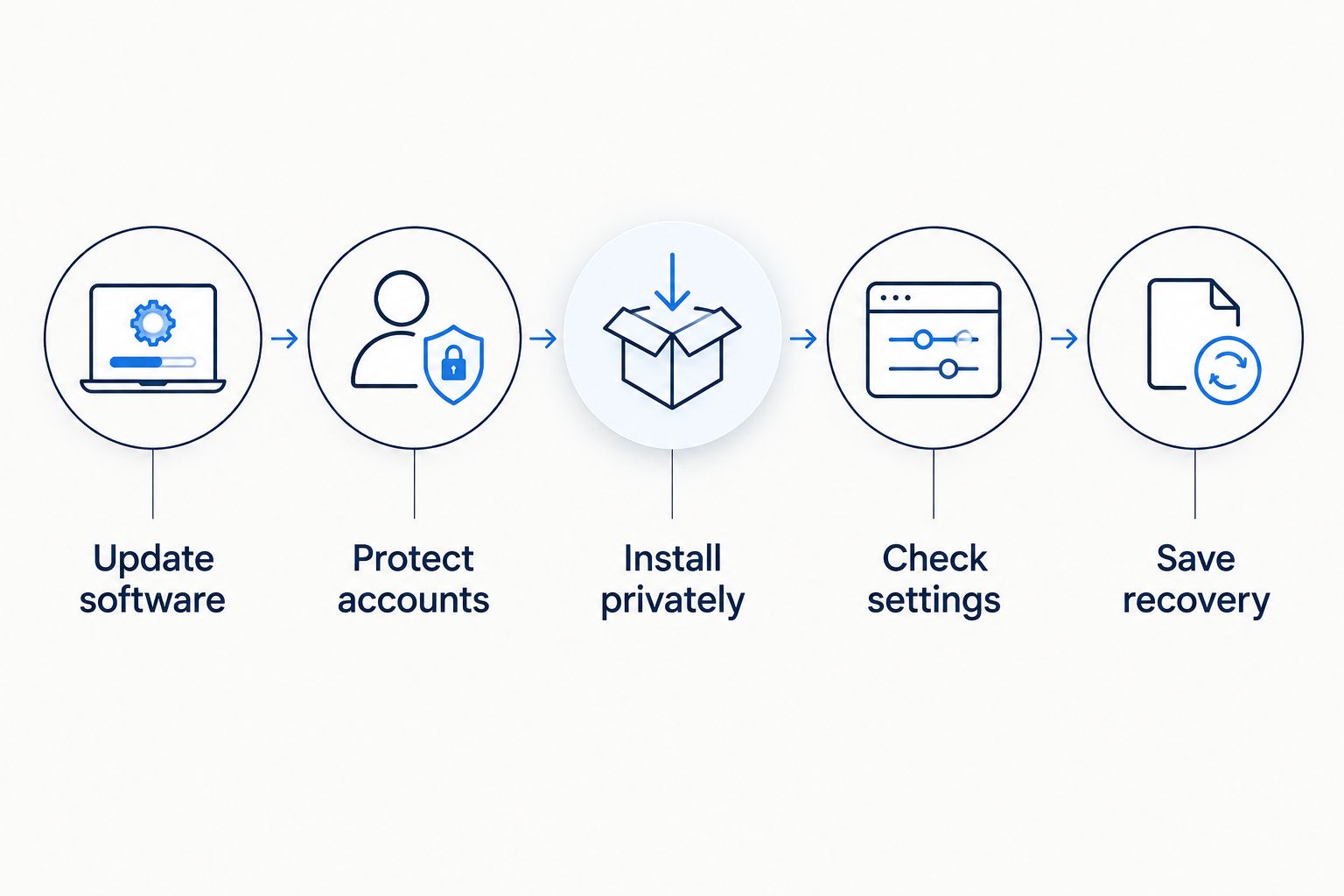
Prepare your phone and recovery access while you still have a familiar connection. Security settings are easier to check before you depend on a new line for directions or a booking confirmation.
Update software
Install available operating-system and app security updates. Check that your phone still receives security support, and remove apps you no longer need or recognise.
Updates do not make a phone invulnerable. They address known weaknesses, which is a useful protection regardless of whether you connect through an eSIM, physical SIM, or Wi-Fi.
Protect accounts
Use unique passwords for your provider account and the email account linked to it. Enable stronger authentication where available, and protect the provider account for your home number too.
Where a service supports them, passkeys resist phishing by binding authentication to the legitimate service. Authenticator apps also avoid reliance on an SMS number, although their codes still need protection from fake login pages.
Install privately
Keep activation details out of public messages and shared screenshots. Start setup through the provider's official app, website, or supplied instructions—not an unsolicited message claiming that your connection needs repair.
Read the installation prompts before approving them. Do not install an unfamiliar configuration profile or grant remote access merely because someone calls themselves support.
Check settings
Confirm which line handles mobile data and which line carries your home number. Review screen-lock settings, notification previews, and the permissions granted to apps you use while travelling.
Keeping a home line enabled has connectivity implications, but it is not an account-security measure. Protect that line's account independently of your travel-data settings.
Save recovery
Keep recovery codes somewhere protected and accessible without relying solely on the phone you are carrying. Know how to reach your provider and how to access your device's lost-phone controls.
Before travelling in 2026, test your recovery route—not just your data connection. If losing your phone also removes every way to sign in, a working eSIM will not solve the resulting access problem.
Does a VPN make eSIM data secure?
A VPN encrypts traffic between your device and the VPN service. It changes where some network visibility sits, but it does not make a phishing site trustworthy or protect information from malware already running on your phone.
HTTPS already encrypts properly configured website connections. A VPN adds a separate tunnel; it does not replace HTTPS, secure login practices, or software updates. The VPN provider also becomes a party you must trust.
For work travel, follow your employer's connection requirements. Use a VPN for a defined need, not as proof that an eSIM is safe. If your concern is a stolen password or a fraudulent subscription transfer, address that problem directly.
What should I do if I suspect my eSIM was hacked?
Unexpected loss of service alone does not prove hacking. Coverage problems, device settings, and subscription issues also interrupt data. Look for account-change notices, unfamiliar logins, or changes you did not authorise.
If you suspect account takeover, use a trusted device and connection to contact the provider through a verified channel. Secure the associated email account, change compromised credentials, and review active sessions. Do not follow recovery links from the same suspicious message that raised the alarm.
If your home number is involved, tell its provider that you suspect an unauthorised transfer. Check important accounts that use that number for recovery, particularly email and financial services, and replace SMS-based recovery where suitable alternatives exist.
For a lost phone, use the device maker's available lost-device controls and contact the relevant providers. Do not assume deleting a travel eSIM will recover compromised accounts or erase information already accessed.
Where does A-sim fit into a secure travel setup?
A-sim travel eSIMs are best for travellers who want to manage international mobile data through an app or website. A-sim offers global, regional, and single-country travel eSIMs, with app-based usage management and top-ups.
The practical benefit is managing your travel connection without handling a removable SIM card. The limitation is that connectivity does not replace device protection, account authentication, or encrypted apps. Choose A-sim for its stated travel-data functions, and apply the same security checklist to the phone carrying the connection.
FAQ
Is eSIM data secure from hacking in 2026?
eSIM data uses cellular network security, but it is not immune to hacking in 2026. Account takeover, phishing, malicious software, and physical access to an unlocked phone remain separate risks.
Is an eSIM safer than a physical SIM?
An eSIM removes the risk of someone taking out the SIM card and placing it in another device. It does not eliminate fraudulent subscription transfers, compromised provider accounts, or attacks on your phone.
Can someone steal my eSIM by scanning its QR code?
An activation QR code can contain sensitive installation information, so keep it private. Whether another person can use it depends on its validity and the provider's activation checks.
Does an eSIM encrypt my banking details?
An eSIM does not independently provide end-to-end encryption for banking details. A legitimate banking app or HTTPS website supplies its own connection security, while your phone and login credentials also need protection.
Do I need a VPN when using a travel eSIM?
A travel eSIM does not automatically require a VPN. Use one when it serves a specific privacy or workplace requirement, and remember that it does not prevent phishing or account takeover.
Can hackers get my home number through a travel eSIM?
A separate data-only travel subscription does not itself carry your home number. Your home-number account remains a separate target, so protect its credentials and recovery settings even when another line handles mobile data.
Does losing signal mean my eSIM has been hacked?
Losing signal does not by itself prove that an eSIM has been hacked. Check coverage and settings, then investigate unexpected account changes or login notices through a verified provider channel.
One last thing
The recovery email for your mobile account deserves as much attention as the mobile account itself. If an attacker can reset your provider password through that inbox, a strong provider password alone is not enough.
Before your next trip, protect that email account and store recovery information securely. Your strongest travel-security improvement can be an account setting, not a different SIM.