Yes—you can make emergency calls abroad without a local phone number when your phone and the destination’s mobile networks support emergency calling. A data-only travel eSIM does not itself provide ordinary voice service, and an internet connection does not guarantee access to emergency dispatch. For travel in 2026, use your phone’s built-in emergency dialler, know the destination’s emergency number, and keep another way to summon help.
- For esim emergency calls abroad no local number, use the native emergency dialler; connection depends on local networks and rules.
- A-sim suits travellers seeking travel eSIM data and app-based usage management, not a substitute for emergency-call preparation.
- 112 reaches emergency services throughout the European Union; 911 serves Canada and the United States.
- A data connection, messaging app or visible signal indicator does not guarantee an emergency call will connect.
Can I make emergency calls abroad without a local number?
A local number is not universally required for an emergency call, but successful connection is not universal either. Emergency calls have special handling that differs from ordinary calls. The destination’s rules, available network and your handset determine what works.
Keeping a home line available gives you another calling option, subject to carrier support. Read the guide to keeping your home number active with a dual-SIM setup before changing your travel settings.
| Calling option | Best for | Main benefit | Main limitation |
|---|---|---|---|
| Built-in emergency dialler | Contacting local emergency services | Uses the phone’s emergency-call function | Requires a supported emergency connection; operation varies by destination |
| Home SIM with voice roaming | Keeping ordinary voice calls and a callback number | Retains your existing number where roaming works | Depends on carrier arrangements and handset settings |
| Local voice-enabled SIM or eSIM | Routine local calls during a trip | Provides ordinary voice service when included | Does not solve a lack of mobile coverage |
| Internet calling or messaging app | Contacting family or another person for assistance | Uses an available internet connection | Is not a replacement for the local emergency dialler |
Why this matters
An emergency call is not the same as calling a hotel or sending a message. A travel plan that handles maps and browsing can still lack ordinary voice calls, while a phone without an ordinary calling connection can sometimes place an emergency call.
Prepare the emergency route separately from your travel data. In 2026, check destination-specific instructions before departure, rather than treating a working eSIM as proof that every kind of call works.
If you are already in danger, attempt the local emergency number immediately. If the call fails, ask someone nearby, accommodation staff or a local business to call for help; do not spend the emergency comparing plans.
Which emergency number should I dial abroad?
Use the number for the country where you are physically located. Do not assume your home emergency number is the correct number everywhere.
These established emergency numbers provide useful starting points for 2026 travel preparation:
| Destination | Emergency number | Official guidance to consult |
|---|---|---|
| European Union | 112 | European Commission guidance on the European emergency number |
| Canada | 911 | Local government and emergency-service guidance |
| United States | 911 | National 911 Program guidance |
| Australia | 000 | Australian Government Triple Zero guidance |
112 is the European Union’s emergency number, not a promise of worldwide access. Some countries outside the EU also support it, but you should check your destination rather than assume recognition.
For a multi-country itinerary, save the emergency number for each stop. Some destinations use separate numbers for police, ambulance and fire services. Record those distinctions alongside your accommodation address.
Use official destination guidance for your 2026 checklist. An old travel forum post is not a substitute for instructions from the local government or emergency service.
What should I do if I need emergency help?
Use the phone’s emergency-call function rather than searching for an internet calling app. Exact screen labels differ between iPhone and Android devices, so find the emergency option before your trip.
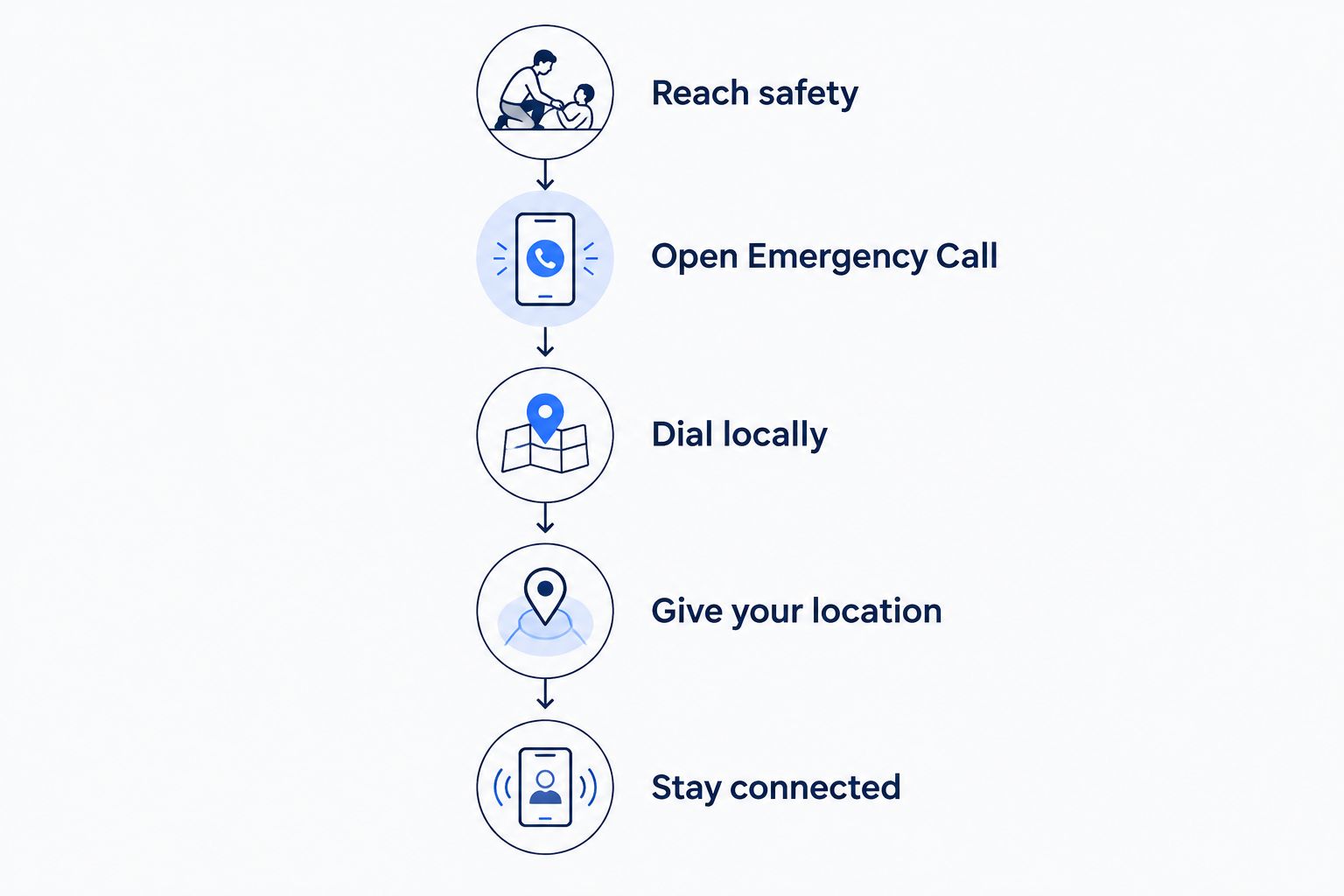
- Reach safety. Move away from immediate danger when you can do so safely. Ask a nearby person for assistance if you cannot use your phone.
- Open Emergency Call. Use the native Phone app or the emergency-call option on the lock screen. Do not assume a messaging app reaches dispatch.
- Dial locally. Enter the destination’s emergency number. If it fails, seek another phone or a person who can call.
- Give your location. State the country, town, street, building or nearby landmark. Describe what happened and follow the dispatcher’s instructions.
- Stay connected. Remain on the call unless instructed otherwise. Tell the dispatcher if you do not have a reliable callback number.
Do not place a test call to an emergency number just to check your eSIM. Use your handset’s support information, your carrier’s guidance and the destination’s official instructions for preparation.
If you accidentally connect to emergency dispatch, do not simply hang up. Explain that the call was accidental and follow the operator’s instructions.
Does a data-only eSIM support emergency calls?
A data-only eSIM provides internet access rather than ordinary carrier voice service. Emergency calling is a separate handset-and-network function, so neither of these conclusions is safe: that data access guarantees an emergency call, or that lacking ordinary voice service always prevents one.
Check the distinction in your phone settings. Selecting a travel eSIM for mobile data does not necessarily make it the line used for normal calls, and opening an internet calling app does not invoke the native emergency dialler.
Use mobile data for supporting tasks, not as your only route to dispatch. Maps can help identify your location, and messages can alert someone who can assist. Both depend on working data and a usable device.
For routine travel connectivity, A-sim offers travel eSIMs for individual countries, regions and global destinations, with usage management and top-ups through its app. A-sim travel eSIMs suit travellers who want mobile data they can manage through an app. That role is distinct from establishing an emergency voice connection; prepare the latter separately.
Can I call with no SIM or no service?
A phone without a SIM can place emergency calls in some destinations and network conditions, but this is not a worldwide guarantee. Local requirements can include having a valid SIM, and your handset must support the available emergency connection.
A no-service message also needs careful interpretation. It can mean your ordinary carrier connection is unavailable, rather than prove that every possible emergency connection is unavailable. Conversely, an emergency-call option on the screen does not prove a suitable network is within reach.
Attempt the emergency call, but do not rely on SIM-free calling as your travel plan. If it fails, use another phone or ask someone nearby to call. A handset cannot create mobile coverage where no compatible network is reachable.
Keep the distinction practical: an inactive subscription, missing ordinary service and absent radio coverage are different problems. None should become a reason to delay seeking help through another person.
Can I use Wi-Fi or an app instead?
A Wi-Fi connection supports internet activity, but it does not automatically turn a data-only plan into a carrier voice line. Carrier Wi-Fi Calling is a separate feature whose emergency-call support and overseas use depend on the carrier and device.
An ordinary messaging or internet calling app is useful for reaching a trusted contact. It is not a dependable substitute for dialling local emergency services through the phone’s built-in calling function.
Use the distinction when preparing your phone:
- Native emergency dialler: Your first calling route for local emergency dispatch.
- Carrier Wi-Fi Calling: A feature to verify with your home carrier, including overseas emergency handling.
- Internet messaging: A supporting route to someone who can help, not a guaranteed dispatch connection.
- Nearby phone: A practical alternative when your handset cannot connect.
If Wi-Fi is your only working connection, contact someone who can summon local help while you seek a usable phone. Explain where you are and which service you need; do not assume the recipient knows your current destination.
Why emergency calling abroad varies
Emergency access depends on more than whether your eSIM appears active. These factors explain why the same phone can behave differently across destinations:
- Local rules: Countries differ in whether emergency calls require a SIM or other valid network credentials.
- Network coverage: A compatible mobile network must be reachable for a terrestrial cellular call.
- Handset compatibility: The phone must support the available network technology and emergency-call handling.
- Device settings: Airplane mode disables cellular radios; line settings also affect ordinary calling options.
- Calling route: Native emergency calls, carrier Wi-Fi Calling and internet app calls use different systems.
- Callback access: A reachable phone number helps dispatchers contact you again if the call disconnects.
Check these factors for your actual phone and destination in 2026. General eSIM compatibility alone does not answer the emergency-calling question.
What should I save before leaving Canada?
Save the destination’s emergency numbers somewhere you can open without internet access. Include your accommodation address, a nearby landmark and the name of the town or district.
Keep a second copy outside your phone. A flat battery, damaged handset or stolen device removes both your calling tool and any information stored only on it.
Your 2026 preparation list should also include:
- Your travel insurer’s assistance contact and policy reference.
- A trusted contact who knows your itinerary.
- Relevant medical information you need to communicate.
- The location of your phone’s emergency-call screen.
- Your home carrier’s instructions for voice roaming and overseas Wi-Fi Calling.
Keep ordinary carrier roaming and travel data settings distinct. You can choose a travel eSIM for data while separately checking whether your home line remains available for voice calls. Do not assume that disabling data roaming also disables every other service.
Will emergency services know my location automatically?
Automatic location information is not something you should rely on alone. Its availability and accuracy depend on the handset, network and local emergency-service systems.
Tell the dispatcher where you are, even if your phone can share location. Start with the place name and a clear address or landmark. If you can safely open a map, read the location information it shows rather than assuming it has already reached dispatch.
A hotel name without the city can be ambiguous. A trail name without an entrance or nearby landmark can also leave uncertainty. Describe what you can see and answer the operator’s questions.
Can emergency services call me back without a local number?
A local number is not the only possible callback number. A working home number can be useful abroad, but it must be reachable through your carrier’s service arrangements.
If you lack a reachable number, say so during the emergency call. Do not assume the dispatcher can redial a data-only eSIM or contact you through a messaging account.
Ask what to do if the connection drops. If someone nearby has a reachable phone and agrees to help, tell the dispatcher that alternative number clearly.
FAQ
Can I make emergency calls abroad with no local number?
Yes, where your handset and the local network support emergency calling without a local number. Use the native emergency dialler and the destination’s emergency number; connection is not guaranteed everywhere.
Can I dial 112 anywhere in the world?
112 is the emergency number throughout the European Union, not a guaranteed worldwide number. Check official emergency-service guidance for destinations outside the EU.
Does a data-only travel eSIM include emergency voice calls?
A data-only travel eSIM does not itself provide ordinary carrier voice service. Emergency calling uses separate handset and network handling, whose availability depends on the destination.
Can I call emergency services through a messaging app?
Do not rely on an ordinary messaging app to reach emergency dispatch. Use the phone’s built-in emergency dialler, and use messages to contact someone who can assist.
Will 911 work when I leave Canada?
911 is the emergency number in Canada and the United States, but it is not universal abroad. Save the official emergency number for each country on your itinerary.
Do I need to give the dispatcher my location?
Yes—state your location explicitly during an emergency call. Automatic location support varies, so give an address, town or clear landmark and follow the dispatcher’s questions.
Can I use A-sim for travel data and keep my home number?
A-sim provides travel eSIM connectivity; keeping your home number depends on your handset’s line support and your home carrier. Check the data-line and voice-line settings separately before departure.
One last thing
Prepare for the dropped call, not just the first call. Before ending a conversation with emergency dispatch, make sure the operator has your location and understands whether you can receive a callback.
A reachable number is useful, but a clear location and a nearby person who can help are also practical safeguards. Keep those details ready before you need them.