Yes, you can use an eSIM on a smartwatch if the watch has cellular hardware and your carrier supports that exact model. A GPS-only or Bluetooth-only watch cannot gain cellular service by installing an eSIM. A phone travel eSIM is not automatically compatible with a watch, and international watch service requires separate checks for carrier support and roaming.
- Using an esim on smartwatch requires a cellular model and a supported watch plan.
- A phone travel eSIM does not automatically work on a cellular smartwatch.
- A-sim provides travel eSIMs for phones; smartwatch compatibility requires separate confirmation.
- For travel, confirm watch roaming separately from your phone’s mobile data.
Can I use eSIM on a smartwatch?
Yes, but the watch and the plan must both support smartwatch cellular service. The eSIM capability in a phone does not make its mobile plan transferable to your wrist. You need a cellular watch, a compatible paired phone where required, and a carrier that can activate service on that watch.
A-sim is best for travellers seeking phone travel eSIMs with app-based usage management and top-ups. Treat that phone connection and your watch’s cellular connection as separate setup decisions.
The distinction matters in 2026 because an eSIM describes how a mobile subscription is installed, not which devices a subscription supports. Two devices can both use eSIM technology without accepting the same plan.
| Connection option | Best for | What it gives you | Main limitation |
|---|---|---|---|
| Bluetooth through a paired phone | Travellers keeping their phone nearby | Supported watch functions through the phone connection | The watch depends on its connection to the phone |
| Wi-Fi on a compatible watch | Connected use at a suitable Wi-Fi location | Internet access for supported watch functions | Network login requirements and watch features vary |
| Cellular watch with a supported watch plan | Travellers who need connected functions away from their phone | A separate cellular connection on the watch | Activation, roaming and features depend on the carrier and model |
These are connection methods, not interchangeable subscriptions. Choose based on whether you need the watch to stay connected when you leave your phone behind.
Why this matters
A travel eSIM can solve your phone’s internet access without solving independent watch connectivity. Your watch can still communicate with a nearby paired phone through Bluetooth, but that does not mean it has its own mobile service.
Imagine leaving your phone at the hotel before a walk. A watch that worked beside the phone does not necessarily retain messaging, live maps or internet access outside. Its independent connection depends on cellular service or suitable Wi-Fi, and individual apps have their own requirements.
Plan for the connection you need when the phone is absent, not just the connection you see during pairing. That avoids confusing successful phone activation with successful smartwatch activation.
Cellular smartwatch: use a supported watch plan
A cellular smartwatch contains the hardware needed to connect to a mobile network. The eSIM stores the subscription used for that connection. Having the hardware is necessary, but it does not guarantee that your chosen carrier will activate the device.
Watch subscriptions commonly involve carrier-specific setup and account requirements. A standard paired Apple Watch cellular setup, for example, generally requires the iPhone and watch to use the same carrier; supported family configurations have different rules. Follow the requirements for your actual setup rather than applying phone eSIM instructions to the watch.
Best for: staying connected during activities where you leave your phone behind. The advantage is a cellular connection on your wrist. The limitation is that the watch plan, supported features and destination service need their own checks.
Do not assume a domestic watch subscription includes international use. A watch that connects at home still needs compatible roaming arrangements and supported hardware for service abroad.
GPS-only smartwatch: use the phone or Wi-Fi
A GPS-only smartwatch does not have the cellular hardware needed for an independent mobile connection. Installing an app, scanning an activation code or changing a setting cannot add that hardware.
GPS and mobile data also serve different purposes. GPS determines location; mobile data supplies an internet connection. A watch can support location tracking without supporting cellular service, while live map information or other online functions still need an appropriate connection.
Best for: travellers who usually keep their phone nearby. The benefit is using supported connected functions through the paired phone without activating a watch cellular subscription. The limitation is losing that phone-based connection when the devices are apart.
Suitable Wi-Fi provides another route for supported functions on compatible watches. Hotel or airport networks that require browser-based sign-in can complicate watch access, so do not treat every visible network as usable.
How do I check smartwatch eSIM compatibility in 2026?
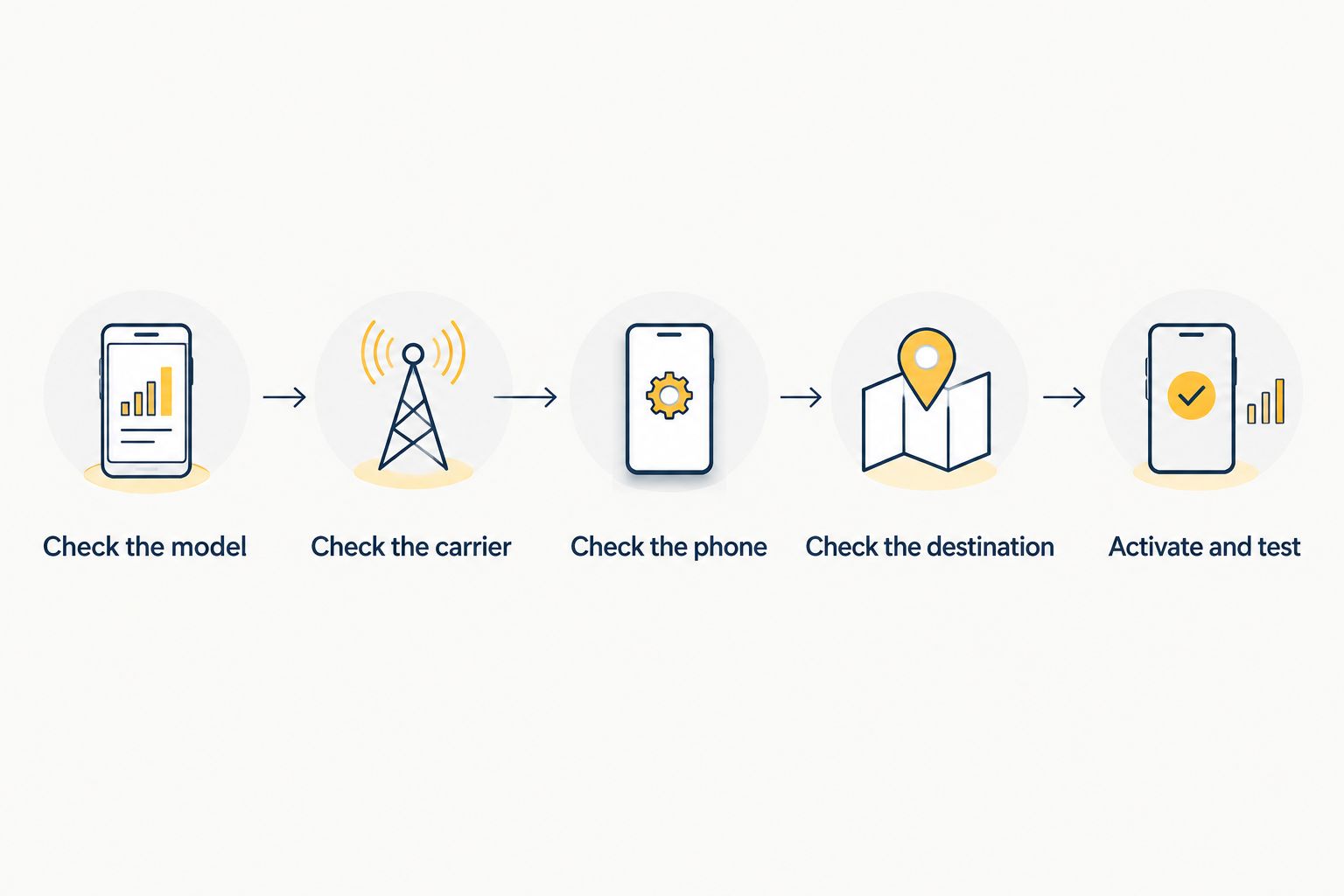
Check the hardware first, then the carrier, then your destination. This order prevents you from trying to activate a subscription on a watch that cannot use it.
- Check the model. Find the exact model in the watch settings, original documentation or manufacturer account. Confirm that it is the cellular or LTE version, not just that the product family includes a cellular option.
- Check the carrier. Look for explicit support for that watch model and account type. Support for phone eSIMs alone is not sufficient evidence of support for smartwatch activation.
- Check the phone. Confirm that the paired phone meets the watch manufacturer’s requirements. Apple Watch pairs with iPhone; Android-based watch requirements depend on the specific manufacturer and model.
- Check the destination. Ask whether the watch subscription supports cellular service in the country you will visit. Confirm watch roaming specifically, rather than asking only whether your phone plan works abroad.
- Activate and test. Follow the manufacturer’s watch setup process. Then test supported connected functions with the phone out of Bluetooth range and the watch disconnected from Wi-Fi.
Testing with the phone beside you is not enough. Bluetooth can make the watch appear fully connected even when its cellular service is inactive.
Keep your phone available during setup even if your goal is to use the watch independently later. Activation and account authentication can require the companion app or carrier account access.
Why smartwatch eSIM compatibility varies
Smartwatch eSIM compatibility depends on more than whether a device advertises eSIM support. For a 2026 trip, check these factors against your exact watch and subscription:
- Hardware version: cellular and non-cellular versions of the same watch family have different connection capabilities.
- Carrier support: the provider must support activation on the watch, not merely offer downloadable phone eSIMs.
- Account eligibility: the carrier can require an eligible phone subscription or a specific watch service arrangement.
- Paired phone: the watch must meet the manufacturer’s phone and operating-system requirements.
- Regional model: a watch’s supported mobile bands and regional configuration affect compatibility.
- International service: watch roaming depends on the model, carrier arrangements and destination network.
A positive answer to one factor does not cancel a negative answer to another. A compatible watch still cannot use a plan that the provider does not support for wearables.
Can I put my phone’s travel eSIM on my smartwatch?
Not automatically: a phone travel eSIM is not proof of smartwatch support. Only use a subscription on a watch when the provider explicitly supports that device and supplies the appropriate activation process.
A phone activation code is not a universal credential for every device with an eSIM. Watch setup can run through the phone’s companion app and carrier account rather than the QR-code process used for a phone.
A-sim offers global, regional and single-country travel eSIMs for iPhone and Android phones, with usage management and top-ups through its app. Those phone services do not establish smartwatch compatibility; confirm wearable support separately before attempting watch installation.
The practical choice is simple. If you will carry your phone, use the watch’s supported paired-phone functions. If you need the watch to work without the phone, arrange a compatible watch subscription rather than assuming the phone travel plan covers both devices.
Will my smartwatch work abroad without my phone?
Yes, for supported connected functions when the watch has suitable cellular service or usable Wi-Fi. Offline functions can remain available without either connection, but live services depend on the watch, app and network.
For independent cellular use, check the destination against the watch subscription’s roaming support. Phone roaming support does not establish watch roaming support, even when both subscriptions belong to the same account.
Before your 2026 departure, test the functions you actually need: a call, a message, a map update or an app refresh. Do not use the appearance of a signal icon as the only test of whether those functions work.
A home test confirms that activation works locally. It does not confirm international roaming, so keep the destination check separate and retain a phone-based backup for travel information.
Does my watch need its own phone number?
The numbering arrangement depends on the watch service. Some subscriptions share the paired phone’s public number for supported calls, while standalone arrangements can use a separate number.
Number sharing does not mean that the phone and watch contain one interchangeable eSIM. The carrier manages the relationship between subscriptions and determines which calling and messaging functions are supported.
Ask how incoming calls, ordinary text messages and app notifications behave when your phone is switched off or left behind. Those are different functions; success with one does not prove that every other function works independently.
What should I do if smartwatch activation fails?
Start with compatibility rather than repeatedly reinstalling the subscription. Confirm the cellular model, paired-phone requirements, carrier eligibility and the activation method specified for the watch.
Then distinguish an activation problem from a connection problem. A subscription that has not been added is different from an active subscription that cannot connect at your destination. The second situation requires checking coverage, roaming support and device settings.
- If the watch is non-cellular, stop trying to add a mobile plan and use its supported phone or Wi-Fi connection.
- If the carrier does not list the watch as supported, ask the carrier to confirm eligibility before continuing.
- If activation works but travel connectivity fails, check watch roaming rather than changing the phone travel eSIM.
- If the watch works only beside the phone, repeat the test without Bluetooth and Wi-Fi masking the cellular connection.
Do not delete a working phone travel eSIM to troubleshoot an unrelated watch subscription. Keep the phone connection intact while you isolate the watch problem, and follow provider instructions before removing any profile.
FAQ
Can I use an eSIM on any smartwatch?
No. Using an eSIM on a smartwatch requires a cellular model and a provider that supports activation on that watch. GPS-only and Bluetooth-only watches cannot gain cellular hardware through an eSIM installation.
Can I scan my travel eSIM QR code into my watch?
Only follow that process if the provider explicitly supports your watch and instructs you to use it. A phone travel eSIM activation code does not establish smartwatch compatibility.
Will my watch still work if my phone uses a travel eSIM?
Supported paired-phone functions can still work through the phone connection. That does not give the watch independent cellular service; leaving the phone behind requires a separate connectivity check.
Can an Apple Watch use a different carrier from my iPhone?
A standard paired Apple Watch cellular setup generally requires the watch and iPhone to use the same carrier. Supported family configurations have different requirements, so check the rules for your setup.
Does a cellular smartwatch automatically work overseas?
No. International cellular service depends on watch roaming support, the device model and the destination. Confirm the watch subscription separately from your phone’s roaming or travel eSIM.
Can I use a smartwatch without buying a cellular plan?
Yes, through supported offline functions and compatible phone or Wi-Fi connections. You need a supported cellular subscription for an independent mobile-network connection.
How do I check smartwatch eSIM support before travelling in 2026?
Confirm the exact cellular model, carrier eligibility, paired-phone requirements and destination roaming support. Then test the functions you need without a nearby phone connection or Wi-Fi.
One last thing
A working watch beside your phone proves less than you think. Bluetooth can hide the absence of an independent cellular connection. The useful test is what still works when the phone connection and Wi-Fi are unavailable.
For your 2026 travel checklist, keep phone data and watch connectivity on separate lines. Use A-sim travel eSIMs for the phone setup described by the service, and confirm any independent watch connection with a provider that supports your exact wearable.