Yes, a VPN can slow down eSIM data abroad because it adds processing and sends your connection through a VPN server before reaching the destination. The slowdown is not caused by the eSIM itself, and switching off the VPN will not fix weak mobile coverage, network congestion, or a plan’s speed restriction.
- Does a VPN slow down eSIM data abroad? Yes, but weak coverage and mobile routing also affect speed.
- Compare VPN-off and VPN-on connections before changing your travel eSIM settings.
- A nearby VPN server is a useful starting point, not a guarantee of better performance.
- A-sim travel eSIMs support app-based usage management and top-ups; VPN performance remains a separate issue.
Why this matters
A slow map, interrupted video call, or stalled upload does not identify the cause of the problem. You need to separate your mobile connection from the extra route your VPN introduces before changing either.
For travel in 2026, keep performance and protection separate. A faster connection is not automatically a safer one, and a VPN is not a fix for every connection problem. Start with the distinction explained in eSIM data security, then test the connection you actually use.
Does a VPN slow down eSIM data abroad?
A VPN can reduce download and upload speeds and increase response time on an eSIM connection abroad. It adds an encrypted connection to a VPN server, which then forwards your traffic. The effect depends on that route, the server, your phone, and the underlying mobile network.
An eSIM and a physical SIM both provide subscriber credentials for mobile service. Neither format removes the processing or routing involved in a VPN connection. Changing SIM format is not a targeted solution to VPN-related delay.
Use this comparison to choose what to test, rather than assuming one setting wins everywhere.
| Connection setting | Best for | Advantage | Limitation |
|---|---|---|---|
| VPN off | Establishing your mobile connection’s baseline | Removes the VPN route and processing from the test | Removes VPN-specific protection; individual apps still depend on their own security |
| Nearby VPN server | Testing a shorter VPN route | Offers a sensible starting point for reducing added distance | Geographic proximity does not guarantee good routing or an uncongested server |
| Distant VPN server | Access that requires a particular server location | Provides an exit connection in that selected location | Adds geographic distance and can increase response time |
| Work-required VPN | Accessing employer-controlled resources | Supports the organisation’s required connection method | Your employer can restrict server choices and settings |
The useful comparison is your own connection with and without the VPN under similar conditions. There is no universal slowdown percentage that applies to every travel eSIM, country, phone, and VPN.
Test the connection before changing your plan
For your 2026 trip, use a controlled comparison rather than switching settings at random. Keep the phone in the same place and avoid downloading files in the background.
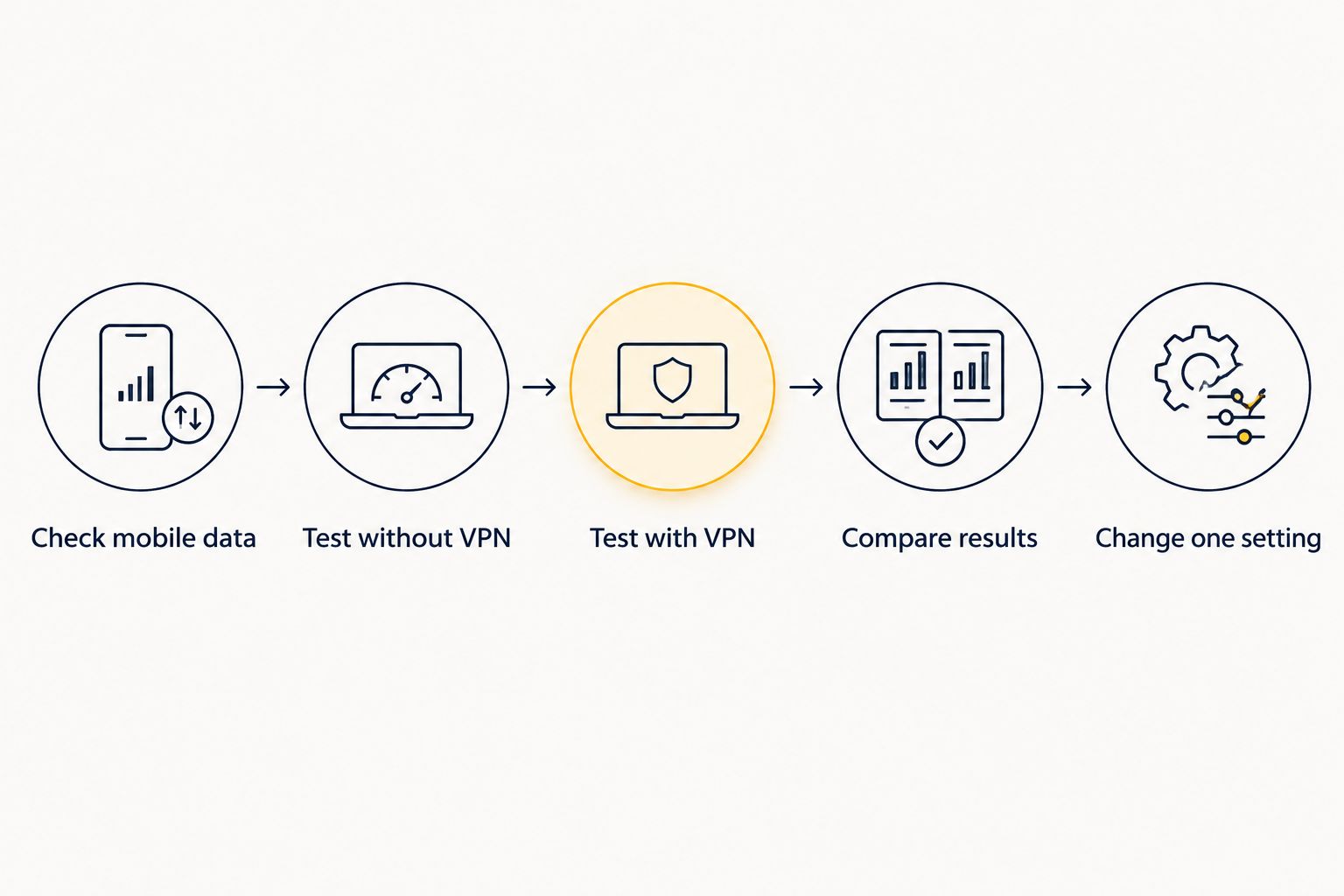
- Check mobile data. Turn Wi-Fi off and confirm that your travel eSIM is the selected mobile-data line. This prevents a Wi-Fi connection or another SIM from becoming the real test connection.
- Test without VPN. If your security requirements allow it, disconnect the VPN and measure download speed, upload speed, and response time. Use a non-sensitive test rather than opening work resources.
- Test with VPN. Reconnect the VPN and repeat the same test using the same test destination. Record the VPN server location alongside the results.
- Compare results. Look for a repeated difference, not just one disappointing result. Also repeat the task that matters: loading a map, joining a call, or sending a file.
- Change one setting. Try another permitted VPN server, then repeat the comparison. Keep everything else unchanged so you can identify what helped.
You can use 2 connection states, VPN off and VPN on, with 3 readings per state. That gives you 6 measurements to compare; this is a suggested test method, not a performance benchmark. Speed tests consume data, so check your remaining allowance before repeating them.
Keep the results simple. Download and upload speed describe how quickly data moves; response time describes how long a request takes to receive a response. Record speed in Mbps and response time in milliseconds, using the labels your test tool provides.
Do not disconnect a work-required VPN just to get a cleaner test. Use your organisation’s approved diagnostic process instead.
VPN off: establish your mobile-data baseline
The VPN-off result tells you how the underlying connection performs without the VPN route. It is a diagnostic baseline, not a recommendation to abandon protection.
If maps and websites remain slow with the VPN disconnected, investigate mobile coverage, the selected data line, and your plan conditions. Check whether the same problem affects different apps. A single slow website does not prove that your entire mobile connection is slow.
Signal bars alone do not settle the question. They do not show every factor affecting throughput, including congestion and routing beyond the mobile tower. Test the task itself before drawing a conclusion.
Disconnecting a VPN does not remove HTTPS encryption from websites that use it. However, it does remove the VPN tunnel and its specific protections. Do not treat those two security arrangements as interchangeable.
Nearby VPN server: start here when location is flexible
A nearby VPN server is a practical first test when you do not need a particular exit location. A shorter geographic route can reduce added delay, but internet routing does not always follow the shortest physical path.
Try the VPN app’s automatic selection and a nearby permitted location as separate tests. Keep the same mobile connection and test destination. Choose based on the measured result and the task you need to complete.
The trade-off is location. A nearby server does not provide an exit connection in your home country unless that location happens to be nearby. Services that depend on connection location can behave differently after you switch servers.
For a 2026 itinerary spanning several countries, reassess the server after you move. A location that worked well at the start of your trip is not automatically the right choice at the next destination.
Distant or work-required VPN: prioritise the required access
Use the required server location when access depends on it, then troubleshoot within those limits. Speed is not the only requirement when you need an employer’s private resources or an approved connection route.
A distant VPN server introduces more geographic distance. That can increase response time even when download speed looks adequate. The result is particularly noticeable in tasks that depend on quick exchanges rather than transferring a large file.
For a managed work VPN, ask your IT team which gateways are permitted and what diagnostics they need. Report your destination, the selected gateway, the affected application, and whether the problem occurs on other approved connections.
Do not disable required security controls or install a second VPN as an improvised fix. Competing connection settings complicate troubleshooting and can conflict with your organisation’s requirements.
Why VPN performance varies abroad
These factors explain why the same phone and VPN behave differently between destinations. None provides a reliable slowdown percentage on its own.
- Mobile coverage: A weak or unstable radio connection limits the data connection before the VPN adds anything. Moving to a place with better reception is a useful comparison.
- Network congestion: Shared mobile-network capacity affects performance. A VPN cannot create additional capacity on an overloaded mobile connection.
- Travel-data routing: The mobile connection’s route to the internet affects response time. The VPN adds another route on top of that existing path.
- VPN server location and load: Distance, routing, and server capacity affect the VPN portion of the connection. A nearby server is not necessarily the fastest available choice.
- VPN protocol and phone processing: Different connection methods have different processing demands. Use settings supported by your VPN provider and permitted by your organisation.
- Plan restrictions: A speed limit or reduced-speed condition still applies when you use a VPN. Check the plan terms and your current usage rather than assuming the VPN caused the restriction.
Fix the layer that the comparison identifies. If both VPN-off and VPN-on tests perform poorly, changing VPN servers alone is not enough. If the baseline works well and performance repeatedly worsens after connection, focus on the VPN route and settings.
How do I know whether the VPN or the eSIM is the problem?
Compare the same task with the VPN off and on, if permitted. A repeated drop after connecting the VPN points to the VPN path or settings; poor performance in both states points to something outside that comparison.
Avoid deleting your eSIM as an early troubleshooting step. Removing a profile does not diagnose VPN routing, and reinstallation depends on the provider’s process. Check the selected data line and connectivity settings first.
If only one app fails, investigate that app separately. A service can reject a VPN exit address or experience its own problems even while other apps work normally.
Does a VPN use more eSIM data abroad?
A VPN adds data overhead because it wraps traffic inside its connection. The amount depends on the protocol and connection behaviour, so do not apply a fixed percentage to your travel allowance.
For data planning in 2026, consider the complete task: the app’s traffic, background activity, and any repeated downloads or tests. A VPN does not make video, cloud backups, or file transfers free of mobile-data usage.
Your VPN app and mobile-data account can report different totals because they measure different scopes. Use the provider’s usage view when checking your travel allowance, rather than treating a VPN session counter as the final account balance.
Should I turn off my VPN for video calls abroad?
Turn off the VPN only if your security requirements permit it and your comparison shows that it causes the call problem. Otherwise, test another approved server or reduce the call’s video demand.
A call needs a stable connection, not just a strong download result. Upload performance, response time, and inconsistent packet delivery also affect conversations. Test the calling app after changing a setting rather than relying only on a speed-test score.
Do not trade required work security for a smoother call. If the VPN must stay connected, ask the meeting organiser or IT team for an approved alternative.
Keep your travel plan separate from VPN troubleshooting
A-sim is best for travellers who want to manage travel eSIM usage and top-ups through an app. You can get its travel eSIMs through the app or website, with global, regional, and single-country options.
The benefit is managing your travel-data service in one place. The limit is that an eSIM service and a VPN solve different problems: changing your data plan does not, by itself, correct a distant VPN route or a restrictive work gateway.
When choosing A-sim travel eSIMs for a 2026 trip, match the destination coverage to your itinerary. Then test your VPN separately on the connected phone. App-based usage management helps you track consumption, but it is not a substitute for checking connection performance.
FAQ
Does a VPN always slow down eSIM data abroad?
No, a VPN does not always produce a noticeable slowdown on eSIM data abroad. It adds processing and changes routing, but the measured result depends on the mobile network, VPN server, and task.
Is an eSIM slower than a physical SIM when I use a VPN?
The SIM format itself does not determine VPN speed. Compare the mobile service, coverage, routing, and VPN settings rather than assuming a physical SIM removes VPN delay.
Which VPN server should I choose while travelling?
Start with a nearby permitted server when you do not need a specific exit location. Compare it with automatic selection because proximity alone does not guarantee the best result.
Can a VPN bypass my travel eSIM’s speed limit?
A VPN does not remove a speed limit applied to your mobile-data service. Check your plan conditions and usage before treating slow performance as a VPN problem.
Will switching off my VPN stop my phone from using eSIM data?
No, switching off a VPN does not stop mobile-data usage. Apps continue using the selected mobile-data connection unless you disable data or restrict their access.
Can I test a work VPN by disconnecting it abroad?
Disconnect a work VPN only when your organisation permits it. If the VPN is mandatory, use approved diagnostics and ask IT which alternative gateways are allowed.
Does A-sim include a VPN with its travel eSIMs?
Do not assume a travel eSIM includes a VPN. Check the current service details and arrange any required VPN separately before relying on it abroad.
One last thing
Your fastest download result is not necessarily your best travel connection. A map or call can feel slow because responses arrive late or inconsistently, even when a file downloads quickly.
Before your next important call, test the actual app on the selected mobile-data line with your intended VPN setting. Keep the configuration that meets both your access requirements and the task—not simply the one with the biggest download figure.