Yes, an eSIM can work in remote areas with weak signal if its supported mobile network reaches your location and your phone can maintain a connection. It cannot create coverage where none exists, and weak reception can leave you with slow data or dropped connections. For a remote trip in 2026, choose by the network serving your route—not by whether the SIM is digital or physical.
- Can an eSIM work in remote areas with weak signal? Yes, but only within a supported mobile network’s coverage.
- An eSIM and a physical SIM use your phone’s cellular radio; neither creates additional coverage.
- A-sim travel eSIMs suit travelers who want app-managed data, not a replacement for off-grid communication.
- Download maps before departure and check network coverage along your route, not just at your destination.
Can an eSIM work in remote areas with weak signal coverage?
An eSIM works with weak signal only when the connection remains usable on a network your plan permits. The digital SIM identifies your subscription; your phone’s radio and the local mobile network carry the connection. Changing the SIM format does not strengthen that radio link.
The distinction matters when comparing eSIM signal with a physical SIM. With the same phone, network access and location, the SIM format itself is not the reason one connection works better.
| Connection option | Best for | Main advantage | Main limitation |
|---|---|---|---|
| Travel eSIM | Travelers with compatible phones who want digital setup | Adds a travel subscription without inserting a card | Works only on networks the plan permits |
| Physical SIM | Travelers whose phones need a removable SIM | Provides cellular access without requiring eSIM support | Still depends on local mobile coverage |
| Wi-Fi | Connecting at a location with working internet | Bypasses the phone’s cellular connection | Does not provide connectivity along an entire remote route |
| Dedicated satellite communicator | Off-grid messaging and emergency planning | Uses a separate communication system from terrestrial mobile networks | Requires compatible equipment and service; terrain can still obstruct reception |
These options solve different problems. A cellular subscription connects you where an accessible mobile network exists; an off-grid communication plan addresses the places where it does not.
Why this matters
A plan that includes your destination country does not guarantee service on every road, trail or island in that country. Country coverage and route coverage are different checks. A connection that works at your hotel tells you little about the next mountain pass.
For remote travel in 2026, separate convenience from reliability. Digital installation is useful before departure, but your route, the available networks and your phone determine what happens after you leave populated areas.
Also separate an inconvenience from a safety requirement. Waiting to upload photos is one problem; needing assistance without a working connection is another. Do not make emergency arrangements depend entirely on ordinary mobile data.
Weak signal: a connection exists, but service is unreliable
Weak signal means your phone receives a mobile network but struggles to maintain a useful connection. A page might load while a video call fails. Moving inside a building or behind a ridge can change the result.
Use a light task to test the connection. Send a short message or open a simple webpage before starting navigation that needs live updates. Signal bars alone do not establish that internet access is working.
A displayed network name is not proof that the travel line can transfer data, either. Your phone still needs the correct subscription selected, an active plan and settings that match the provider’s instructions.
When reception is intermittent, save demanding tasks for a stronger connection. Pause large uploads, app updates and cloud backups. This reduces competing data activity, but it does not improve the underlying radio signal.
No coverage: an ordinary travel eSIM cannot connect
If no permitted mobile network reaches your location, a standard cellular travel eSIM cannot provide internet access there. Buying another data allowance or reinstalling the profile does not create a tower connection.
A different subscription helps only if it provides access to a different network that actually covers the location. Two plans using the same underlying network share that network’s coverage gaps.
Treat a known coverage gap as a planning problem, not an installation problem. Download what you need before entering it, agree on check-in arrangements and use appropriate off-grid communication equipment when your trip requires it.
Some phones offer separate satellite features. Those capabilities depend on the device, service and location; they are not an automatic benefit of installing a travel eSIM.
Why remote-area eSIM reception varies
The subscription is only one part of the connection. These factors explain why service changes as you travel:
- Network access: Your plan must permit a network that serves the location. A visible network is not necessarily one your subscription can use.
- Terrain: Hills, valleys and other obstructions can block or weaken the path between your phone and a mobile site.
- Indoor reception: Walls and building materials can reduce reception even where outdoor service works.
- Phone compatibility: Your device must support the destination network’s relevant cellular bands and the eSIM service you intend to install.
- Network demand: A working signal does not guarantee responsive data when the serving network is busy.
- Line settings: The wrong data line, disabled cellular data or incorrect provider-required settings can prevent access despite available coverage.
For your 2026 itinerary, check the actual route against the underlying operator’s coverage information. Look beyond the country name and destination city. Roads between stops deserve the same attention as overnight accommodation.
Ask the provider which networks the plan permits and whether network selection is automatic or user-selectable. Do not assume that every travel eSIM lets you switch freely between all local operators.
How to prepare an eSIM for a remote trip
Prepare while you still have dependable internet. Installation, coverage checks and offline downloads are easier before you reach an uncertain connection.
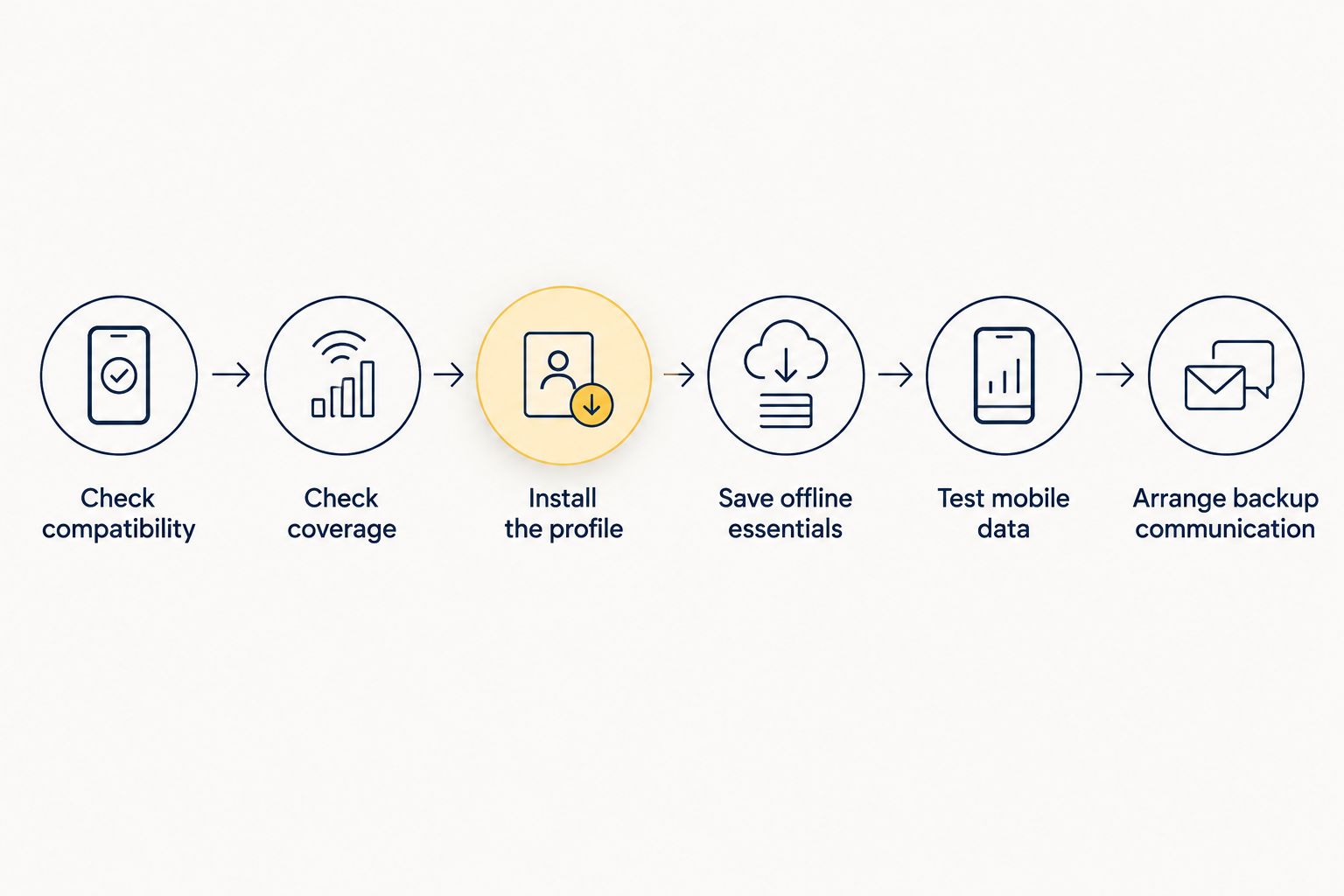
- Check compatibility. Confirm that your specific phone model supports eSIM and can accept the intended travel subscription. Check its network-lock status as well.
- Check coverage. Identify the networks included with the plan and inspect coverage along your route. A broad country listing is not enough for a remote journey.
- Install the profile. Follow the provider’s instructions using a stable connection. Check the activation and validity rules before deciding when to start the plan.
- Save offline essentials. Download maps, booking details, destination addresses and important contact information. Open the saved material without internet to verify it works.
- Test mobile data. Select the travel line for cellular data and test it where service is available. Confirm that a webpage loads rather than relying only on signal bars.
- Arrange backup communication. Tell someone your route and check-in expectations. For travel beyond mobile coverage, assess a suitable dedicated communication option.
This sequence keeps setup issues separate from coverage issues. If the line works before you enter a remote area and fails only after reception disappears, repeatedly reinstalling it is not a sensible first response.
Keep the setup instructions accessible offline too. If you need to troubleshoot later, you should not have to search the internet to discover which settings the provider requires.
What to do when your eSIM has weak signal
Check the location and the selected data line before changing the subscription. Start with actions that preserve your existing setup.
- Move to a safe, open location or closer to a window. Do not climb, leave a safe route or stop dangerously just to find reception.
- Confirm that the travel eSIM is enabled and selected for cellular data.
- Follow the provider’s data-roaming instructions for that line. Settings for your home line are a separate decision.
- Briefly toggle airplane mode, then turn it off so the phone can reconnect. Cellular service does not work while airplane mode keeps the cellular radio disabled.
- Restart the phone if the connection remains stuck.
- Use manual network selection only when the provider permits it, and select an allowed network.
After each change, test a small data task. Changing several settings together makes it harder to identify what fixed the problem.
If you can see reception but cannot transfer data, check the plan’s status and remaining allowance when you have access. A depleted allowance and a coverage gap require different solutions. Topping up addresses the former, not the latter.
Avoid deleting the eSIM as an early troubleshooting step. Reinstallation requirements differ by provider, and you might need internet access or support to restore the profile.
Choosing a travel eSIM for a remote route
Choose network access first, then setup convenience. For a remote trip in 2026, a plan’s geographic scope is useful only when its permitted networks serve the places you will visit.
A global plan, regional plan and single-country plan describe different destination scopes. None of those labels, by itself, establishes stronger reception in a particular valley or town. Ask the same coverage questions whichever scope you choose.
A-sim offers travel eSIMs for global, regional and single-country destinations, with purchase through its website or app and usage management and top-ups through the app. A-sim travel eSIMs are best for travelers who want app-managed mobile data. That convenience does not remove the need to check the supported networks along a remote route.
The benefit is managing the travel subscription digitally. The limitation is the same fundamental limitation as other cellular subscriptions: an ordinary travel eSIM needs usable mobile coverage. Do not treat app access or an available top-up as proof that reception exists.
Before choosing A-sim for a remote itinerary, confirm the current destination coverage, supported networks and device requirements. Match those details to your journey rather than assuming that a plan covering the country covers every stop.
Will switching to a physical SIM fix weak reception?
A physical SIM does not inherently receive a stronger signal than an eSIM. Both rely on the phone’s cellular hardware. Switching format while keeping equivalent network access does not solve a terrain-related coverage gap.
Switching subscriptions can help if the new subscription reaches a different operator with service where you are. The useful change is the network—not the plastic card.
Before replacing a working travel line, establish which operator serves the location. Otherwise, you risk changing the setup without changing the part of the connection that caused the failure.
Can a second eSIM provide a reliable backup?
A second eSIM is a useful coverage backup only when it gives you a usable alternative network. Another plan on the same underlying operator does not provide independent coverage.
Check your phone’s ability to keep the relevant lines active and select the correct line for data. The ability to store multiple profiles does not necessarily mean every stored profile can be active together.
For safety-critical travel, a second cellular subscription is not equivalent to an off-grid communication system. Both cellular lines can lose service in the same uncovered area.
Can offline maps replace a working data connection?
Offline maps can support navigation without mobile data, but they do not replace communication. A phone’s location function can operate without an internet connection, while the map app needs the relevant map content available locally.
Downloaded maps do not guarantee live traffic, current closures or every routing feature. Test the app offline before departure and save important destinations rather than expecting a search to work later.
FAQ
Can an eSIM work in remote areas with weak signal?
Yes, an eSIM can work with weak signal if its permitted mobile network reaches the location and the connection remains usable. It cannot create coverage where no supported network is available.
Is a physical SIM better than an eSIM for rural coverage?
A physical SIM is not inherently better for rural coverage. With equivalent network access and the same phone, reception depends on the cellular network and local conditions rather than the SIM format.
Will topping up my eSIM improve the signal?
Topping up an eSIM does not improve signal strength. It adds data allowance where the plan supports a top-up, but it cannot fix a missing radio connection.
Can I use an eSIM without Wi-Fi in a remote area?
An installed, active eSIM can use mobile data without Wi-Fi where a supported cellular network is available. Installation or account tasks can require a separate working internet connection.
Why does my phone show signal bars but the internet does not work?
Signal bars show reception, not guaranteed internet access. Check the selected data line, provider-required settings, plan status and whether the subscription is allowed to use the detected network.
Should I get a second eSIM before a remote trip in 2026?
Get a second eSIM as a coverage backup only if it provides access to a useful alternative network. Two subscriptions on the same operator can share the same coverage gaps.
Can I rely on a travel eSIM for emergency communication off-grid?
Do not rely solely on a standard travel eSIM for off-grid emergency communication. Plan suitable backup communication and check-in arrangements for areas beyond mobile coverage.
One last thing
Test your offline preparation, not just your mobile connection. Before leaving reliable coverage, disable cellular data and Wi-Fi, then open your saved maps, booking details and important addresses. This exposes anything that was merely cached or still needs internet access.
Make that check part of your 2026 departure routine. The most useful preparation for a coverage gap is having essential information ready before the gap begins.