Yes, you can use an eSIM in a country with internet censorship if your phone and plan support service there, but an eSIM does not automatically give you unrestricted internet access. Access depends on the network carrying your traffic, where that traffic reaches the public internet, local restrictions, and the app or website you want to use—not whether your SIM is digital.
- For eSIM country internet censorship questions, data routing matters more than SIM format.
- A working mobile connection does not prove that messaging, maps, or work apps are accessible.
- International roaming can follow a different internet route, but it does not guarantee unrestricted access.
- A-sim travel eSIMs suit travellers who want app-managed data; they are not a censorship guarantee.
Why this matters
Your phone can show a strong mobile signal while a particular website refuses to load. That is not necessarily an installation problem. Network registration, internet connectivity, and access to individual services are separate checks.
For travel in 2026, plan around the services you actually need: your airline app, accommodation details, maps, messaging, and work accounts. A destination listed in a plan tells you where the plan is intended to connect; it does not establish that every app works there.
Treat connectivity and unrestricted access as separate requirements. The same distinction applies to security: read about eSIM safety for international travel before assuming that a digital SIM makes your browsing private.
Can I use an eSIM in a country with internet censorship?
Yes, subject to device compatibility, destination coverage, and local rules. An eSIM provides a mobile subscription, not an exemption from internet filtering. The useful comparison is between connection routes, rather than between a physical SIM and an eSIM.
| Connection option | Best for | Main advantage | Main limitation |
|---|---|---|---|
| Local mobile subscription | Travellers choosing a domestic mobile service | Uses the local operator's service directly | Internet access remains subject to that service's filtering and restrictions |
| International travel eSIM | Travellers arranging mobile data before departure | Supports a separate travel data subscription | Routing varies by plan; foreign routing is not guaranteed |
| Home-carrier roaming | Travellers keeping their existing mobile subscription | Keeps the familiar subscription in use abroad | Routing and destination support depend on the carrier |
| Hotel or public Wi-Fi | Travellers using a fixed-location connection | Provides another way to get online | Has its own filtering, security, and reliability limitations |
These options are not guarantees of access. Two subscriptions connecting to the same local operator can use different routes to the internet. Conversely, two differently branded travel plans can rely on similar underlying arrangements.
Ask about the specific destination and plan. A general statement that a provider offers international data is not enough to establish how your connection will behave in a censored network environment.
Local internet routing: expect local restrictions
With local internet routing, your mobile traffic reaches the public internet through a network in the destination. Restrictions applied along that route can affect websites, messaging services, or particular app functions.
The benefit is a direct local connection. The limitation is that changing the SIM format does not change the filtering environment. A local physical SIM and a local eSIM are both subject to the network arrangements serving them.
Choose a local subscription for its supported service, not because its digital format promises different website access. Check the operator's terms and the destination's current requirements before relying on it for essential communications.
Foreign internet routing: different access, not a guarantee
Some international roaming services carry traffic through another country before it reaches the public internet. This is commonly described as home-routed roaming. It can produce different access results from a locally routed connection.
That distinction explains why a travel data connection and hotel Wi-Fi can behave differently in the same location. It does not establish that a particular travel eSIM bypasses restrictions, and it does not make the local mobile network irrelevant.
Foreign routing also introduces a different network path, which can affect responsiveness. Ask the provider to confirm the route for your destination; do not infer it from the provider's headquarters, plan name, or website address. Even a confirmed route is not a promise that every service will remain accessible.
A VPN: a separate tool with separate limitations
An eSIM and a VPN do different jobs. The eSIM supplies the mobile subscription; a VPN creates an encrypted connection between your device and a VPN server over an existing internet connection.
A VPN does not repair missing mobile coverage, an expired data allowance, or a phone that cannot register on the network. VPN connections themselves can also be restricted, and local rules govern their use.
For a 2026 trip, check current official guidance and your employer's requirements before depending on a VPN. If a work VPN is required, confirm it with your IT team before departure. Do not assume a consumer VPN is an acceptable substitute for an approved work connection.
Why eSIM internet access varies
The same phone can produce different results across subscriptions and networks. These are the factors to check:
- Internet routing: Traffic reaching the internet locally can encounter different filtering from traffic routed through another country.
- Local network controls: The mobile operator and authorities can restrict services or interrupt connectivity regardless of the SIM's format.
- Service-specific restrictions: A website can load while its sign-in, media, or calling functions fail.
- Plan configuration: Destination support, roaming settings, and the selected data line determine whether the subscription connects correctly.
- App and account requirements: A service can restrict access based on location, account settings, or its own security checks.
- Changing conditions: Network rules and service access can change between booking your trip and arriving.
A screenshot from another traveller proves only what worked for that person at that moment. It does not establish the same result for your plan, phone, account, or travel dates.
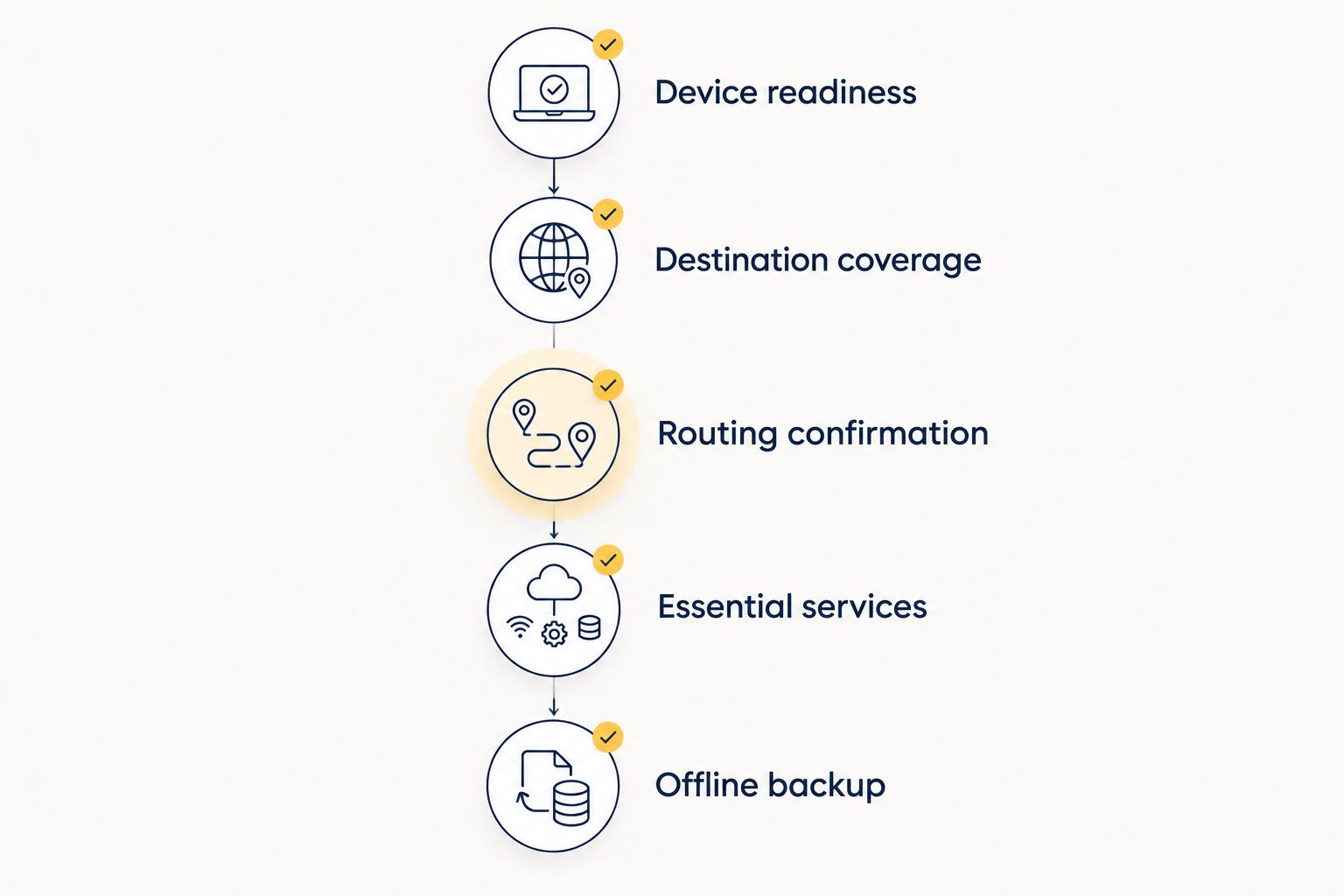
Complete these 5 checks before departure in 2026
1. Device readiness
Confirm that your exact phone model supports eSIM and that it accepts the subscription you intend to use. A carrier-locked phone can prevent you from adding another provider's service even when the handset supports eSIM technology.
Find the phone's mobile-data and roaming settings before leaving. Knowing where to select the travel line is more useful than trying to interpret an unfamiliar setup screen at the airport.
2. Destination coverage
Check every country on your itinerary against the plan's stated coverage. A regional label is not a substitute for a destination list, particularly when your trip includes a stopover or border crossing.
Check installation and activation instructions separately. Installing a profile and starting its validity period are not necessarily the same event; follow the terms for the specific plan rather than assuming when service begins.
3. Routing confirmation
Ask the provider whether the destination uses local or foreign internet routing and whether the arrangement is confirmed for your chosen plan. Ask separately about essential apps; an answer about coverage alone does not answer a question about access.
Save the response where you can read it offline. Written details help distinguish a promised plan feature from a broad statement about international connectivity.
4. Essential services
List the functions you need, not just the app names. Messaging, voice calls, file uploads, and account sign-in are different functions, even when they sit inside the same app.
Check your account recovery methods before departure. A data connection does not automatically provide the phone number or SMS service that an account uses for verification. Keep required recovery information secure and accessible through an approved method.
5. Offline backup
Download supported offline maps, booking confirmations, accommodation addresses, and transport instructions. Store essential contact details outside the messaging app you usually use.
An offline backup is useful whether the problem is censorship, weak coverage, an exhausted allowance, or a lost connection. Prepare the information you need to reach your accommodation without any live internet access.
Preparation should reflect the consequences of losing access. A holiday itinerary needs offline addresses and bookings; a work trip also needs an approved communication fallback and clear instructions from your employer.
Run these 3 tests after arrival
Separate connection problems from service-access problems before changing settings. Test on the travel data line with Wi-Fi turned off so you know which connection you are evaluating.
- Basic browsing: Open an ordinary website that does not require sign-in. If nothing loads, check the selected data line, signal, allowance, and provider setup instructions first.
- Account access: Sign in to an essential account and complete its normal verification process. Loading the home page is not enough if you cannot reach your booking or work files.
- Essential functions: Test the actual action you need, such as sending a message, making an approved call, or uploading a document. A working text conversation does not prove that calling works.
Record which functions fail rather than labelling the entire connection as broken. The pattern gives support a more useful starting point.
If a website works but one app fails, investigate that app and its requirements. If every service fails, start with connectivity. Neither pattern proves censorship by itself; account restrictions, outages, and setup problems also cause failures.
Compare 2 connections without changing everything
If you have another permitted connection, compare the travel data line with Wi-Fi. Keep the app, account, and task the same. Change only the connection so the result is easier to interpret.
Different results suggest a network-path difference, not proof of a particular filtering mechanism. Follow the provider's troubleshooting instructions, and avoid repeatedly deleting the eSIM profile: reinstalling it depends on the plan's rules and available setup method.
Does an eSIM automatically unblock websites?
No. An eSIM changes how your mobile subscription is stored, not the access rules of every network your traffic crosses. Its internet route can differ from another subscription, but that difference must be established for the plan you use.
Buy for confirmed coverage and service requirements, not an assumed ability to unblock content. For 2026 travel, treat broad claims of unrestricted access as something to verify against destination-specific terms.
Is using a travel eSIM the same as using a VPN?
No. A travel eSIM provides mobile connectivity; a VPN uses connectivity that already exists. Neither one alone establishes that your activity is anonymous or that a particular use is permitted locally.
For sensitive work, follow your organisation's security policy. Connection convenience is not a substitute for a device, account, and communication setup approved for the destination.
Where app-managed travel data fits
A-sim travel eSIMs are best for travellers who want to manage their data through an app. A-sim offers global, regional, and single-country travel eSIMs, with usage management and top-ups through its app.
Those features address travel-data administration. They do not establish unrestricted access to websites, support for a particular VPN, or a specific internet-routing arrangement. Before choosing a plan for a censored destination, confirm those requirements separately.
The practical benefit is managing the travel subscription without replacing a physical SIM. The limitation is unchanged: an app-managed plan still depends on its supported networks, routing, and local conditions.
FAQ
Can I use an eSIM somewhere that blocks websites?
Yes, if your device, plan, and local rules support the service, but blocked websites are not automatically accessible. Internet routing and network restrictions determine access, not the digital SIM format.
Will a travel eSIM work differently from hotel Wi-Fi?
A travel eSIM can work differently from hotel Wi-Fi because the connections can follow different network routes. Test your essential apps on each connection rather than assuming they provide identical access.
Does a strong mobile signal mean my apps will work?
A strong mobile signal does not guarantee that your apps will work. Network registration, internet connectivity, account access, and individual app functions are separate checks.
Can I use a VPN with an eSIM?
A VPN can use an eSIM data connection when the network permits the VPN connection and local rules permit its use. A VPN does not fix missing coverage or a mobile subscription that has not connected.
Does A-sim guarantee access to blocked websites?
Do not treat A-sim travel eSIMs as a guarantee of access to blocked websites. Confirm destination-specific routing and essential-service requirements before choosing your plan.
Should I install my eSIM before entering the country?
Install before departure when the provider's instructions permit it, and check when plan validity begins. Keep the setup instructions accessible offline in case connectivity is limited after arrival.
What should I check about internet restrictions before travelling in 2026?
For travel in 2026, check current official guidance, the plan's destination support, its routing arrangements, and your essential app requirements. Download offline travel information and follow your employer's security rules for work access.
One last thing
Test the action, not the icon. A messaging app opening successfully says little about whether a voice call, attachment upload, or verification step will work.
Before you depend on a connection, complete the task that matters: retrieve the booking, load the route, or contact the person meeting you. That is a more useful check than signal bars—and it tells you exactly which offline backup you still need.