Yes, you can use eSIM data for video calls on a slow connection if the connection supports your calling app’s upload and download requirements. Start with lower video quality, then switch to audio-only if speech breaks up; an eSIM provides mobile connectivity, but it does not remove weak coverage, network congestion, or delays.
- Can I use eSIM data for video calls on a slow connection? Yes, but prioritize clear audio over sharp video.
- Zoom lists 600 kbps upload and download for high-quality one-to-one video; other modes need more bandwidth.
- Check upload speed, pause background transfers, and disable video if speech becomes unreliable.
- A-sim travel eSIMs suit travelers who want destination data and app-based usage management; connection quality still matters.
Can I use eSIM data for video calls on a slow connection?
Yes. The deciding factor is the usable connection, not whether your SIM is digital or physical. A video-calling app sends your camera and microphone output while receiving the other person’s audio and video. Both directions need enough capacity.
Zoom’s published desktop system requirements provide a useful reference for planning calls in 2026. These figures describe Zoom’s requirements, not a guaranteed speed from a travel eSIM or a universal requirement for every calling app.
| Calling option | Published Zoom bandwidth requirement | Best for | Main limitation |
|---|---|---|---|
| High-quality one-to-one video | 600 kbps upload and 600 kbps download | A face-to-face conversation on a limited connection | Leaves less room for competing transfers |
| 720p one-to-one video | 1.2 Mbps upload and 1.2 Mbps download | Showing clearer facial expressions or objects | Needs more bandwidth than the lower-quality mode |
| 1080p one-to-one video | 3.8 Mbps upload and 3.0 Mbps download | Calls where fine visual detail matters | A poor starting choice on a slow connection |
| Audio-only | No camera stream to send | Keeping speech clear when video struggles | You lose visual cues and demonstrations |
For the wider connection question, see whether eSIM data is faster than local carrier roaming. The SIM format alone does not establish which connection performs better.
A speed test above an app’s minimum is not a promise of an uninterrupted call. Available bandwidth changes, and a connection can deliver enough data overall while delivering individual packets late or inconsistently.
Why this matters
A travel connection that loads maps and messages can still struggle with a live meeting. Those tasks tolerate waiting; a conversation depends on audio arriving promptly and consistently.
In 2026, treat a video call as a live connection test rather than a simple download-speed test. Clear speech matters more than a sharp picture. If the other person cannot hear a complete sentence, improving camera resolution is the wrong priority.
Separate the symptoms before changing anything. A blurred picture with clear speech calls for a different response than delayed replies, missing words, or repeated disconnections. That distinction helps you avoid changing settings that do not address the actual problem.
Lower-quality Zoom video: 600 kbps in each direction
Zoom lists 600 kbps upload and download for high-quality one-to-one video in its desktop system requirements. Use that figure as an app-specific reference, not as a guaranteed minimum for all video calling.
This mode is the sensible starting point when your connection is limited. Where the app offers an HD setting, turn it off and keep unnecessary visual effects disabled. Available controls differ between mobile and desktop versions.
The benefit is a smaller video demand than HD. The trade-off is reduced detail: small objects, handwritten notes, and text shown through the camera become harder to read.
Best for: a conversation where seeing the other person helps, but fine visual detail is unnecessary. If speech remains clear and the image is merely soft, keep talking instead of repeatedly reconnecting.
Zoom 720p video: 1.2 Mbps in each direction
Zoom lists 1.2 Mbps upload and download for one-to-one 720p video. That requirement gives you a reason to avoid enabling HD automatically on a constrained travel connection.
Sharper video helps when you need to show an object or read an expression. It also competes with background activity for the same mobile connection. A laptop uploading files through your phone’s hotspot adds another demand on that upload capacity.
For a 2026 travel meeting, start below HD and increase quality only after the conversation is stable. There is little benefit in a clearer image if it comes with missing words.
Best for: a stable connection and a call with a genuine visual purpose. Skip the higher-quality setting when the call is mainly discussion.
Zoom 1080p video: 3.8 Mbps upload, 3.0 Mbps download
Zoom lists 3.8 Mbps upload and 3.0 Mbps download for one-to-one 1080p video. These requirements make full HD an unsuitable default when you already know the connection is slow.
The upload figure matters because your phone must send your camera feed. A connection with a strong download result can still produce poor outgoing video if its upload capacity is limited.
Full HD offers more visual detail, but that advantage only helps when the network and app support it reliably. Do not chase this setting to improve an ordinary conversation.
Best for: detail-sensitive calls on a connection with sufficient capacity. On a slow travel connection, choose lower video quality or audio instead.
How do I make an eSIM video call work on a slow connection?
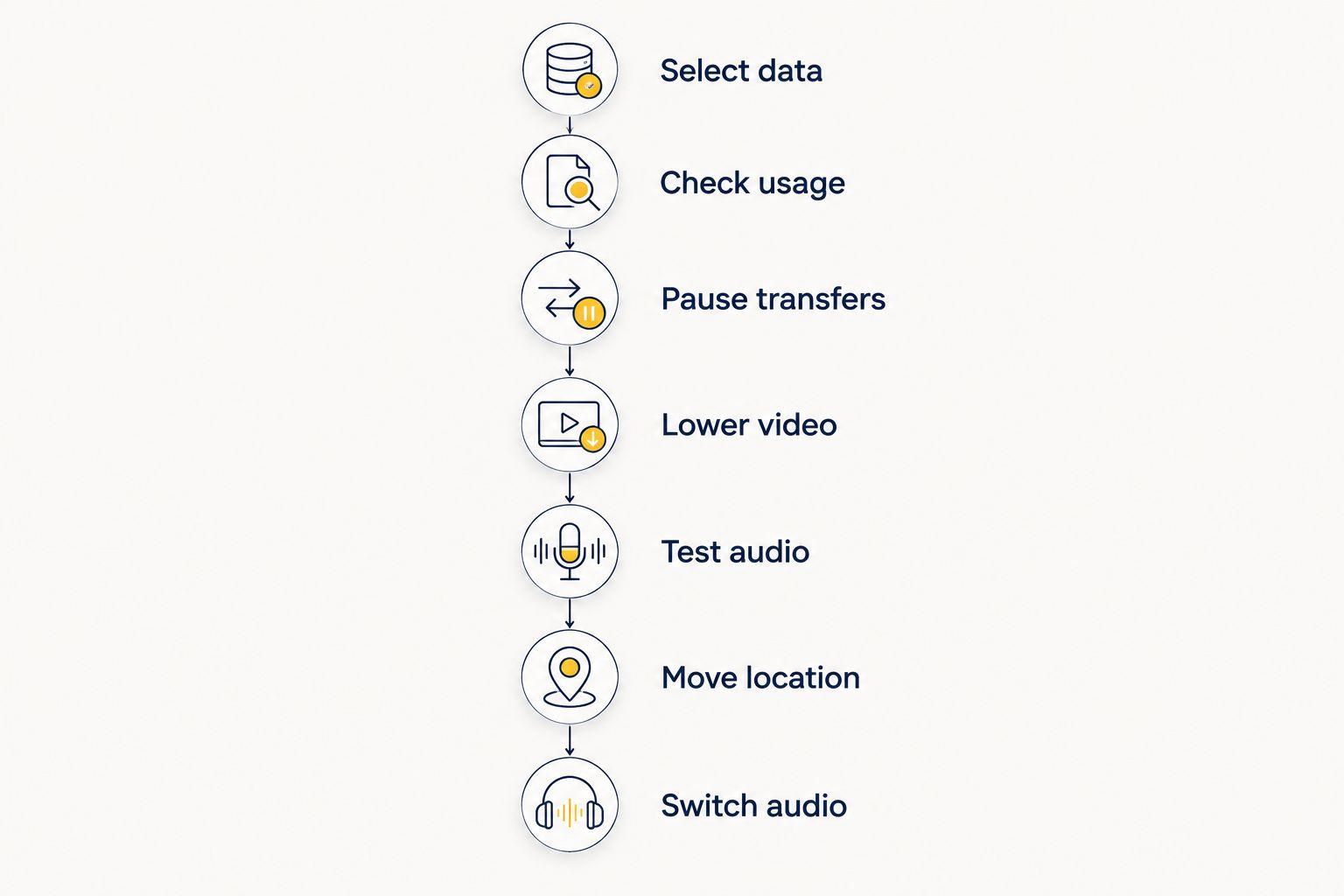
Use this sequence before an important call in 2026. Change one thing at a time so you can tell which adjustment helps.
- Select data. Confirm that your travel eSIM is selected for cellular data. If you want to test mobile performance, disconnect from Wi-Fi so the call uses the connection you intend to assess.
- Check usage. Check your remaining allowance and any plan conditions affecting speed. An active eSIM does not necessarily mean you have unrestricted data remaining.
- Pause transfers. Stop cloud backups, file uploads, downloads, and streaming. If you use a hotspot, check the connected laptop as well as the phone.
- Lower video. Disable HD where available and reduce video quality. If your app offers a data-saving setting for calls, try it and assess the result.
- Test audio. Speak naturally and ask whether the other person hears complete sentences. Watch for delay, not just a frozen picture.
- Move location. If reception is weak, test another nearby position while stationary. Avoid walking around during the test, which makes the result harder to interpret.
- Switch audio. Turn off your camera if speech still breaks up. If incoming video remains a problem, ask the other participant to turn off their camera too.
Repeat the call test after making an adjustment. Judge success by understandable speech and usable interaction, not by signal bars alone. Bars describe reception rather than the complete end-to-end performance of your call.
Why video-call quality varies on an eSIM connection
These factors affect live calls regardless of whether you use an eSIM or a physical SIM:
- Upload capacity. Your camera and microphone need an outgoing connection. A download result alone does not show whether other people can receive you clearly.
- Coverage and reception. Buildings, indoor positioning, and distance from network infrastructure affect mobile reception. Test a different location before changing providers or plans.
- Network congestion. Other users share mobile network capacity. Strong reception does not guarantee enough bandwidth for the call you want to make.
- Latency and packet delivery. Delay, variation in delay, and lost packets interfere with conversation. More nominal bandwidth does not automatically correct those problems.
- Competing traffic. Background uploads, streaming, and hotspot devices use the same connection. Stop avoidable traffic before lowering the call’s quality further.
- Plan conditions. Data allowances and speed-management rules affect what your connection can deliver. Read the applicable terms rather than assuming every plan behaves alike.
These factors explain why buying more data and improving call quality are different decisions. More allowance addresses consumption. It does not repair weak reception or network congestion.
Can I use an eSIM hotspot for a laptop video call?
Yes, when your phone and plan support tethering, an eSIM connection can carry a laptop’s video call through a hotspot. The laptop still depends on the phone’s mobile connection, with an additional local connection between the devices.
Best for: meetings that need a desktop app or laptop workflow. The benefit is access to your usual meeting tools; the drawback is that laptop background activity also shares the mobile data connection.
Pause file synchronization and downloads before joining. Keep the phone and laptop close enough for a reliable hotspot connection, and test from the same location where you will take the meeting.
If the hotspot call fails, try the calling app directly on your phone. That removes the hotspot connection from the test. It does not guarantee success, but it helps distinguish a local connection problem from a mobile network problem.
Will turning off my camera fix a slow video call?
Turning off your camera reduces outgoing data demand, but it does not stop incoming video. That distinction matters when download capacity is the limiting factor.
Ask the other participant to disable their camera if the call still struggles, or use the app’s audio-only mode where available. Audio-only is the strongest fallback when the conversation matters more than the picture.
The benefit is less traffic competing with speech. The drawback is losing visual information, so send a document or image separately when you need to discuss something specific.
Audio-only cannot fix every connection. Severe packet loss or long delays can still interrupt speech, even after both cameras are off.
Does a travel eSIM make video calls faster?
A travel eSIM supplies access to mobile data; it is not a video-call accelerator. The local network connection, plan conditions, and app requirements determine the experience.
A-sim travel eSIMs are best for travelers who want destination data and app-based usage management. You can obtain global, regional, or single-country options through the website or app, manage usage in the app, and top up there.
A-sim supports those travel-data tasks, but adding data does not guarantee a faster call. For your 2026 trip, match the destination coverage to your itinerary and test the connection before depending on it for a meeting.
FAQ
Can I use eSIM data for video calls on a slow connection?
Yes, if the connection supports the calling app’s requirements in both directions. Start with lower video quality and switch to audio-only when speech becomes unreliable.
How much upload speed does a Zoom video call need?
Zoom lists 600 kbps upload for high-quality one-to-one video, 1.2 Mbps for 720p, and 3.8 Mbps for 1080p in its desktop system requirements. These are app-specific planning figures, not guarantees of uninterrupted calling.
Why is my video call bad when my download speed looks good?
Your upload capacity or packet delivery can still be poor when download speed looks good. Video calls need a usable outgoing connection and consistent delivery, not just a strong download result.
Will turning off my camera save eSIM data?
Turning off your camera removes your outgoing video stream and reduces that part of the call’s data use. Incoming video still uses data unless the other participant disables it or you choose an audio-only mode.
Is hotel Wi-Fi better than an eSIM for video calls?
Neither connection type is automatically better for video calls. Test both from the place where you will take the meeting, and choose the connection that delivers clearer speech and fewer interruptions.
Can I join a laptop meeting using my phone’s eSIM?
Yes, if your phone and plan support hotspot tethering. Pause background laptop transfers because they share the same mobile connection as the meeting.
Will topping up my travel eSIM improve video-call quality?
A top-up adds data according to the applicable plan, but it does not repair weak reception or network congestion. A-sim lets travelers manage usage and top up through its app; assess the connection problem separately.
Should I enable HD video while traveling in 2026?
Leave HD off when your travel connection is slow or inconsistent. Enable higher-quality video only when the call is stable and clearer visuals serve a real purpose.
One last thing
Turning off only your own camera solves only part of the video demand. If the other person keeps sending video, your connection still needs to receive it.
Agree on an audio fallback before an important meeting. Tell the other person that if speech starts breaking up, both cameras go off. That simple decision keeps troubleshooting from taking over the conversation.