No—using an eSIM through your phone’s supported settings does not, by itself, void its warranty. Installing a travel plan is different from altering the phone’s hardware or operating system. Your warranty still depends on its terms, the fault involved and applicable consumer law; it does not guarantee that every connection problem qualifies for a repair.
- Does eSIM affect phone warranty? Normal installation does not, by itself, void coverage.
- A-sim travel eSIMs suit travellers who want destination data and app-based usage management.
- Carrier locks affect network access, not whether installing an eSIM constitutes a hardware modification.
- Separate mobile-service problems from phone faults before requesting warranty support.
Does using an eSIM affect my phone’s warranty?
Installing an eSIM through the phone’s built-in setup process is normal use of a supported feature, not an unauthorized hardware modification. You add a mobile-service profile without opening the device, replacing components or bypassing its operating system’s security controls.
For travel in 2026, separate the installation method from the problem you need fixed. A failed activation, an expired data allowance and a damaged phone are different issues with different support routes. The guide to eSIM safety for international travel covers the broader travel-security question.
| Situation | What it means for warranty questions | Best next step |
|---|---|---|
| Install an eSIM through supported settings | Normal use does not itself void the phone warranty | Follow the phone and provider instructions |
| Travel plan installs but cannot connect | A connection failure alone does not establish a hardware defect | Check activation, coverage and line settings |
| Phone is locked to a carrier | Another provider’s profile can be blocked by the carrier restriction | Ask the original carrier about unlocking |
| Installation instructions demand rooting or jailbreaking | This is a separate modification, not ordinary eSIM setup | Stop and use a supported installation method |
| Phone has an independent hardware fault | Coverage depends on the fault and warranty terms | Request diagnosis from the manufacturer or authorized service provider |
The distinction is cause, not timing. A fault appearing after installation does not prove that the eSIM caused it, and an installed eSIM does not automatically establish that a repair is covered.
Why this matters
Warranty worries can lead you to troubleshoot the wrong thing. If mobile data stops working, deleting every profile or resetting the phone immediately can remove useful evidence without resolving the underlying issue.
Start with the symptom. Is the phone failing to recognize a line, connecting without internet access, or experiencing a problem unrelated to mobile service? Each description points to a different investigation.
For a 2026 trip, keep your phone warranty and your travel-data agreement separate. The manufacturer handles qualifying device defects; the mobile-service provider handles its plan, activation and account issues. Neither agreement replaces the other.
Normal eSIM installation versus phone modification
An eSIM profile supplies the information your phone needs to connect to a mobile provider. On a compatible device, installing that profile uses functionality the phone already supports. You do not need to alter its internal components.
The benefit is straightforward: you can add a travel line without handling a physical SIM card. The limitation is equally important: eSIM support does not mean every phone variant, carrier arrangement or travel plan is compatible.
Supported installation: best for ordinary travel use
Use the installation method provided for your phone and plan, such as the phone’s built-in add-eSIM workflow. Read each prompt before accepting it. Installing a cellular plan and granting an unrelated app broad device-control permissions are not the same action.
Choose supported installation, not a workaround that changes the operating system. A provider’s instructions should help you add the mobile profile, not require you to defeat the phone’s protections.
Carrier unlocking: best for resolving a network restriction
Carrier unlocking concerns which mobile providers your phone can use. It is not the same as rooting Android or jailbreaking an iPhone. Ask the carrier responsible for the lock to explain its official process.
The benefit of an official unlock is access to other compatible providers. Its limitation is that unlocking does not add missing eSIM hardware, change destination coverage or repair a device fault.
Rooting or jailbreaking: not a travel-eSIM requirement
Rooting and jailbreaking change access to operating-system controls. They are separate from ordinary eSIM installation and introduce their own security and support concerns.
Do not treat a request for those changes as a routine activation step. Manufacturer warranty terms can exclude damage caused by unauthorized modifications; a normal travel-profile installation does not require such a modification.
Why warranty outcomes vary
The eSIM label is not the deciding factor in every repair claim. These factors determine which terms and support process apply:
- The manufacturer’s terms. Check the warranty supplied for your exact device rather than assuming all phones have identical coverage.
- The reported fault. A display failure, charging problem and mobile-data failure require different diagnoses.
- The cause of the problem. A service configuration issue is different from a defective device component.
- Separate modifications or damage. Rooting, jailbreaking, physical damage and unauthorized repairs must be assessed independently of eSIM installation.
- Applicable consumer law. Legal rights depend on the jurisdiction and are separate from a manufacturer’s voluntary warranty.
- Where you request service. International service arrangements depend on the device and applicable support terms; installing a travel profile does not establish overseas repair eligibility.
For Canadian travellers in 2026, do not assume that a travel destination follows Canadian warranty or consumer-protection rules. Ask about service eligibility before arranging an overseas repair, especially when the device was purchased elsewhere.
How do I install an eSIM without changing my phone’s software?
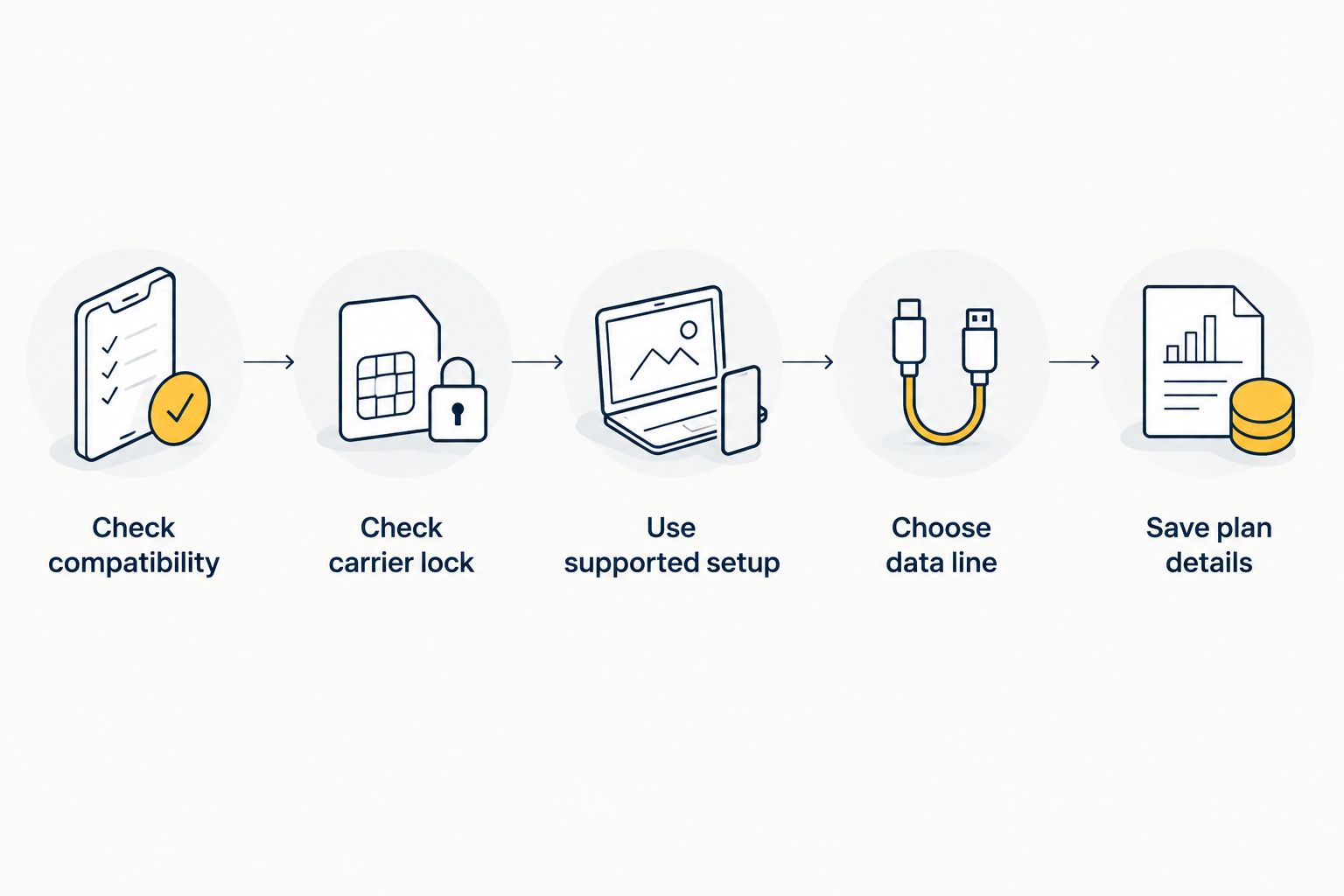
Use the supported mobile-plan setup process and leave system-security controls intact. Before you begin, confirm compatibility for the exact device rather than relying only on its model family.
- Check compatibility. Confirm that your specific phone variant supports eSIM and that the travel plan supports it. Devices sold in different markets can have different SIM capabilities.
- Check carrier lock. Establish whether the phone accepts another provider’s service. A visible add-eSIM menu does not prove that the phone is carrier-unlocked.
- Use supported setup. Follow the provider’s installation instructions through the phone’s normal settings or supported app workflow. Do not install unrelated tools promising to bypass restrictions.
- Choose data line. Select the intended travel line for mobile data. Keep voice, messaging and home-line settings separate from that choice.
- Save plan details. Keep the order reference and installation instructions somewhere you can access if mobile data is unavailable. Treat activation codes as sensitive information.
This sequence checks eligibility before configuration. It prevents you from mistaking a carrier restriction for a failed phone component or attempting an unnecessary software modification.
On an iPhone, the Carrier Lock entry under Settings, General, About identifies the lock status; an unlocked device displays No SIM restrictions. Android menus vary by manufacturer, so use the device maker’s instructions or ask the original carrier instead of relying on a universal menu path.
What should I do if my phone stops working after installation?
Describe the failure before changing the phone. An installed profile, a working network connection and usable internet access are separate stages. Knowing which stage failed makes your support request more useful.
If the profile will not install
Record the exact error message and confirm that you are using the installation method intended for the plan. Check device compatibility and carrier-lock status. Do not repeatedly scan an activation code without checking the provider’s instructions.
Contact the eSIM provider about the profile or activation process first. If the phone’s own setup function consistently fails, ask the device manufacturer to assess that behaviour rather than assuming the plan caused hardware damage.
If the profile installs but data does not work
Check that the intended line is enabled and selected for mobile data. Then review activation status, destination coverage, data allowance and any provider-required settings. Follow the travel provider’s roaming instructions specifically for the travel line, not indiscriminately for every line.
A profile appearing in settings does not prove that the service is active at your location. Equally, lack of internet access does not prove a warranty-covered phone fault.
If the phone has an unrelated fault
For a charging failure, damaged display or other device problem, request normal device support. Explain when the symptom began and whether it persists independently of the travel line.
If the phone overheats or shows physical battery damage, stop treating it as a routine connectivity issue. Follow the manufacturer’s safety instructions and arrange assessment; repeatedly changing cellular settings is not a substitute for addressing a physical safety problem.
Should I delete the eSIM before a warranty repair?
Do not delete an eSIM solely to make the phone eligible for warranty service. Instead, follow the repair provider’s preparation instructions and ask what will happen to installed mobile profiles during diagnosis, resetting or replacement.
Turning off a line and deleting its profile are different actions. Disabling a travel line can help isolate a connectivity symptom while leaving the installation in place. Deleting the profile removes it from the device and can create a separate reinstallation problem.
Before handing over your phone in 2026, back up personal data, record the relevant plan details and confirm the provider’s recovery process. Do not assume that the original installation code remains reusable or that a replacement phone automatically receives the existing plan.
Your repair provider can explain what device preparation is required. Your eSIM provider can explain whether and how the service can be restored. Ask both questions before erasing anything.
Who is a travel eSIM best for?
A-sim travel eSIMs are best for travellers who want destination data and app-based usage management. A-sim offers global, regional and single-country travel eSIMs through its app or website, with usage management and top-ups through the app.
The practical advantage is managing travel connectivity without visiting a physical SIM counter. The limitation is that a travel plan does not remove your phone’s compatibility requirements or carrier restrictions, and it is not a substitute for device-warranty support.
Choose the plan around your destination and intended use, then check your exact phone. Warranty anxiety should not push you toward an unsupported workaround, and a convenient purchase process should not replace compatibility checks.
FAQ
Does eSIM affect phone warranty in 2026?
Normal eSIM installation does not, by itself, void your phone warranty in 2026. Coverage still depends on the warranty terms, the fault and applicable consumer law; installing a profile does not guarantee that every problem is covered.
Does a travel eSIM count as an unauthorized phone modification?
A travel eSIM installed through supported phone settings is not an unauthorized hardware modification. Rooting, jailbreaking or opening the device are separate actions and are not required for ordinary eSIM setup.
Will a carrier-locked phone lose its warranty if I try an eSIM?
A carrier restriction blocking an eSIM does not, by itself, mean the phone has lost warranty coverage. Ask the original carrier about official unlocking rather than using tools that bypass device protections.
Should I contact my eSIM provider or the phone manufacturer first?
Contact the eSIM provider first for plan, activation or account problems, and the phone manufacturer for a suspected device fault. Record the exact symptom so support can distinguish a service issue from a hardware problem.
Do I need to remove my eSIM before sending my phone for repair?
You do not need to remove an eSIM simply to establish warranty eligibility. Follow the repair provider’s preparation instructions and confirm profile recovery with the eSIM provider before deleting or resetting anything.
Does A-sim provide my phone’s warranty?
A-sim provides travel eSIMs, not a replacement for your phone manufacturer’s warranty. Use the travel provider for plan questions and the manufacturer or authorized service provider for qualifying device repairs.
Does using an eSIM abroad guarantee that I can get warranty repairs there?
Using an eSIM abroad does not establish eligibility for warranty repairs in that country. Check the manufacturer’s international service terms for your device before arranging an overseas repair.
One last thing
An eSIM profile on your phone is not the same thing as the service agreement behind it. Removing the profile does not automatically cancel that agreement, secure a refund or prove anything about a hardware fault.
For your 2026 travel checklist, save the plan reference alongside your device purchase record. If something fails abroad, those records help you address the correct issue with the correct provider—without deleting useful information first.