Yes, you can use an eSIM for WhatsApp verification abroad if its phone number can receive the verification SMS or automated call. A data-only eSIM supplies internet access but cannot receive those messages itself; you still need access to the number you are registering. If WhatsApp is already registered, switching your internet connection to a travel eSIM does not, by itself, change your WhatsApp number.
- Can you use eSIM for WhatsApp verification abroad? Yes, when the registered number can receive the verification SMS or call.
- A data-only travel eSIM connects WhatsApp to the internet; it does not receive SMS verification codes.
- Keep access to your registered number before reinstalling WhatsApp or changing phones abroad.
- A-sim offers travel eSIMs with app-based usage management; confirm SMS capability separately before relying on a plan for verification.
Why this matters
Internet access and phone-number verification are separate jobs. Your travel connection can load WhatsApp while the verification message goes to a different mobile line. Buying more data does not fix a number that cannot receive an SMS or call.
For a 2026 trip, decide whether you need to keep using an existing account or register it again. Those situations have different requirements. The guide to receiving SMS verification codes on an eSIM-only phone explains the distinction between an eSIM profile and a phone number with messaging service.
Can you use eSIM for WhatsApp verification abroad?
Yes, but the eSIM format is not what determines whether verification works. The number you enter must be one you control, and you must be able to complete the verification method WhatsApp presents. For SMS or automated-call verification, the associated mobile service needs the corresponding capability.
WhatsApp uses a 6-digit verification code for its standard phone-number registration process. That code confirms control of the number; your internet connection lets the app communicate with WhatsApp. The two functions do not have to come from the same SIM.
| Setup | Best for | What supports verification | Advantage | Limitation |
|---|---|---|---|---|
| Data-only travel eSIM | Keeping an already registered account connected | Another service connected to the registered number | Supplies internet without requiring a new WhatsApp number | Cannot receive an SMS or cellular verification call itself |
| eSIM with a phone number and SMS or voice service | Registering a number you control abroad | The supported SMS or voice service on that number | Can provide the number-verification channel | Having a number alone does not guarantee the required service works abroad |
| Home SIM plus travel eSIM | Keeping your existing WhatsApp number | Your home line receives the verification message or call | Separates travel data from access to your existing number | Requires compatible dual-SIM operation and a home line that works at your destination |
Do not select a travel plan solely because it says eSIM. Check whether it includes a usable phone number, inbound SMS, and voice service. Then check whether those services operate in the country you are visiting.
What does not count as verification?
Receiving a WhatsApp message is not the same as receiving a carrier SMS. WhatsApp chats arrive through the app over an internet connection; an SMS verification message arrives through the mobile service for the registered number.
Likewise, seeing signal bars on your travel eSIM does not prove your home number is reachable. You can have working data on one line and no service on the other. Check each line separately rather than treating the phone's connection indicator as proof that both work.
Data-only travel eSIM: internet, not an SMS inbox
A data-only travel eSIM is best for keeping an existing WhatsApp account online. It can carry messages, voice calls, and video calls inside WhatsApp because those functions use internet data. It does not need to share the number registered to the account.
The benefit is continuity: you keep communicating through your existing account while using a different internet connection. The limitation appears when WhatsApp asks you to verify the registered number again. The travel data connection cannot turn into an SMS service for that number.
For your 2026 travel setup, keep the registered account working before departure. Avoid uninstalling WhatsApp merely to switch mobile data. Changing the data line is a phone-network setting, not an instruction to create a new WhatsApp account.
Keep access to your registered number even when everyday WhatsApp use runs over travel data. That access matters if you replace your phone, reinstall the app, or need to register the account again. An account working today does not make its number unnecessary tomorrow.
Voice-and-SMS eSIM: verify the service, not the label
An eSIM with a phone number and suitable messaging or voice service is best for verifying that specific number abroad. The relevant question is whether you can actually receive the SMS or automated call, not whether the profile is digital.
Before relying on it, confirm these details with the mobile provider:
- Number ownership: You control the number you intend to register.
- Inbound SMS: The service supports incoming messages, including verification messages.
- Incoming calls: The service supports voice calls if you need the call-verification option.
- Destination service: The number remains reachable in the country you are visiting.
- Continued access: You can keep the number active for later account verification.
The advantage is direct access to a verification channel on the eSIM itself. The limitation is that service capabilities differ between plans. A phone number printed in an account screen is not proof that inbound SMS or voice is included.
Do not use a temporary number you cannot retain just because it receives a code once. WhatsApp registration ties the account to that number. Plan for future access before registering it.
Home SIM plus travel eSIM: keep the roles separate
A home SIM alongside a travel eSIM is best for travellers keeping an existing WhatsApp number. On a compatible phone, you can assign mobile data to the travel line while keeping the home line enabled to receive a verification message or call.
This setup uses 2 mobile lines with different jobs: travel internet and home-number access. Your home line can be a physical SIM or an eSIM, depending on the phone's supported configuration. Not every phone supports every combination of active profiles.
The benefit is that you do not need to change your WhatsApp number just to use travel data. The limitation is that your home provider still has to support service at your destination. Keeping a line enabled cannot create roaming access that the provider does not offer.
A-sim travel eSIMs are best suited to travellers who want destination connectivity with app-based usage management. A-sim offers global, regional, and single-country travel eSIMs, with usage management and top-ups through its app. Treat those features as connectivity tools; confirm a plan's SMS and voice capabilities separately before depending on it for verification.
How do you prepare WhatsApp verification before travelling?
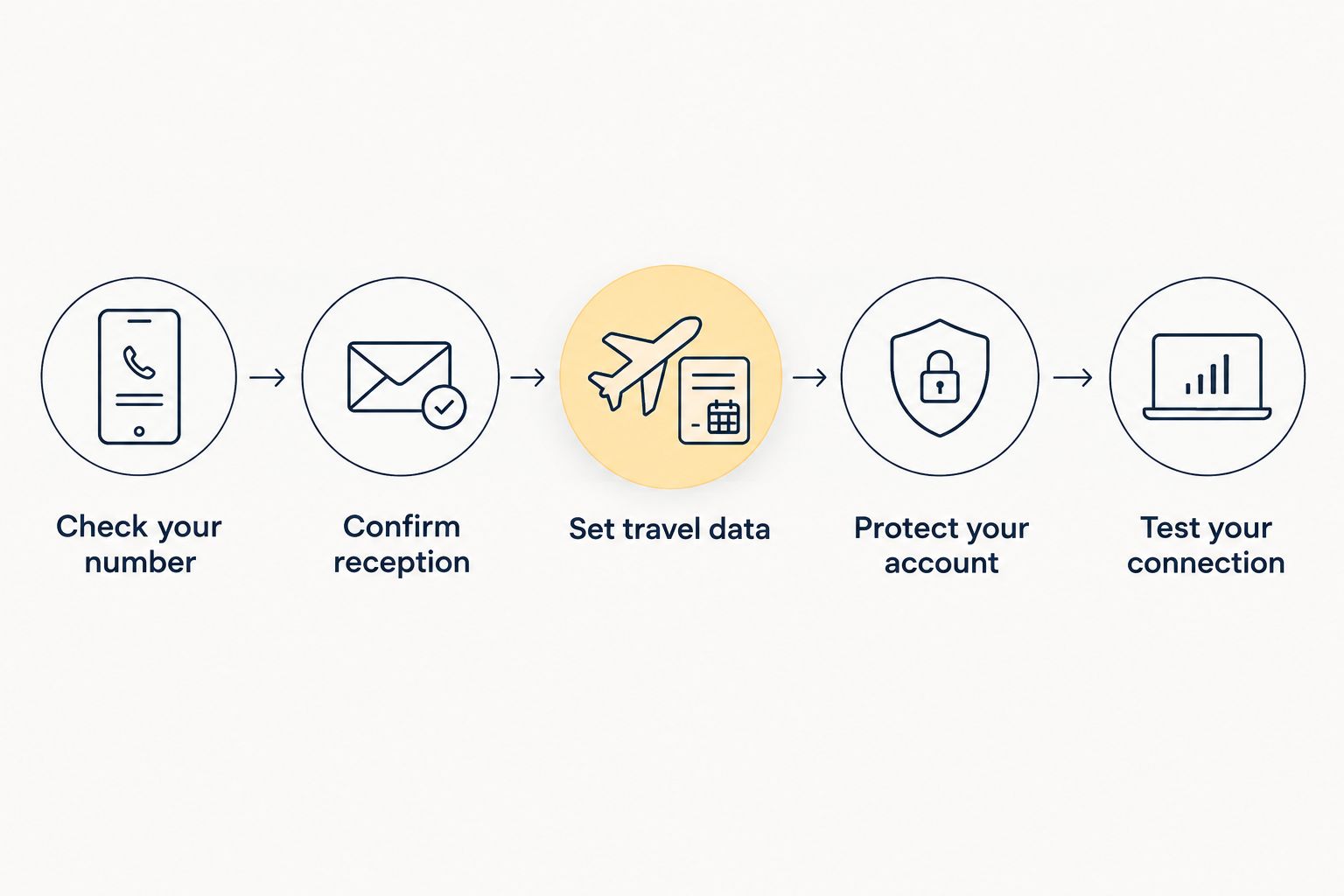
For a 2026 departure, prepare the registered number before changing your data setup. The aim is simple: keep WhatsApp connected without losing the ability to prove that the account's number belongs to you.
- Check your number. Open WhatsApp settings and confirm which phone number the account uses. Do not assume it matches the SIM currently supplying mobile data.
- Confirm reception. Ask your home provider whether that number can receive SMS and calls at your destination. Confirm the roaming requirements for those services.
- Set travel data. On a compatible phone, select the travel eSIM for mobile data. Keep the registered-number line enabled if you need it for verification.
- Protect your account. Enable WhatsApp two-step verification and add a recovery email through the app's supported settings. Keep the PIN private.
- Test your connection. Check that WhatsApp sends and receives messages through the intended internet connection. Separately check the home line's service when you arrive.
The connection test confirms that WhatsApp has internet access. It does not guarantee that a future verification SMS will arrive, so do not skip the provider check.
Keep the verification code and security PIN separate
A WhatsApp registration code and a two-step verification PIN serve different purposes. The registration code is a 6-digit code delivered through the verification process. The two-step verification PIN is a 6-digit PIN you choose when enabling that security feature.
Knowing your PIN does not make a data-only eSIM receive SMS. Equally, receiving a registration code does not remove a two-step verification requirement. Follow the app's prompts for the account you are accessing, and never share either credential with someone requesting it in a chat.
Why WhatsApp verification abroad varies
For a 2026 trip, these factors determine whether the verification route works:
- Plan capabilities: Data access, inbound SMS, and voice are distinct services. Check what the specific mobile plan includes.
- Registered number: WhatsApp verifies the number entered during registration, not whichever line supplies internet.
- Roaming access: Your registered-number provider must support the relevant service at your destination.
- Phone configuration: A disabled home line cannot receive a carrier message simply because travel data works.
- Account situation: Keeping an existing session connected is different from registering after a reinstall or phone change.
- Verification prompts: Use the method and waiting period shown inside WhatsApp rather than repeatedly requesting fresh codes.
Troubleshoot the verification channel first. If WhatsApp opens and loads normally, changing your data plan is not the first fix for an SMS that never arrives. Check the number, its line settings, and its ability to receive the message.
Can I keep my WhatsApp number when I switch to a travel eSIM?
Yes, switching the mobile-data connection does not automatically change your WhatsApp number. Keep the existing registration if you want contacts to reach the same account.
Use WhatsApp's change-number process only when you intend to move the account to a different number. Installing a travel eSIM and changing an account number are separate actions.
What should I do if my WhatsApp verification code does not arrive abroad?
Check the registered number, country code, and receiving line first. Confirm that the line is enabled and has service, then check with its provider whether incoming verification SMS is supported abroad.
Wait for the timer WhatsApp displays before requesting another code. If the app offers automated-call verification, use it only when that number can receive incoming calls. Working travel data does not prove either receiving channel is working.
Do I need to verify WhatsApp every time I cross a border?
No, crossing a border or changing internet connections does not by itself require a new WhatsApp registration. An already registered account can use a different mobile-data connection or Wi-Fi.
Still, keep control of the registered number throughout your 2026 trip. If registration is required later, the destination connection alone is not a substitute for access to that number.
FAQ
Can I verify WhatsApp with a data-only eSIM abroad?
A data-only eSIM cannot receive the SMS or cellular call used for phone-number verification. It can supply internet while you receive the verification on another service connected to the number you are registering.
Will my WhatsApp number change when I install a travel eSIM?
No, installing a travel eSIM does not automatically change your WhatsApp number. Keep your existing account registration unless you intentionally use WhatsApp's change-number process.
Can I receive the WhatsApp code on my home SIM while using eSIM data?
Yes, on a compatible dual-SIM phone, your home line can receive the code while the travel eSIM supplies data. The home line must be enabled and support incoming SMS at your destination.
Can WhatsApp call me with a verification code abroad?
Use automated-call verification if WhatsApp offers it and the registered number can receive incoming calls. A data-only travel eSIM does not provide a cellular incoming-call service.
Does a WhatsApp verification code arrive as a WhatsApp chat?
The standard SMS verification code arrives through the mobile messaging service for the registered number, not as an ordinary WhatsApp chat. A working chat connection does not confirm that your number can receive SMS.
Is my two-step verification PIN the same as my SMS code?
No, your two-step verification PIN and registration code are separate credentials. Both use 6 digits, but you choose the security PIN while the registration code comes through the verification process.
Can A-sim help me keep WhatsApp working while travelling?
A-sim offers travel eSIM connectivity and app-based usage management for international destinations. Confirm the chosen plan's capabilities separately, and retain access to your WhatsApp number for any required phone-number verification.
One last thing
A phone can have working WhatsApp calls and still be unable to receive a verification call. The first runs inside the app over internet data; the second needs the receiving service associated with the registered number.
Before leaving in 2026, write down which line does each job. That simple distinction keeps you from troubleshooting the travel connection when the real problem is access to your home number.