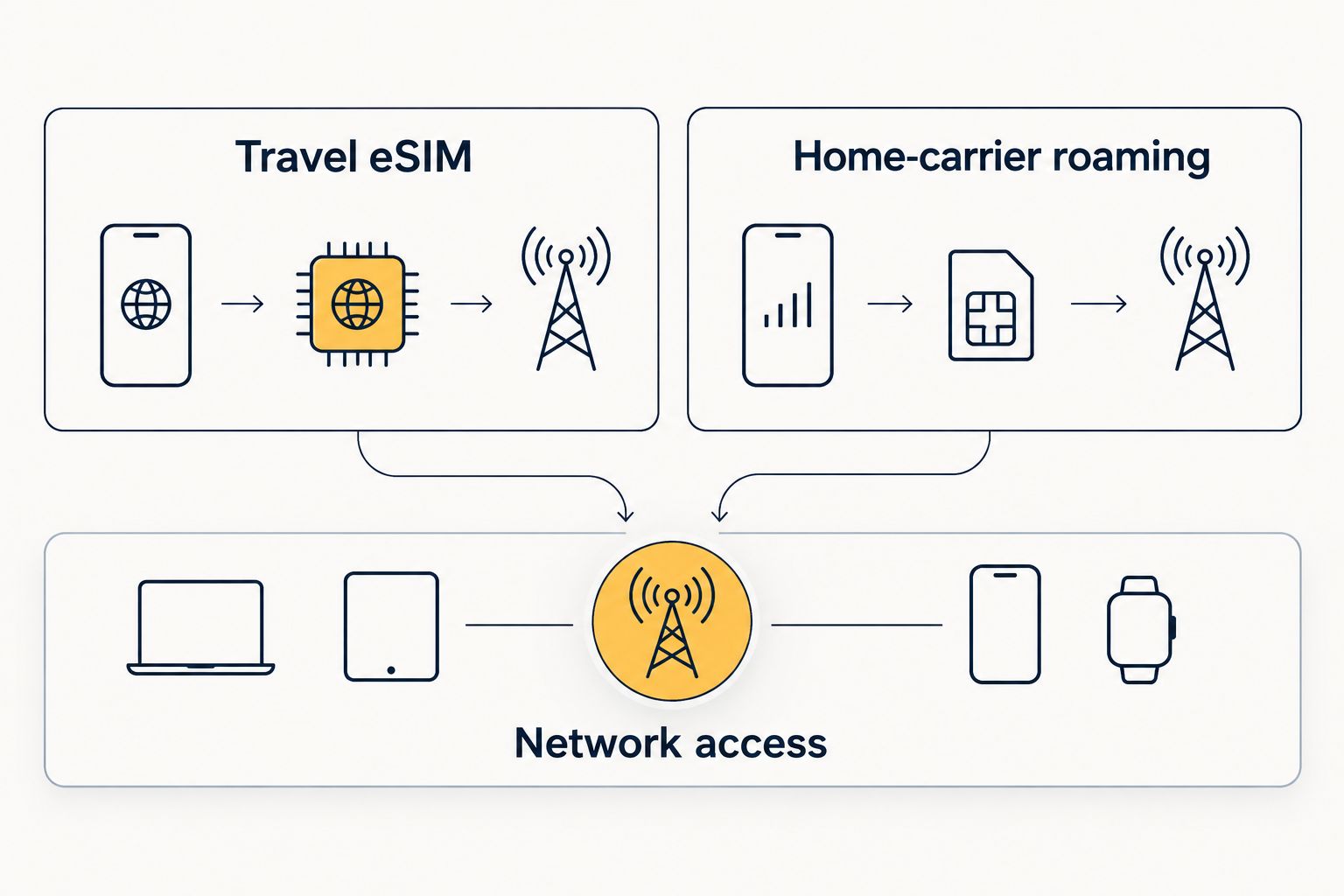
No. An eSIM is not inherently faster than home-carrier roaming or a local SIM: the faster connection is the one that gets better network access, coverage and routing where you use it. A travel eSIM can outperform your home carrier’s roaming connection, but it can also be slower. The eSIM format alone does not tell you which result you’ll get in 2026.
- Is eSIM data faster than local carrier roaming? Not by default; network access and location decide speed.
- A-sim travel eSIM is best for arranging destination data through an app or website, not for a guaranteed speed increase.
- Compare a travel eSIM with home-carrier roaming in the same place before choosing a data line.
Why this matters
A speed claim about an eSIM often mixes up how a plan is installed with how its data reaches the internet. Your phone stores an eSIM digitally, but the connection still depends on a mobile network. That distinction matters when you’re deciding whether to keep using your home carrier abroad or switch your phone’s data line.
There’s also an ambiguity in the question. “Local carrier roaming” can mean your home carrier’s roaming service on a network abroad, or a SIM bought from a carrier in the country you’re visiting. Those are different comparisons. If you want the narrower signal question, see whether eSIM signal works as well as a physical SIM.
Is eSIM data faster than local carrier roaming?
Neither option wins on speed by default. A travel eSIM and a roaming plan can connect your phone to networks with different coverage and connection conditions. Even when they use the same local network, their data may be handled differently. A local carrier SIM adds a third option, but its physical card does not give it an automatic speed advantage over an eSIM.
| Option | What you’re comparing | Where it can win | Where it can lose |
|---|---|---|---|
| Travel eSIM | A destination data plan installed digitally | Better access to a usable network at your location | Weaker coverage, plan restrictions or less direct data routing |
| Home-carrier roaming | Your existing line using a partner network abroad | Better partner-network access or routing at your location | A weaker partner network, roaming restrictions or less direct routing |
| Local carrier SIM or eSIM | A plan from a carrier in the destination country | Strong local coverage and direct access under its plan terms | Poor coverage where you are or restrictions in the chosen plan |
Best for convenience: a travel eSIM if you want to arrange destination data without replacing a physical SIM. Best for keeping your existing data setup: home-carrier roaming. Best for assessing local network access directly: a local carrier plan, provided you check its coverage and terms. None of those labels is a speed ranking.
What changes if you mean a local carrier SIM?
A local carrier SIM and a travel eSIM are both ways to obtain mobile data at your destination. The meaningful comparison is their specific plans and network access, not whether one uses plastic and the other installs digitally. If both connections use the same network, the local SIM still does not win solely because it is physical.
Check which network each plan uses, whether either plan has speed restrictions, and whether the phone can connect to the available network technology. Those details can explain a difference; the words “local” and “eSIM” cannot. For a 2026 trip, compare the actual destination and plan terms rather than assuming either category is faster everywhere.
How do you compare eSIM speed with roaming on your phone?
Use the same phone, place and test method. You’re trying to compare the two connections, not a good signal in one spot with a poor signal somewhere else.
- Confirm both lines work. Activate the travel eSIM and verify that your home line can use roaming before you start comparing speeds.
- Choose one location. Stand in the same spot for both tests. A window, building interior or busy area can change the result if you move between tests.
- Test the first data line. Set it as the phone’s mobile-data line, turn off Wi-Fi and run your usual speed test. Record download speed, upload speed and latency if the test displays them.
- Switch data lines. Select the other line for mobile data and repeat the same test in the same location. Confirm the phone switched lines before reading the result.
- Repeat where you’ll use data. A result at the airport does not settle how the connections will behave at your accommodation or another destination on the trip.
This is a comparison procedure, not a promised result. A single test captures conditions at that moment. If a connection is fast outside but unreliable indoors where you work, the outdoor result is less useful than the indoor one.
Which test result should you use?
Use the result from the place and activity that matter to you. Download speed helps with large files and streaming; upload speed matters when sending files or joining a video call; latency affects how quickly an online action responds. A connection that leads on one measure does not have to lead on the others.
Look at whether the result is repeatable, too. If one line alternates between usable and unusable during the same task, a single high speed-test result is a poor basis for choosing it. In 2026, the practical winner is the connection that performs better during your real use at the locations you’ll visit.
Why eSIM and roaming speeds vary
No speed figure applies to every travel eSIM, carrier or destination. These factors explain why two data lines on the same phone can perform differently:
- Local coverage. A network with weak reception at your exact location can lose to another network with stronger reception, regardless of plan format.
- Network access. The travel eSIM and roaming line can use different local networks or have different access conditions on a shared network.
- Plan restrictions. Read the applicable plan terms for any speed limits or changes after a data allowance is used. Do not assume every plan handles limits alike.
- Data routing. The path from the local network to an online service can differ between plans. That difference can affect latency even when the signal looks similar.
- Phone compatibility. Your phone must support the available network bands and technologies to use a connection as intended. An eSIM cannot add radio capabilities the phone lacks.
- Local demand and surroundings. Network load and physical obstacles affect the connection you experience at a given place and time.
These factors also explain why another traveler’s speed result is not your forecast. Their phone, plan, location and test conditions need not match yours. Use published plan terms to narrow the choice, then use your own connection test to judge performance.
Can stronger signal bars settle the comparison?
No. Signal bars are a quick indication of reception, not a complete measurement of data performance. Two lines can show similar reception while delivering different speeds or latency because network access, load and routing still matter.
Don’t treat the number of bars as proof that one provider is faster. If both lines are available, test the task you care about on each one. That gives you evidence tied to your phone and location rather than a guess based on the status bar.
When does a travel eSIM make sense?
A travel eSIM makes sense when you want to set up destination data digitally and choose it as your phone’s data line. A-sim offers travel eSIMs for global, regional and single-country use, arranged through its app or website; usage and top-ups can be managed in the app. A-sim travel eSIM is best for travelers who want to arrange destination data digitally, not for travelers seeking a guaranteed speed boost.
That convenience has a clear limit in this comparison: the supplied information does not identify a network or measured speed for a particular destination. Check the current destination plan details before relying on a speed claim. If you need to preserve your home line for calls or messages, also check your phone’s line settings rather than assuming the data switch changes every service.
You can review A-sim when choosing a destination plan. Treat network access and any applicable speed terms as the deciding information for performance. Installation method tells you how the plan gets onto your phone; it does not tell you how fast the connection will be.
Check your destination data options
Compare the available travel eSIM options for your trip.
What should you check before choosing?
If speed is the priority, start with your destination rather than a general claim about eSIMs. The following checks tell you what can be learned before departure and what still needs a real connection test:
- Check destination coverage. Confirm that the plan covers every country where you intend to use mobile data. A regional plan is useful only where its stated coverage matches your route.
- Identify the available network information. Check whether the plan names a local network or describes the access it provides. If it does not, do not infer a speed advantage.
- Read the speed terms. Look for stated limits or changes after an allowance is used. A headline data amount alone does not describe performance throughout a trip.
- Check your phone. Confirm eSIM support, carrier-unlock status and relevant network compatibility before you depend on a new line abroad.
- Decide what happens to your home line. Selecting an eSIM for data is separate from deciding whether your home line stays active for calls and texts.
- Test after connecting. Use the same-location method above if both travel data and home-carrier roaming are available to you.
If a plan does not disclose the detail you need, the honest answer is that its speed cannot be ranked from the information at hand. Choose based on the terms you can verify, then confirm performance when you connect. That is more reliable than a 2026 list that declares every eSIM faster than every roaming plan.
Does the answer change for different travel tasks?
For maps and messaging, choose the connection that stays usable where you travel. A peak download result is less helpful if the line drops when you need directions. Test at the locations that matter, not just where a speed-test result looks strongest.
For video calls and file uploads, check upload performance as well as download performance. If you work from several places, test each connection in the places where you’ll work. One line can suit your task better without being faster on every measure.
For laptop tethering, verify that your chosen plan and phone setup support the way you intend to share data. Then test the laptop connection itself. A result measured only on the phone does not replace checking the device you’ll actually use.
Related speed questions
Is a travel eSIM faster if it uses a different local network?
A travel eSIM can be faster if that network performs better at your location under the relevant plan terms. It can also be slower. The network name is useful context, but a same-place test gives you a better answer for your phone in 2026.
Is a local physical SIM faster than a travel eSIM?
No, not because it is physical. Compare the local carrier plan and travel eSIM by coverage, network access, restrictions and routing. The SIM format is not a speed specification.
Can home-carrier roaming beat an eSIM abroad?
Yes. Home-carrier roaming can beat a travel eSIM when its connection performs better where you are. Keep the roaming line as an option until you’ve checked the destination terms or tested both connections.
FAQ
Is eSIM data faster than local carrier roaming?
No, an eSIM is not inherently faster than home-carrier roaming or a local carrier SIM. Compare network access, plan terms and performance at your destination.
Is a local SIM faster than an eSIM for travel?
A local SIM is not faster just because it is physical. The specific plans and the networks available to your phone determine the useful comparison.
Can a travel eSIM be slower than roaming?
Yes. A travel eSIM can be slower if its connection performs worse than your home carrier’s roaming connection at your location.
Does an eSIM improve my phone’s signal?
No, the digital SIM format does not improve your phone’s radio or local coverage. The network available to the plan determines the reception you can use.
How can I test eSIM speed against roaming abroad?
Turn off Wi-Fi and test each data line on the same phone in the same place. Compare download, upload and latency results, then repeat the comparison where you’ll use data.
Should I choose an eSIM based on a speed-test result from another country?
No. A result from another country does not establish performance at your destination. Check the destination plan’s terms and test your own connection when it is active.
Can I keep my home line while using a travel eSIM for data?
Your phone’s line settings determine which installed line supplies mobile data and which stays active for other services. Check your device and carrier settings before relying on both lines during a trip.
One last thing
Compare the connection, not the SIM format. In 2026, a travel eSIM’s practical advantage is digital setup; a speed advantage has to come from the network and plan you actually use. Keep home-carrier roaming available as a comparison if your phone and arrangements allow it, and judge both lines where you need them.