
No—you do not normally need a separate eSIM firmware update before travel; you need a compatible, unlocked phone that meets your provider’s software requirements. Install any required phone software or carrier-settings updates before departure, but remember that an update does not remove a carrier lock, add missing eSIM hardware, or activate your travel plan.
- An eSIM firmware update before travel is not a routine requirement; check phone compatibility and provider instructions instead.
- Phone software, carrier settings and eSIM activation are different tasks. Updating one does not complete the others.
- A-sim travel eSIMs suit travellers who want app-based usage management and top-ups.
- Install over a reliable internet connection, check the activation rules, and keep your installation details accessible offline.
Why this matters: A failed connection is not automatically a firmware problem. Checking compatibility, installation and data settings separately keeps you from changing the wrong thing while travelling.
For your 2026 trip, A-sim offers travel eSIMs for individual countries, regions and global travel, with usage management and top-ups through its app. Those features do not replace the compatibility checks your phone needs before installation.
Does an eSIM need a firmware update before I travel?
A travel eSIM does not normally require a separate firmware update that you download and install yourself. Follow your phone manufacturer’s supported software-update process and your provider’s installation instructions instead.
The word update causes confusion because several different tasks sit between buying a plan and using mobile data. Use this sequence to check readiness:
- Check compatibility. Confirm that your exact phone model and regional variant support eSIM, not just that the product family does.
- Check unlocking. Confirm that your phone permits service from another provider. Software updates do not remove a carrier lock.
- Check software. Review the manufacturer’s available updates and the travel provider’s stated requirements.
- Install the profile. Use the provider’s supplied installation method while you have a reliable internet connection.
- Check activation. Read when validity begins and whether the plan must reach a supported destination network.
- Select travel data. Choose the travel line for mobile data and apply the provider’s roaming instructions to that line.
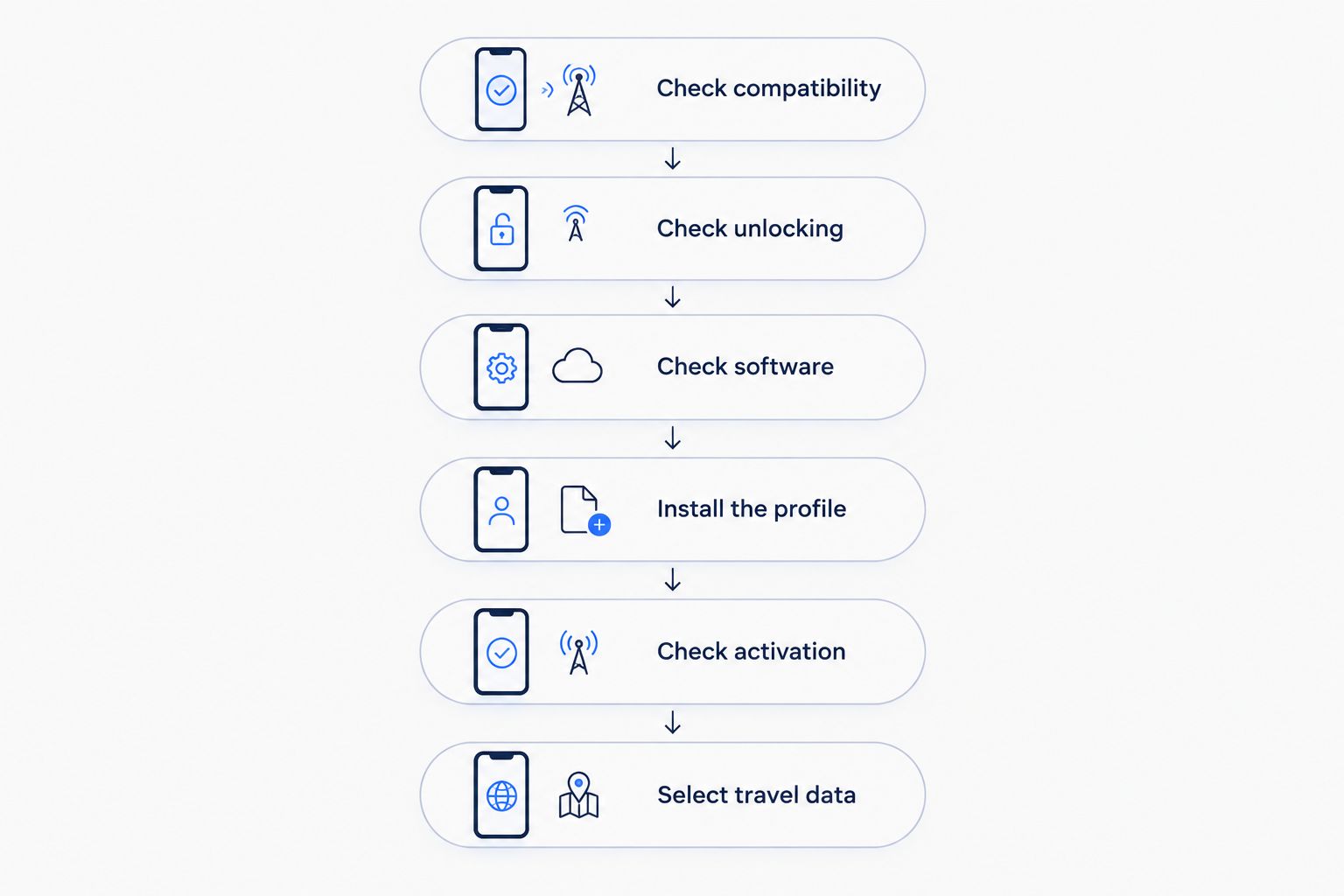
Complete the checks you can at home. If activation depends on reaching a destination network, an installed profile without local service is not proof that the installation failed.
Which update are you actually being asked to install?
An instruction to update your phone is not the same as an instruction to reinstall your eSIM. Before changing anything, identify which part of the setup the message names.
| Task | What it changes | Best for | What it does not do |
|---|---|---|---|
| Phone software update | The operating system and software components included by the manufacturer | Meeting supported software requirements and receiving published fixes | Remove a carrier lock or add missing hardware |
| Carrier-settings update | Network-related configuration supplied through supported carrier processes | Applying carrier configuration when prompted | Replace your destination plan or its activation rules |
| Provider app update | The app used to buy or manage service | Keeping app-based installation and account tools current | Update the phone’s operating system |
| eSIM profile installation | The subscription profile stored on your device | Adding the travel service to a compatible phone | Guarantee coverage everywhere you travel |
| Plan activation | The service becoming usable under its activation conditions | Starting service according to the plan’s rules | Prove that your phone needs firmware work |
For a 2026 departure, use the instructions for your current phone software rather than an old screenshot. Settings labels change, and an unfamiliar menu name is not evidence that the eSIM is incompatible.
Recommendation: use official update channels, not a downloaded file advertised as an eSIM firmware fix. The benefit is a supported installation process; the limitation is that software cannot solve every compatibility or service problem.
What should I check on an iPhone?
Start with the exact iPhone model, its regional version and its carrier-lock status. Apple’s eSIM support differs across models and markets, so another traveller’s working setup is not enough to confirm yours.
Open Settings > General > Software Update to review available iOS updates. Use Settings > General > About to check device information and respond to a carrier-settings update prompt if one appears.
Before updating, back up the phone and follow Apple’s power, storage and connection requirements. Complete the update while you still have time to restart the phone and check that essential apps work.
Then follow the eSIM provider’s installation instructions. Finding an option to add an eSIM is useful, but the provider must still support your device and the destination you need.
Best for iPhone travellers: check compatibility before buying, then complete required updates before installing. The trade-off is preparation time at home rather than troubleshooting after arrival.
What should I check on an Android phone?
Check the exact model number and regional variant with the manufacturer and travel provider. Android settings differ by manufacturer, so a menu path from another phone is not a universal instruction.
Search Settings for software update, system update and eSIM. Follow the manufacturer’s update process, then use the provider’s instructions to add the travel profile.
A missing eSIM option needs investigation, not an unofficial firmware download. Confirm that the device supports eSIM and that any work-device restrictions permit adding a mobile plan.
Best for Android travellers: use model-specific instructions. They reduce menu confusion, but they do not override carrier locks, regional hardware differences or employer restrictions.
For your 2026 checklist, record the model number and software version before contacting support. Those details are more useful than saying that you have a recent Android phone.
Why eSIM update requirements vary
There is no single firmware instruction that fits every travel phone. These factors determine what you actually need to check:
- Exact device variant. Phones sold under the same family name do not always have identical eSIM support across markets. Check the model you own.
- Installed software. A provider’s supported setup can require a particular software version. Follow its stated requirement rather than assuming every available update is mandatory.
- Carrier configuration. A carrier-settings prompt concerns network configuration. Treat it separately from downloading the travel profile.
- Carrier-lock status. A locked phone can reject service from another provider even when its software is current. Ask the original carrier about unlocking.
- Device management. An employer-managed phone can restrict adding mobile plans. Check with your administrator before purchasing service.
- Plan activation rules. Installation, the validity period and destination-network connection are distinct events. Read the plan’s instructions before enabling it.
These checks explain why a friend’s successful installation is not a compatibility guarantee. Match instructions to your device and plan, not just the destination.
Should I install my eSIM before I leave?
Install before departure when the provider’s instructions permit it, but check when validity begins first. Early installation gives you access to your usual internet connection and support channels; the drawback is starting validity too soon if installation triggers it.
Read the guide to installing an eSIM before travel before deciding when to add the profile. Keep the installation confirmation and setup instructions accessible without mobile data.
Do not assume you can fully test a destination-only plan from home. You can confirm that the profile appears in settings, but service still depends on the plan’s activation conditions and supported networks.
For travel in 2026, make installation timing part of your departure checklist rather than an airport task. That separates a preventable setup problem from a connection you can only check after landing.
Will a software update unlock my phone for a travel eSIM?
A software update will not remove a carrier lock. Ask the carrier that controls the lock to confirm eligibility and the unlocking process before you buy another provider’s plan.
Treat unlocking and eSIM compatibility as separate checks. A phone can support eSIM hardware while still restricting which provider’s service you can add.
If the phone belongs to your employer, confirm permission as well. Technical compatibility does not give you authority to change a managed device’s mobile service.
Should I delete my eSIM if it fails after an update?
Do not delete an installed travel eSIM as your first troubleshooting step. Reinstallation depends on the provider’s rules, and removing the profile can turn a settings problem into a recovery task.
Check whether the profile is still listed, whether the line is enabled and whether it is selected for mobile data. Confirm that you are in a supported destination and apply the provider’s data-roaming instructions to the correct line.
Restart the phone if the manufacturer or provider recommends it. If service still fails, capture the exact error message and contact support before deleting profiles or resetting network settings.
What should I do if the eSIM will not connect after landing?
Start with settings, not firmware. The symptom matters: a profile that cannot be added needs different troubleshooting from an installed line that has signal but no internet access.
| Symptom | First check | Avoid |
|---|---|---|
| The phone will not add the profile | Compatibility, lock status, installation method and internet connection | Repeatedly retrying without recording the error |
| The profile is installed but shows no service | Destination support, line status and activation instructions | Assuming installation proves local coverage |
| Signal appears but data does not work | Selected data line, roaming instructions and any required APN settings | Editing network settings from an unrelated guide |
| Service stopped after working | Remaining allowance, validity and provider status | Deleting the profile before support checks it |
Keep your home line’s roaming settings separate from the travel line’s settings. Enabling roaming for a travel eSIM does not mean you should enable it for every line on the phone.
A-sim travel eSIMs are best for travellers who want app-based usage management and top-ups. That helps you manage the plan, but it cannot correct an unsupported handset or remove a carrier lock.
FAQ
Do I need an eSIM firmware update before travel in 2026?
You do not normally need a separate eSIM firmware update before travel in 2026. Check your phone’s compatibility, carrier-lock status and the provider’s software requirements, then use official update channels for any required updates.
Does updating iOS or Android activate my travel eSIM?
Updating iOS or Android does not itself activate your travel eSIM. Installation and activation follow the provider’s process, including any destination-network or validity conditions.
Can an update make an unsupported phone use eSIM?
An update cannot add missing eSIM hardware. Confirm the exact model and regional variant with the manufacturer and provider before purchasing a travel plan.
Do I need Wi-Fi to update my phone and install an eSIM?
Use a reliable internet connection and follow the manufacturer’s requirements for phone updates and the provider’s requirements for eSIM installation. Wi-Fi is a practical preparation option before you leave.
Will updating my phone delete my travel eSIM?
A normal phone software update is not an instruction to delete your travel eSIM. Back up your phone, follow the manufacturer’s update guidance and check that the profile remains listed afterward.
Should I turn on data roaming for my travel eSIM?
Turn on data roaming for the travel eSIM when its provider instructs you to do so. Apply that instruction to the travel line, not automatically to your home line.
Can I manage my A-sim travel eSIM through an app?
You can manage A-sim travel eSIM usage and top-ups through its app. App management is separate from phone software updates and does not replace device-compatibility checks.
One last thing
Save the exact error message before changing settings. An installation error, no-service message and data-connection failure describe different problems; support needs to know which one you have.
Keep installation details private when sharing screenshots. Hide activation codes and account information, and send troubleshooting material through the provider’s support channel rather than a public post.