Yes, some old phones support eSIM technology in 2026, but age alone does not decide it. An older phone needs built-in eSIM support, compatible software and an eligible carrier setup; installing an app cannot add eSIM hardware to a phone that lacks it. Check your exact model before choosing a travel eSIM.
- Can old phones support eSIM technology? Yes, if the exact model has built-in eSIM support.
- iPhone XS, iPhone XS Max and iPhone XR support eSIM; iPhone X does not.
- An EID and an Add eSIM setting help you check an older phone, but also confirm its carrier-lock status.
- A-sim is best for travelers with an eSIM-compatible phone who want to manage travel data through an app.
Why this matters
An older phone can work perfectly for calls and still be unable to install a travel eSIM. The decisive question is whether its hardware supports eSIM, not whether it connects to a mobile network or runs a recent app. Check before you leave: discovering the limitation after arrival leaves you looking for another way to get mobile data.
A-sim travel eSIMs are for international destinations and can be managed through an app or website. That makes them relevant if your phone passes the compatibility checks below. If it fails the hardware check, choose a connectivity option your phone actually supports instead.
Can old phones support eSIM technology?
Yes, some can. In 2026, an iPhone XS, iPhone XS Max or iPhone XR has built-in eSIM support, while an iPhone X does not. Android support varies by exact model and region, so a brand name or a phone's age is not enough to establish compatibility.
| Phone or situation | Built-in eSIM support | What to do |
|---|---|---|
| iPhone XS, XS Max or XR | Yes, subject to regional and carrier conditions | Check the eSIM setting and carrier-lock status. |
| iPhone X or earlier iPhone models | No built-in eSIM support | Use another compatible connection method. |
| iPhone SE, first generation | No built-in eSIM support | Do not buy an eSIM for this phone. |
| iPhone SE, second generation or later | Yes, subject to regional and carrier conditions | Confirm the exact model before installation. |
| Older Android phone | Depends on the specific device | Check its EID, settings and manufacturer specifications. |
| eSIM-capable phone locked to another carrier | Hardware support alone is insufficient | Confirm that the carrier permits the eSIM you intend to use. |
The iPhone X and iPhone XR illustrate why model names matter more than appearance. Both are older iPhones, but only the XR has built-in eSIM support. The same distinction applies within the iPhone SE line: its first-generation model is not interchangeable with the second generation when you check eSIM compatibility.
Do not treat the table as an activation guarantee. A compatible phone still needs a usable eSIM setting, an eligible carrier configuration and coverage where you plan to use the line. For Android, verify the full model identifier rather than assuming that every version sold under one model name has the same capabilities.
Check your phone before buying an eSIM
- Find EID. Open your phone's device information or dial *#06# and look for an EID. It is an identifier associated with eSIM capability, not proof that a particular travel plan will activate.
- Check settings. On an iPhone, look under Settings, Cellular or Mobile Data for Add eSIM. On Android, look under network or SIM settings for an option to add or download an eSIM; menu wording varies by device.
- Confirm unlock. Check whether your phone is carrier-locked. A phone can support eSIM hardware while a carrier restriction prevents use of a different provider's plan.
- Check coverage. Confirm that your chosen travel eSIM covers your destination and that your phone is compatible with the network you expect to use.
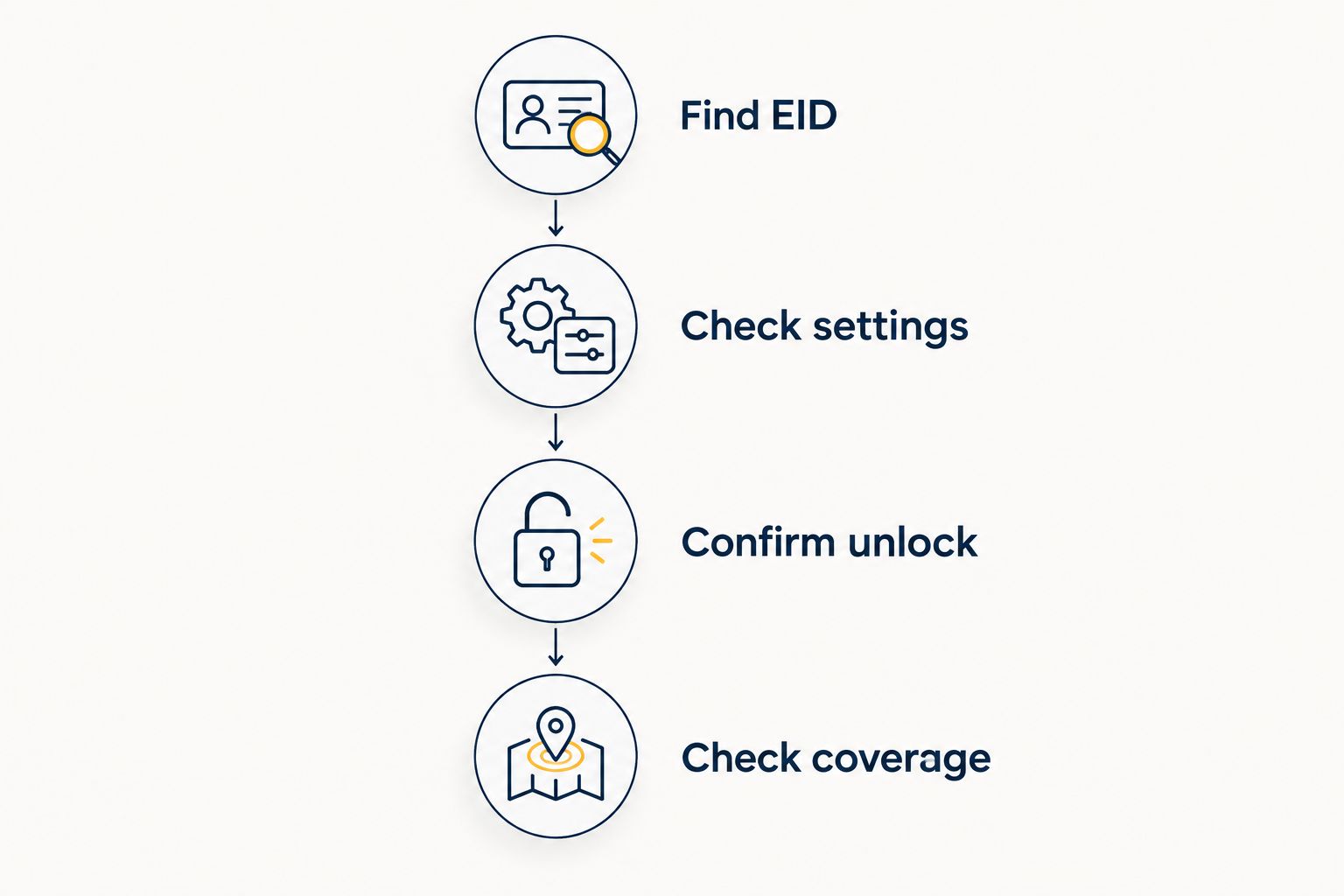
Start with the first two checks. If your manufacturer does not list eSIM support for the exact model, an app download will not make it a native eSIM phone. If the device does support eSIM but activation fails, move on to carrier restrictions and the plan's requirements instead of assuming the phone is too old.
Which older iPhones support eSIM?
The iPhone XS, iPhone XS Max and iPhone XR are the earliest iPhone models with built-in eSIM support. The second-generation iPhone SE also supports eSIM; the first-generation iPhone SE does not. An iPhone X, iPhone 8 or older iPhone cannot gain native eSIM support through an operating-system update.
Best for travelers keeping an older iPhone: an unlocked iPhone XS, XS Max, XR or second-generation iPhone SE with a working Add eSIM option. Their advantage is that you can install an eSIM without replacing the physical SIM solely for travel. Their limitation is that regional versions and carrier conditions still need checking before you rely on one abroad.
If you cannot find Add eSIM, check the exact model, the device's EID and Apple's guidance for the region where the phone was sold. Do not assume that having a SIM tray rules eSIM out: a phone can support both a physical SIM and an eSIM. Nor should you assume that a newer-looking iPhone must support it; the model identifier settles the question.
Can an older Android phone use an eSIM?
Yes, but Android needs a model-by-model answer. Some older Android devices include eSIM hardware, while others from a similar period do not. Support can also differ across regional versions, so a list that names only the phone family is not enough for a purchase decision in 2026.
Best for travelers keeping an older Android phone: a device whose manufacturer lists eSIM support for its exact model and whose settings offer eSIM installation. The benefit is using a travel data line without swapping a physical card. The drawback is that Android menus and carrier eligibility vary, making the final checks less uniform than a single model list suggests.
Find the model number in your device settings and compare it with the manufacturer's specifications. Then check for an EID and an eSIM installation option. If you find an EID but the installation option is missing, verify software and carrier settings before you rule the phone out. If the manufacturer says the model has no eSIM support, an eSIM app cannot change that hardware limit.
Why eSIM compatibility varies
Use these factors to explain a mismatch between a phone that seems capable and a plan that will not install. Each is a separate check; passing one does not automatically clear the others.
- Exact model: iPhone X lacks native eSIM support; iPhone XR has it. Similar names do not mean identical SIM hardware.
- Device generation: the first-generation iPhone SE and second-generation iPhone SE differ on eSIM support.
- Regional version: eSIM features can differ according to where a phone was sold. Check the device's model identifier, not just its marketing name.
- Carrier lock: an eSIM-capable phone can still be restricted to its existing carrier. Check the lock before choosing another provider; the locked-phone eSIM guide explains why hardware support is only part of the answer.
- Software and settings: a supported phone needs an available eSIM installation path. Settings labels differ between iPhone and Android.
- Travel network: the phone and the selected eSIM must work with the network available at your destination. eSIM support by itself does not establish coverage.
In 2026, the shortest useful compatibility check is exact model, eSIM setting, carrier lock, destination coverage. Skip any one of those and you leave an avoidable failure point. Check them while you still have a reliable connection, not after you need the travel line.
Can an app add eSIM support to a phone without it?
No. An app can help you manage an eSIM on a supported phone, but it cannot install the built-in eSIM hardware an unsupported phone lacks. If the manufacturer confirms that your exact model has no native eSIM support, use a compatible phone or another connection method.
That distinction matters when a service offers a quick installation flow. A-sim lets users get travel eSIMs through its app or website and manage usage and top-ups through the app. Those functions help after you establish that your iPhone or Android phone can use an eSIM; they are not a workaround for missing hardware.
Can I keep my physical SIM in an older eSIM phone?
Yes, on a supported older phone that offers a physical SIM and eSIM together. For example, the iPhone XS supports a physical SIM alongside an eSIM, subject to carrier and regional conditions. That arrangement can let you retain your existing line while adding a separate travel data line.
Best for travelers who need their home number available: a supported, unlocked dual-SIM phone. The advantage is keeping the physical SIM in place. The limitation is that your home carrier's roaming rules and your phone's line settings still matter; decide which line handles mobile data before you travel.
What if my old phone has no eSIM option?
First, check the exact model and look for an EID. If the manufacturer lists eSIM support, review the device's software, settings and carrier restrictions. If it does not list support, stop trying to install an eSIM on that phone and plan a different way to connect.
A missing menu by itself is not a complete diagnosis on Android, where wording varies. Equally, seeing an eSIM advertisement in an app store is not evidence that your device supports the feature. Rely on the phone's model-specific specifications and its available SIM settings, not the age of the handset or the app listing.
FAQ
Can old phones support eSIM technology in 2026?
Yes, some old phones support eSIM technology in 2026. Check the exact model, its eSIM setting and its carrier-lock status before choosing a plan.
Does the iPhone X support eSIM?
No, the iPhone X does not have built-in eSIM support. The iPhone XS, XS Max and XR do support eSIM, subject to regional and carrier conditions.
Does an iPhone SE support eSIM?
The second-generation iPhone SE and later SE models support eSIM; the first-generation iPhone SE does not. Confirm which generation you own before installation.
How do I check whether my Android phone supports eSIM?
Check your exact model against the manufacturer's specifications, then look for an EID and an option to add an eSIM in settings. Android support and menu names vary by device.
Can I install an eSIM app on a phone without eSIM hardware?
You can install an app if the phone allows it, but the app cannot add native eSIM hardware. Use a device that the manufacturer lists as eSIM-compatible.
Can a carrier-locked older phone use a travel eSIM?
A carrier-locked phone can block a travel eSIM from another provider even when its hardware supports eSIM. Check its lock status and carrier eligibility before selecting a travel plan.
Can I keep my home SIM while using a travel eSIM?
Yes, if your phone supports a physical SIM and eSIM together and your carrier setup permits it. Check which line is selected for mobile data and review your home carrier's roaming settings.
One last thing
The iPhone X-to-XR distinction is the trap: a small change in model name crosses the line between no built-in eSIM and built-in eSIM support. In 2026, check the model before the plan. A-sim is a practical travel eSIM option for a compatible phone, but it cannot turn an unsupported handset into one.