An eSIM does not have one standard lifespan after activation. In 2026, your travel data lasts for the validity period in your plan’s terms, and the countdown starts at the event those terms specify: purchase, installation, activation or first connection. Using up the data can end your service before the time period ends.
- How long does an esim last after activation? The plan’s validity terms determine when its clock starts and stops.
- Installing an eSIM does not necessarily start its data period; check the plan before setting it up.
- Your data can run out before the validity period ends.
- A-sim suits travelers who want to check usage and top up through an app; confirm the plan’s start rule before travel.
How long does an eSIM last after activation?
The answer is the plan’s stated validity period, counted from its stated start event. Activation alone does not tell you the end date. A provider can use the word activation for adding a profile to your phone, making the line ready for service or connecting to a network. Only the plan terms tell you which event starts the data clock.
| Possible start event | What it means for your trip | What to check |
|---|---|---|
| Purchase | Time can pass before you install the eSIM. | The deadline for using the plan and the date its validity begins. |
| Installation | Adding the profile can start the clock before departure. | Whether installation and plan activation are treated as the same event. |
| Activation | The clock starts when the provider marks the plan active. | How the provider defines activation and where you can see its status. |
| First supported-network connection | You can install before travel without necessarily starting the data period. | Whether the terms explicitly name first connection as the trigger. |
These are possible plan rules, not interchangeable descriptions of every eSIM. A first-connection rule is convenient when you want your phone ready before landing, but it offers no protection if the plan actually starts at purchase or installation. A purchase-based rule is easy to identify from an order date, yet part of its validity period can pass before your trip begins.
The same distinction applies to the end of service. A plan can stop working because its time period ended or because its included data was used. If the provider gives the plan a separate deadline to install or activate it, that deadline matters before the data period even starts.
Why this matters before you travel
In 2026, the useful question is not simply whether the eSIM is on your phone. It is whether this specific plan’s validity clock has started. That difference determines whether you should install before departure, wait until you arrive or take another step specified by the provider.
If you want to prepare your phone early, read the plan terms first, then use this guide to install an eSIM before you travel. Installing a profile and starting its travel data are separate decisions only when the plan rules make them separate. Do not rely on the installation screen to answer a question the provider’s terms define.
There is a second clock to watch: data usage. A valid plan with no usable data left will not behave like a plan that still has data. Likewise, unused data does not by itself extend a plan past its stated end date. Check both the remaining data and the expiry shown for the plan.
How to find the actual expiry date
Use the plan details rather than counting from the moment you tapped Add eSIM. In 2026, the reliable check is still the same: identify the start rule, find the recorded start or expiry date, and compare it with your travel dates.
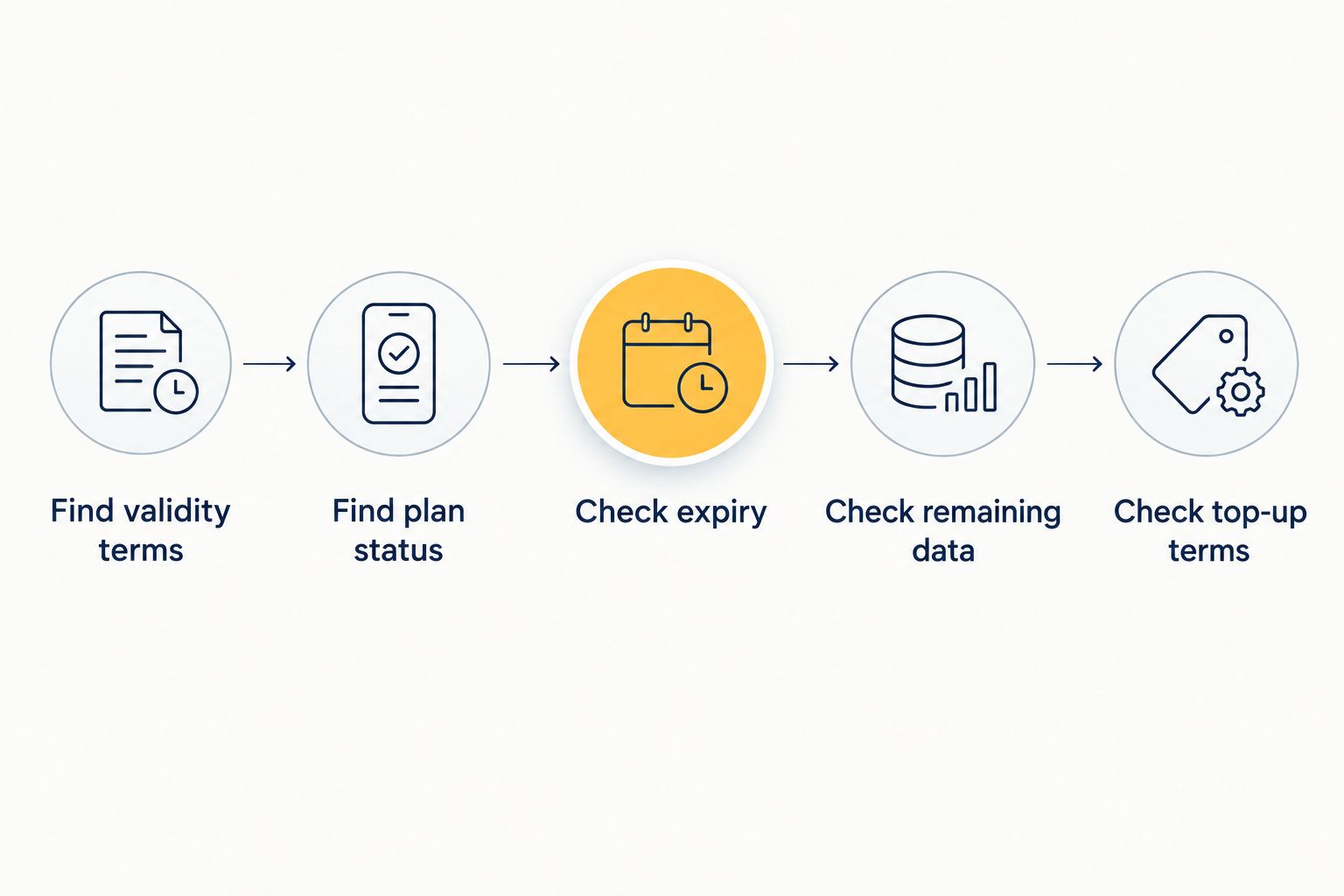
- Find the validity terms. Open the plan details in the provider’s app, website, order confirmation or activation instructions. Look for the exact event that begins the validity period.
- Find the plan status. Check whether the provider labels the plan unused, installed, active or expired. A phone showing an eSIM profile does not establish that travel data is active.
- Check the date and time. Use the expiry displayed by the provider when one is available. Pay attention to the stated time zone if the terms specify one.
- Check remaining data. Time remaining and data remaining answer different questions. You need both to judge whether the plan will cover the rest of your trip.
- Check what a top-up changes. Read whether adding data changes the expiry date, only increases the data allowance or creates a separate validity period. Do not assume a top-up restarts the original clock.
The sequence matters. If you start by looking only at the eSIM settings on your phone, you can confirm that a profile exists but miss the provider’s expiry rule. If you look only at remaining data, you can miss an approaching time limit. Keep the plan details available while you travel so you can check both.
Why eSIM validity varies
There is no safe duration to apply to every travel eSIM in 2026. These plan-level differences determine the answer:
- The start event. Purchase, installation, activation and first connection produce different timelines when a provider uses them as the trigger.
- The stated validity period. The length of service comes from the plan you select, not from eSIM technology itself.
- An installation or activation deadline. A plan can have a deadline for beginning use as well as a separate period for using data.
- The data allowance. You can exhaust the available data while the time period is still open.
- The top-up terms. Adding data and extending validity are different changes; confirm which one the provider offers for your plan.
These factors also explain why another traveler’s answer might not apply to you. Even if you use the same phone model, the provider’s terms control your plan’s countdown. Compare the plan you intend to use, not a generic eSIM setup guide, when your departure date matters.
Does installing an eSIM start the validity period?
Installing an eSIM starts the validity period only if the plan terms make installation the trigger. If the terms instead specify activation or first supported-network connection, use that stated event. In 2026, do not treat the phone’s Add eSIM confirmation as proof that the data period has begun.
Installation places an eSIM profile on your phone. It does not, by itself, explain the provider’s billing or validity rule. Read the plan wording before installing early, particularly if you are preparing your phone well ahead of departure.
Does the eSIM expire if I never use its data?
An unused data allowance does not guarantee that the plan remains valid. A plan can reach its expiry date even when data remains, while an unstarted plan can have its own deadline for installation or activation. Check both deadlines where the provider states them.
This distinction is easy to miss: unused can mean the eSIM was never installed, was installed but never connected, or connected without using much data. Those situations can have different outcomes under the same provider’s terms. Use the plan’s recorded status and rules instead of the word unused alone.
Can I keep using an eSIM after its data runs out?
You cannot count on continued data service after the plan’s available data runs out. The calendar validity period and the data allowance are separate limits. A top-up can add data if the provider offers one, but check whether it also affects the expiry date.
This is where checking usage during a trip helps. A-sim travel eSIM users can manage usage and top up through the app. A-sim travel eSIMs are best for travelers who want to monitor data and top up from their phone; they are not a substitute for checking each plan’s validity terms.
Check your travel eSIM options
Choose destination coverage, then check the plan’s validity terms before installing.
What happens when the validity period ends?
When the plan’s validity ends, do not expect its remaining data to keep working. The eSIM profile can still appear in your phone’s settings; a visible profile is not proof of an active plan. Check the provider’s plan status before troubleshooting the phone or assuming you need to reinstall anything.
If your trip continues beyond the plan’s expiry, check the available options in the provider’s app or website. Read the terms of any new plan or top-up separately. In particular, do not assume that deleting an expired profile resets its validity or that adding data automatically extends the original expiry.
FAQ
How long does an esim last after activation in 2026?
It lasts for the validity period stated in your plan, provided data remains available. Check whether the provider starts that period at purchase, installation, activation or first connection.
Does my eSIM validity start when I install it?
It starts at installation only when your plan terms say so. Some plans use another start event, so check the provider’s wording before installing ahead of your trip.
Can I activate a travel eSIM before I leave?
You can prepare a compatible phone before departure, but whether doing so starts the plan’s validity depends on its terms. Confirm what the provider calls activation before you proceed.
Will unused eSIM data carry over after expiry?
Do not assume unused data remains available after the plan expires. Check the plan’s expiry and any separate rollover terms before relying on leftover data.
Does turning off an eSIM pause its validity?
Do not assume turning off the line pauses the provider’s validity clock. Check the plan terms for its start and end rules.
Does topping up an eSIM extend its expiry date?
A top-up extends expiry only when the provider’s terms say it does. Check whether it adds data, changes validity or creates a separate plan.
Why is my eSIM still on my phone after my plan expired?
The profile on your phone and the plan’s active data service are different things. Check the provider’s plan status rather than treating a visible profile as proof of service.
One last thing
In 2026, the most useful date is the expiry recorded for your plan, not the day you remember adding the eSIM to your phone. Check that date alongside remaining data before departure and during your trip. If the provider does not show a clear expiry, resolve the start rule in the plan terms before relying on the connection.