Yes. Turning off cellular data stops your phone from using mobile data through its eSIM, so you can keep the remaining data for later. In 2026, the setting does not delete the eSIM or guarantee that the plan’s validity period stops running; check the plan terms separately.
- Does turning off cellular data save esim data? Yes: it stops mobile data use until you switch it back on.
- On a dual-SIM phone, check which line supplies data before assuming your travel eSIM is the one being used.
- Wi-Fi downloads do not use eSIM data when they stay on Wi-Fi; hotspots use mobile data when the eSIM supplies the connection.
- Turning data off preserves an allowance, not necessarily the time left on a travel plan.
Does turning off cellular data save eSIM data?
Yes, if you turn off cellular data for the line supplying your connection. The phone stops sending app traffic over that mobile connection. You can still use Wi-Fi, and the installed eSIM remains on your phone.
| What you do | What happens to eSIM data | Best for | Limitation |
|---|---|---|---|
| Turn off cellular or mobile data | Stops mobile internet use while the setting is off | Pausing data use during a flight, meeting or Wi-Fi session | Apps needing internet will not connect away from Wi-Fi |
| Turn off the travel eSIM line | Stops that line from supplying data | Avoiding use of a specific eSIM | Another active line can still supply mobile data |
| Select another SIM for mobile data | Stops using the travel eSIM for data while the other line is selected | Changing which allowance you use | The selected line can incur its own data usage |
| Connect to Wi-Fi with mobile data on | Uses Wi-Fi while the connection stays on Wi-Fi | Staying online without deliberately pausing mobile data | Mobile data can resume if Wi-Fi drops |
| Use airplane mode, then enable Wi-Fi | Stops cellular connections while allowing Wi-Fi | Preventing cellular activity altogether | Cellular calls and texts will not work until you restore the connection |
The key distinction in 2026 is allowance versus validity. A switch on your phone controls whether mobile data is used. It does not, by itself, change the conditions of the eSIM plan you obtained.
Why this matters
Travel phones often have a home line and a travel eSIM installed at the same time. If you turn off the wrong line or change which line supplies data, you can protect one allowance while consuming another. Check your selected data line before relying on the switch.
Saving data is also different from estimating how much you need. If you are planning a longer trip, how much data you need for a two-week trip abroad helps frame that separate decision; turning data off only controls use after you have a plan.
How to stop eSIM data use without deleting the eSIM
The safest sequence is to identify the line supplying mobile data, switch data off, then verify the result. Menu names vary by phone and software version, but the distinction between a data setting and a stored eSIM matters on both iPhone and Android.
- Check the selected data line. In your phone’s cellular or SIM settings, find the line chosen for mobile data. A phone with two active lines can use one for calls and the other for internet access.
- Turn off cellular or mobile data. This pauses mobile internet use on the phone. Leave Wi-Fi on if you still want apps to connect where a Wi-Fi network is available.
- Test without Wi-Fi. With Wi-Fi disconnected, open a page that needs a connection. If cellular data is off, it should not load over the mobile network. Reconnect to Wi-Fi when you finish checking.
- Check your allowance before reconnecting. Your phone’s data counter and your provider’s usage view serve different purposes; use the provider’s view to check the plan allowance.
- Turn data back on when you need it. Confirm the chosen data line again before you start navigation, a video call or a hotspot session.
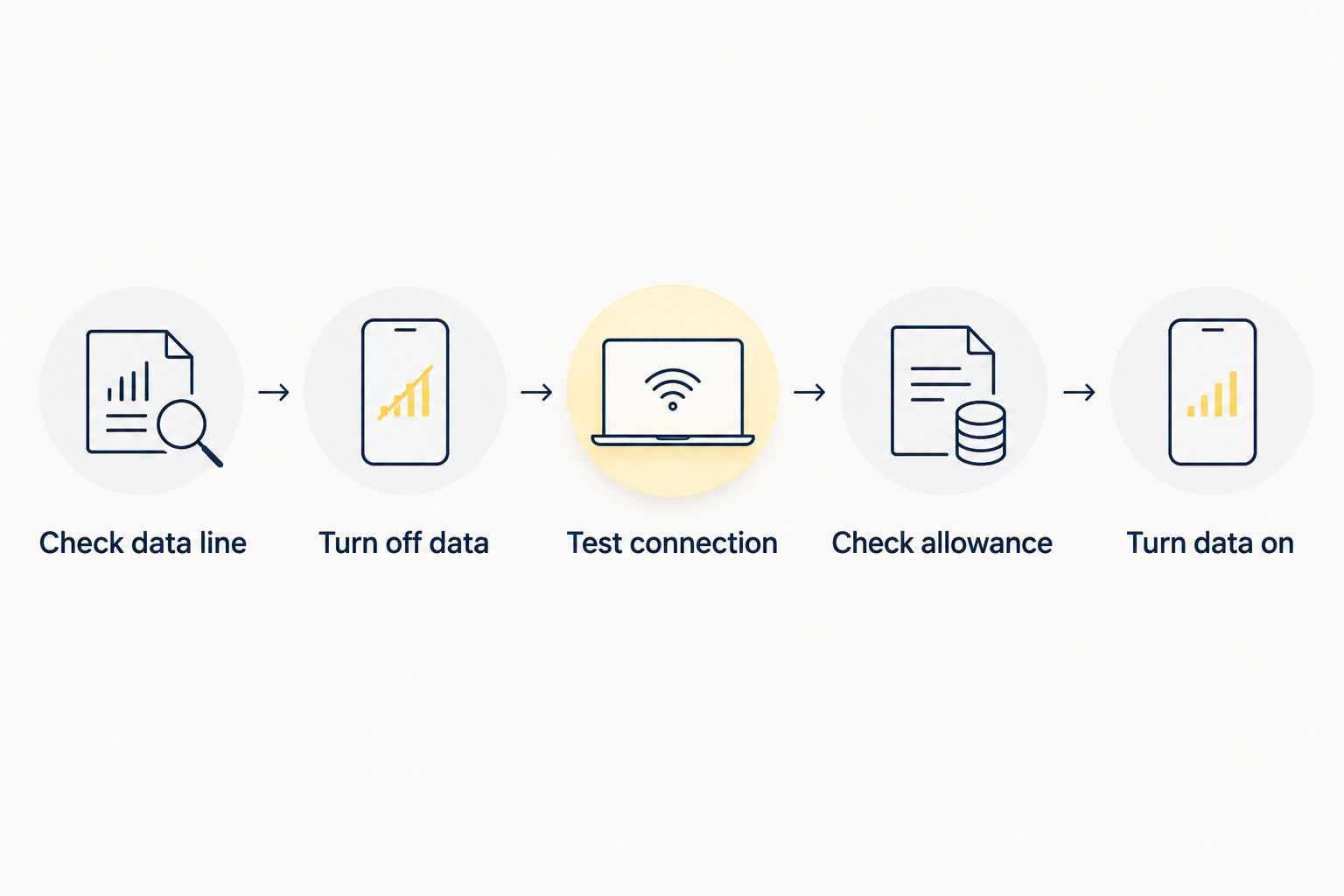
Do not remove the eSIM just to pause data use. Removing a profile is a different action from switching data off, and reinstalling an eSIM depends on the provider’s terms and instructions. The data switch is the direct control for a temporary pause.
Why eSIM data use varies
In 2026, these are the settings and activities to check when an allowance falls faster than expected:
- The selected data line. On a dual-SIM phone, mobile data can come from the home line or the travel eSIM. A change to the selected line changes which allowance carries subsequent traffic.
- Background app activity. Apps can use mobile data when you are not actively looking at them. Turning off mobile data stops that traffic over cellular; limiting background access lets you stay connected for other tasks.
- Wi-Fi availability. A download completed on Wi-Fi does not use your eSIM’s mobile-data allowance. If the phone leaves Wi-Fi while cellular data remains on, later traffic can use mobile data.
- Personal hotspot use. A laptop or another connected device can use the phone’s selected mobile-data line. Its activity counts even when you are not using the phone’s screen.
- Downloads and uploads. Maps, photos, files and app updates use the connection carrying them. Choose Wi-Fi for transfers you do not need while moving.
- Roaming settings. A travel eSIM can need data roaming enabled to connect to its network. Turning roaming off can prevent service, but whether that applies depends on the eSIM’s instructions.
A simple example makes the distinction clear: a 500 MB file downloaded entirely over Wi-Fi uses 0 MB of eSIM mobile data. Download that file over the selected eSIM instead, and the transfer draws on its allowance. The file did not change; the connection did.
What if your phone has two SIM lines?
Turning off the travel eSIM’s line prevents that line from supplying data. It does not prove that all mobile data is off: the home line can still be selected for data. If your aim is to use no cellular data at all, switch off the phone’s cellular or mobile data setting and verify which line is selected when you switch it back on.
Keep calls and internet access separate in your mind. Your phone can show both lines as active while only one supplies mobile data at a time. A line being visible in settings does not mean it is using your travel data allowance.
For example, imagine your travel plan shows 2 GB remaining. Pausing cellular data for 30 minutes does not itself spend that allowance; if no other activity uses the plan, the remaining amount stays at 2 GB. That says nothing about whether the plan’s validity clock continues during those 30 minutes. Check the plan conditions for that answer.
What changes on iPhone?
On iPhone, find the cellular-data control in Settings and check which line is selected for data if you use more than one SIM. Turning cellular data off prevents apps from using the mobile-data connection. Wi-Fi remains a separate way to get online.
For a 2026 trip, check the selected line again after changing SIM settings. If you want to pause only the travel line, distinguish its line controls from the broader cellular-data switch. If you want to prevent all mobile internet use, the broader switch is the clearer choice.
Do not treat a Wi-Fi symbol as a permanent guarantee of zero mobile use. Your phone can leave that network as you move. Turning cellular data off is the direct way to keep mobile data paused when Wi-Fi disappears.
What changes on Android?
On Android, look for Mobile data in your network or SIM settings and check which SIM is selected to supply it. Exact menu wording differs by device. Switching mobile data off pauses internet access through the selected cellular connection while leaving Wi-Fi available.
If you use two lines on Android in 2026, check both the data toggle and the preferred data SIM. Turning off a travel eSIM line protects that line from use, but another enabled SIM can still provide mobile internet. For a full pause, verify that mobile data itself is off.
Data Saver is a different control. It restricts some background activity while leaving mobile data available for permitted use. Choose it when you still need mobile access; choose the mobile-data switch when you want to stop mobile internet use.
Will Wi-Fi save eSIM data?
Yes, while your traffic stays on Wi-Fi. A 200 MB file downloaded entirely through Wi-Fi uses 0 MB of the eSIM’s mobile-data allowance. If you leave Wi-Fi and the download continues over an enabled mobile connection, the remaining transfer can use the selected data line.
The practical 2026 rule is to connect to Wi-Fi before starting a large transfer and turn cellular data off if you do not want the transfer to continue over mobile data. Check that Wi-Fi is connected, rather than assuming the saved network name means you are currently using it.
Wi-Fi does not erase earlier eSIM use. It changes the connection used for new traffic. Your provider’s usage display is the place to check the allowance after a session, while your phone’s app-level settings help identify which activities are permitted to use mobile data.
Does turning off cellular data stop a hotspot?
Yes, if the hotspot relies on that phone’s cellular connection, turning mobile data off removes the connection the hotspot would share. If mobile data stays on, a connected laptop or tablet can use the selected SIM’s allowance without you opening an app on the phone.
Before starting a hotspot session, check which line supplies mobile data. When you finish, disconnect the other device or turn the hotspot off. That avoids treating an idle phone screen as evidence that no data is moving.
Can you still check your eSIM allowance?
Yes, if you have a connection that lets you open the provider’s app or website. On Wi-Fi, you can check usage without using the travel eSIM’s mobile data. If Wi-Fi is unavailable and cellular data is off, an online usage view needs a connection before it can refresh.
A-sim is best for travelers who want to check travel eSIM usage and top up through an app. Its travel eSIMs cover global, regional and single-country destinations. If you need to check an allowance while mobile data is paused, connect to Wi-Fi before opening the app; if you need a top-up, check your current options on A-sim.
FAQ
Does turning off cellular data save esim data in 2026?
Yes. Turning cellular data off stops mobile internet traffic from using the selected eSIM until you turn it back on. It does not necessarily pause the plan’s validity period.
Will my eSIM still be installed if I turn off cellular data?
Yes. Turning off cellular data changes a connection setting; it does not remove the installed eSIM profile. You can turn data back on when you need mobile internet.
Can Wi-Fi use my eSIM data?
No, traffic carried entirely over Wi-Fi does not use the eSIM’s mobile-data allowance. Check that you remain connected to Wi-Fi if cellular data is still enabled.
Does turning off my travel eSIM also turn off my home SIM’s data?
No. Turning off one eSIM line does not automatically turn off another active line. Check the phone-wide mobile-data setting and the selected data SIM if you want to stop all cellular internet use.
Is Data Saver the same as turning mobile data off?
No. Data Saver limits some data activity, while mobile data remains available for permitted traffic. Turn mobile data off when you want to pause mobile internet use altogether.
Will my travel eSIM plan last longer if I switch data off?
Turning data off preserves unused allowance while the switch is off, but it does not necessarily extend a plan’s validity period. Check your plan terms for when validity begins and ends.
Does airplane mode save eSIM data?
Yes, airplane mode stops cellular data use while cellular connections are off. You can enable Wi-Fi separately if you need internet access without using mobile data.
One last thing
Check the data line before checking the data toggle. A switched-off travel eSIM cannot use its allowance, but a home SIM selected for data can still connect if cellular data remains on. That distinction matters more than which SIM name appears first on your screen.