Yes, you can use a travel eSIM on a work-issued phone if the device supports eSIM, its carrier lock permits the plan, and your employer allows installation and use. Company management settings can block changes even on an unlocked phone. Get IT approval before installing anything, and keep your work number and authentication requirements separate from your travel data connection.
- Planning eSIM work issued phone travel? Check employer permission, device compatibility and carrier restrictions before installing.
- A-sim travel eSIMs fit travellers seeking app-managed data, subject to device compatibility and employer approval.
- An unlocked phone is not automatically approved for personal travel data.
- A travel data connection does not replace your work number or remove company device controls.
Why this matters
A phone that supports eSIM is not necessarily a phone you are allowed to change. Your employer controls the acceptable use of its device, while the carrier controls any network lock. These are different barriers, and solving one does not solve the other.
Start with permission, not installation. If your company approves a separate travel connection, check the carrier restriction next; the guide to whether a locked phone can use an eSIM explains that distinction.
For a 2026 trip, confirm the current policy rather than relying on what worked during a previous assignment. A replacement handset, changed mobile contract or updated management profile can change your setup.
Can I use eSIM if I travel with a work-issued phone?
Yes, provided the handset, carrier restrictions and company policy all permit it. A travel eSIM supplies a separate mobile connection; it does not grant permission to modify a company device. Use this sequence before choosing a plan.
- Get permission. Ask IT whether you can add a personal or third-party travel eSIM to the company phone. Include your destination and whether the connection will carry work traffic.
- Confirm compatibility. Check the exact handset model and regional variant, not just the product family. Manufacturer documentation is the right reference for eSIM support.
- Check the carrier lock. Confirm that the phone accepts a plan from another provider. A company-owned phone can still have a carrier restriction.
- Check management restrictions. Ask whether your device profile allows adding cellular plans, selecting a data line and installing any required app.
- Confirm work access. Establish how you will receive calls, verification messages and access to company applications abroad.
- Install and test as instructed. Follow the provider's activation instructions and your employer's approved settings. Do not assume installation and the start of plan validity happen at the same moment.
Stop at any failed check. Buying another plan does not remove a carrier lock or override a management restriction.
The practical choice depends on which connection your employer permits:
| Connection option | Best for | Main benefit | Main limitation |
|---|---|---|---|
| Approved travel eSIM on the work phone | Employees allowed to add a separate data line | Travel data on the handset you already carry | Device, carrier and management restrictions still apply |
| Employer-arranged mobile connection | Employees required to use company-approved connectivity | Follows the company's chosen setup | You depend on the arrangements your employer authorizes |
| Travel eSIM on a personal phone | Travellers whose work phone cannot accept another plan | Keeps the travel connection off the company handset | Work apps or laptop tethering still require separate approval |
Choose the permitted connection first; compare travel plans second. A technically compatible option is not useful if it violates your employer's device rules.
What should I ask IT before installing a travel eSIM?
Ask for an explicit answer about the device and the intended use. Permission to use the phone abroad is not the same as permission to install a third-party cellular plan.
Your request should cover:
- Installation: Can you add a travel eSIM yourself, or must IT provision it?
- Data routing: Can work applications use that connection?
- Work number: Must the company line remain enabled for calls or messages?
- Security: Which VPN, device-management and authentication requirements remain in place?
- Personal use: Is personal travel data permitted on the company handset?
- Payment: Who pays, and what documentation does the employer require?
Include the exact phone model, destination and intended applications. Mention laptop hotspot use if you need it; approval for mobile data does not automatically include tethering a work computer.
For your 2026 travel request, get the approval in a form you can retrieve later. That gives you a clear reference if another support team needs to troubleshoot the setup.
How do I check an iPhone or Android work phone?
On a work-issued iPhone
Open Settings, then General, then About. Apple's carrier-lock guidance uses the Carrier Lock field: No SIM restrictions indicates an unlocked iPhone. That checks the carrier restriction, not your employer's permission.
Look for the option to add an eSIM under the cellular settings. The wording varies with the phone's language and software version. If the option is missing or unavailable, ask IT to distinguish hardware compatibility from a management restriction.
Do not remove the company line to make room without permission. Your work number can be part of the company's calling, recovery or authentication arrangements.
On a work-issued Android phone
Check the exact model against the manufacturer's eSIM documentation. Android settings differ by manufacturer; look for SIM, mobile network or SIM manager settings rather than expecting one universal menu path.
Ask IT or the company carrier to confirm unlocked status. An available Add eSIM option does not prove that an unrelated provider's plan will work.
On either platform, a visible installation button is a capability check, not an authorization check. Keep both questions separate when you contact support.
Why eSIM access varies between work-issued phones
Two employees with similar-looking phones can face different restrictions. These are the checks that explain the difference:
- Exact hardware: eSIM support depends on the model and regional variant.
- Carrier lock: A restriction can prevent use of another provider's plan.
- Management profile: Supported device-management controls can restrict cellular-plan changes.
- Employer policy: The company can prohibit a setup that the phone technically supports.
- Active-line support: The handset determines which installed SIMs can be active together.
- Work requirements: Calling, authentication and security rules determine which settings you must preserve.
Do not treat a colleague's successful installation as proof that yours is approved. Their phone, contract or management profile can differ from yours.
How should I set up an approved travel eSIM?
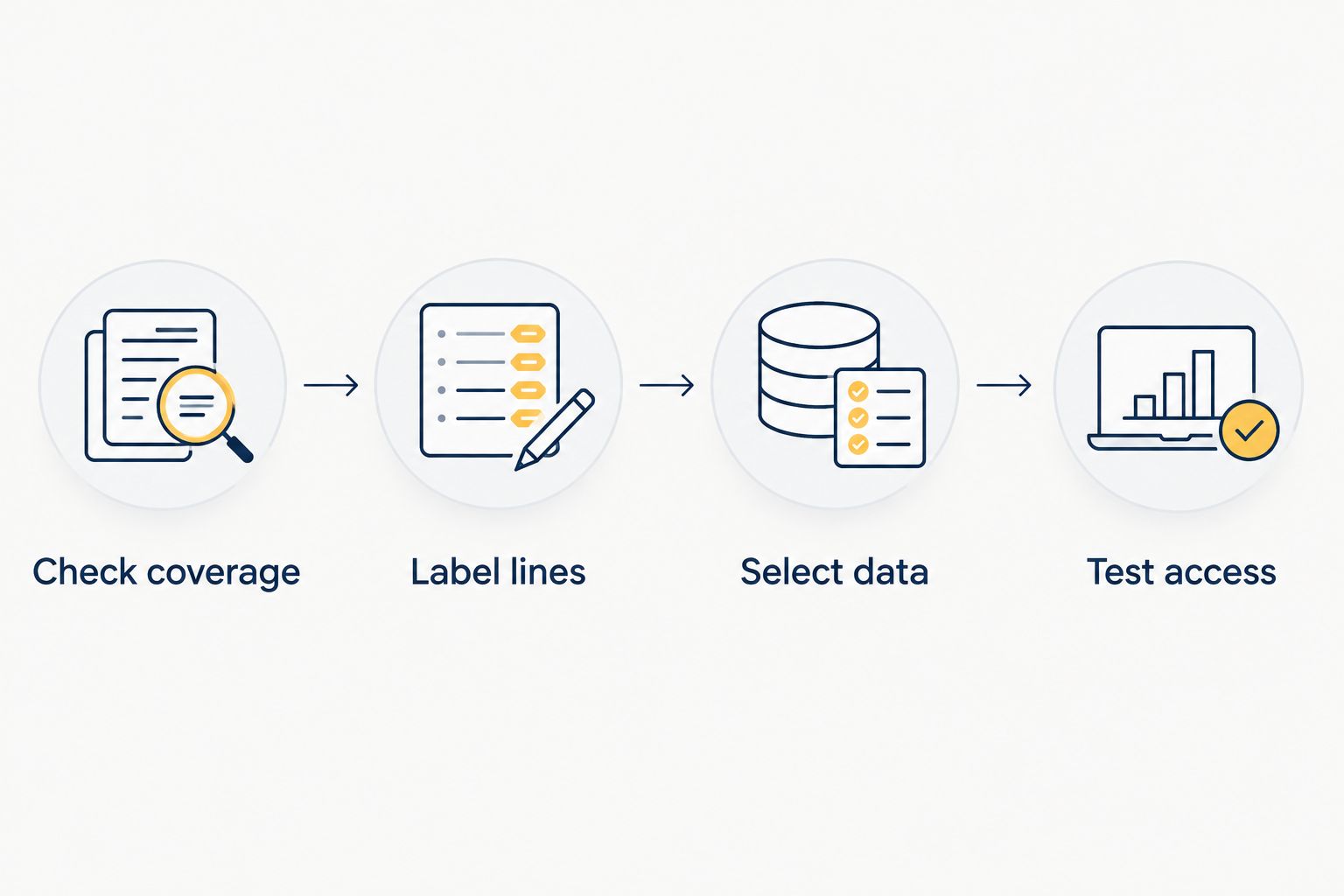
Once IT approves the connection, separate travel data from your work line deliberately. Clear labels help you avoid selecting the wrong line when changing settings.
Check coverage
Confirm that the plan covers your destination and any countries where you need mobile data during the journey. Check its validity and activation instructions before installation; do not assume all providers start the clock the same way.
Label lines
Give the connections recognizable labels, such as Work and Travel, if your device permits renaming them. Keep track of which line holds your work number and which supplies travel data.
Select data
Choose the approved travel line for mobile data. Keep voice and messaging defaults aligned with IT's instructions, and review any setting that automatically switches mobile data between lines.
Test access
Test a browser, your approved work applications and the required VPN when the travel connection is active. Test your authentication method separately; a working internet connection does not prove that verification messages will reach your work number.
For a 2026 departure, save the approved settings somewhere you can access without mobile data. Include your company's support contact and the provider's installation instructions, but keep activation credentials private.
After those checks, A-sim offers travel eSIMs for single-country, regional and global destinations, with usage management and top-ups through its app. A-sim travel eSIMs fit travellers seeking app-managed data, subject to device compatibility and employer approval. The limitation on a work phone remains the same: a travel provider cannot authorize changes to your employer's device.
Can I keep my work number while using travel eSIM data?
Yes, a compatible dual-SIM phone can retain the work line while using another supported line for mobile data. The exact combination of active SIMs depends on the handset. Keeping a line installed is different from keeping it enabled and reachable.
A travel data connection does not transfer your company number to the new plan. Calls and SMS associated with that number still depend on the work line and its service arrangements.
Ask IT whether the work line should remain active and which roaming settings it permits. Do not assume that turning off work-line data also turns off all calling or messaging activity.
Does a travel eSIM bypass company monitoring?
No. A separate mobile connection does not remove device management, managed applications or a required company VPN. Changing the data provider is not the same as changing who administers the handset.
What your employer can see depends on the device's enrollment, installed software and network configuration. Avoid treating either a work eSIM or a personal travel eSIM as a privacy boundary on a company-owned phone.
If privacy is the reason you want a separate connection, use a personal device for personal activity. Keep work access subject to the employer's approved process.
What if IT says no or installation fails?
Do not reset the phone, remove its management profile or delete the company SIM to force installation. Those actions can interrupt work access and conflict with company rules.
Record the error message and tell IT which stage failed: adding the plan, enabling it or connecting to a network. Those are different problems. An installation error does not automatically mean the travel provider lacks coverage.
If another plan is prohibited, use the employer-approved travel arrangement. A personal phone is a separate option for personal connectivity, but connecting a work laptop to its hotspot still requires permission.
Before your 2026 trip, establish the fallback while you still have ordinary access to company support. The useful question is not just whether a plan installs, but how you will work if the approved connection fails.
FAQ
Can I add a personal travel eSIM to my company iPhone?
Yes, if your company permits it, the iPhone supports eSIM and its carrier restrictions allow the plan. Device-management settings can still block installation or cellular changes.
Can an unlocked work phone still block a travel eSIM?
Yes, an unlocked work phone can still have management restrictions or an employer policy that prohibits adding a plan. Carrier unlocking and company authorization are separate checks.
Will a travel eSIM replace my work phone number?
No, a travel data connection does not transfer your work number to the new plan. Keep the company line configured according to IT's instructions if you need its calls or messages.
Can my employer still manage my phone when I use travel data?
Yes, using travel data does not remove company device management. Monitoring and access controls depend on the phone's enrollment, managed software and network configuration.
Can I use A-sim on a work-issued Android phone?
A-sim is an option if the exact Android handset supports the plan and your employer permits installation and use. Confirm carrier restrictions and management settings before choosing a travel eSIM.
Do I need to keep my work SIM enabled for verification texts?
You need the line associated with your work number to remain reachable if authentication uses SMS sent to that number. Confirm its overseas service arrangements or an approved alternative with IT.
What should I check before business travel in 2026?
Check employer approval, exact-device eSIM support, carrier restrictions and work-access requirements before business travel in 2026. Then confirm destination coverage and follow the plan's activation instructions.
One last thing
A successful installation is not a complete work-access test. You can have mobile internet while your company number, verification messages or managed applications remain unavailable.
Before leaving in 2026, confirm the entire chain: approved connection, required authentication and access to the tools you actually need. That is the difference between a connected phone and a usable work phone.