Yes, you can use an eSIM on a tablet without a phone line if the tablet has cellular hardware, supports eSIM, and accepts your chosen data plan. You do not need a separate smartphone subscription or a voice number for mobile internet. A Wi-Fi-only tablet cannot connect directly through an eSIM, and a data-only plan does not provide standard phone calls or SMS.
- An esim tablet without phone line works with compatible cellular hardware and an accepted data plan.
- A Wi-Fi-only iPad or Android tablet cannot gain cellular connectivity by installing an app.
- Data-only eSIMs support internet apps, not standard phone calls or SMS verification.
- A-sim travel eSIMs suit travellers who want destination-based data and in-app usage management; confirm tablet compatibility first.
Can I use eSIM on a tablet without a phone line?
Yes. The requirement is a compatible cellular tablet, not an existing phone line. Your tablet connects to a mobile network using its own installed eSIM and data service. A smartphone does not need to sit nearby or share its connection.
For an iPad-specific walkthrough, see the guide to connecting an eSIM to your iPad for data abroad. Check your exact device before choosing a plan; a familiar model name alone does not establish compatibility.
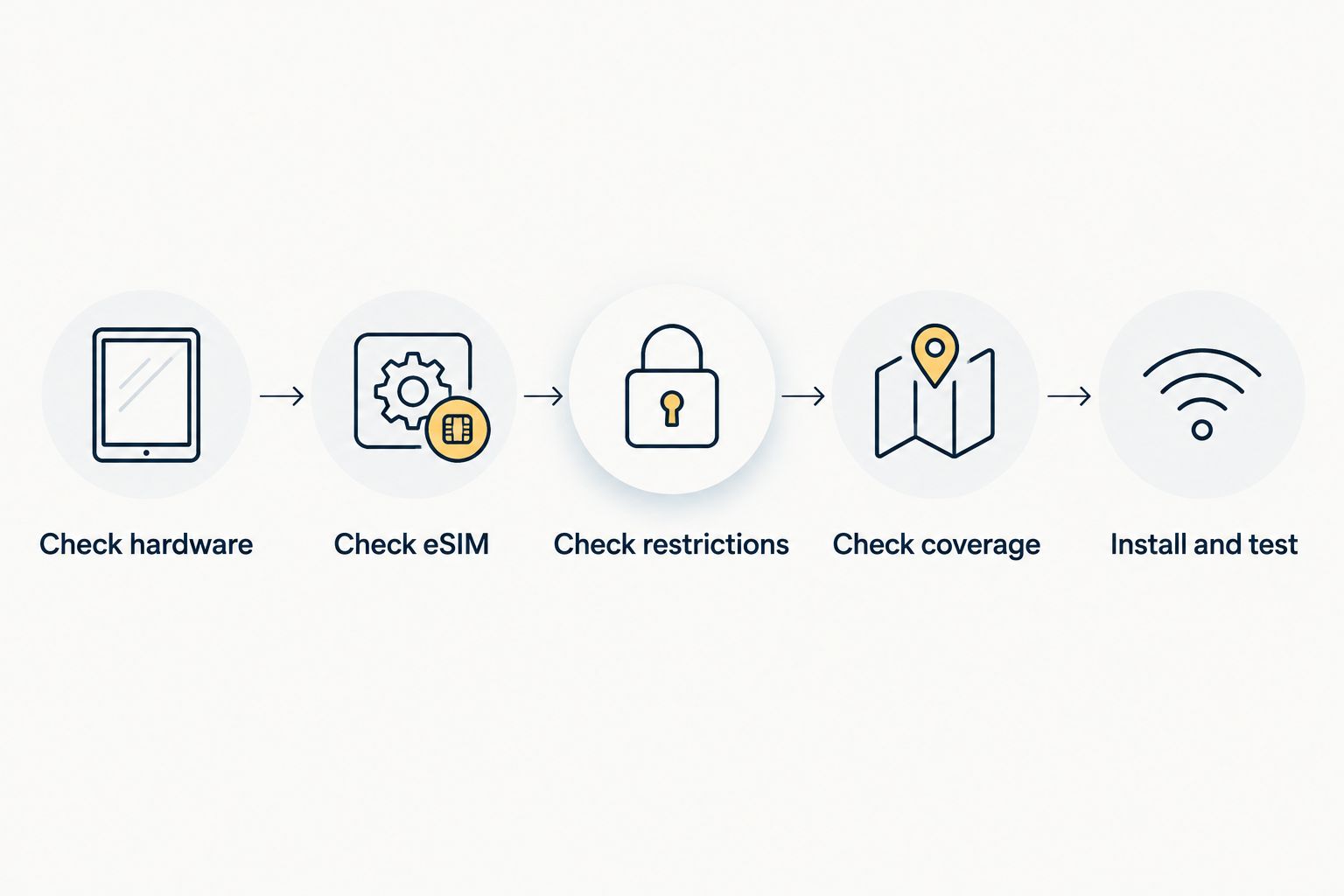
Use this sequence to decide whether a tablet-only setup works:
- Check hardware. Find the exact model in the tablet's settings and confirm that it is a cellular version. A Wi-Fi-only version cannot use mobile data directly.
- Check eSIM. Read the manufacturer's specifications for that exact model and market variant. Cellular support does not automatically mean eSIM support.
- Check restrictions. Confirm that the tablet accepts another provider's service and that the provider supports your device.
- Check coverage. Match the plan's supported destinations to your itinerary, including any countries where you intend to use it during a stopover.
- Install and test. Follow the provider's instructions, select the eSIM for cellular data, and test internet access when the plan is active in a supported destination.
These checks apply to a 2026 purchase as well as a tablet you already own. Do not buy a plan until both device compatibility and destination coverage are confirmed.
Why this matters
You can separate internet access from telephone service. A tablet with a suitable data plan can load maps, open email, join internet calls, and browse without paying for a voice service you do not need.
The catch is hardware. Two tablets with similar names can have different connectivity options, so a shopping listing that says only iPad or Android tablet is not enough. For travel in 2026, check the exact version rather than relying on the device family.
There is also an account-access issue. Your tablet can have working internet while your bank still sends a verification code to a separate phone number. Plan for authentication as well as connectivity.
Cellular eSIM tablet: best for independent mobile data
An eSIM-capable cellular tablet is the direct option when you want internet access away from Wi-Fi without carrying a phone as a hotspot. Once configured with an accepted plan, the tablet handles its own mobile connection.
The benefit is independence. Your tablet does not depend on a nearby phone's battery, hotspot settings, or connection. That suits maps between appointments, email on the move, and work where Wi-Fi is unavailable.
The limitation is compatibility. The tablet needs the right hardware, and the plan must accept that device. Network coverage and the plan's data allowance still govern what you can do.
Best for: travellers who want their tablet to connect on its own. Choose this setup only after confirming the exact tablet and plan work together.
Wi-Fi-only tablet: best for Wi-Fi or a shared connection
A Wi-Fi-only tablet cannot install an eSIM and become a cellular tablet. An eSIM is a network subscription profile; it does not add the missing mobile radio hardware.
You can still use that tablet online through Wi-Fi or a hotspot from another device. This keeps your existing tablet useful, but it does not create an independent mobile connection.
Best for: travellers who mainly use accommodation Wi-Fi or already carry a connected phone. Keep the tablet and use a shared connection if that matches how you travel.
Which tablet connection should you choose?
Choose the connection around where you use the tablet and whether you want another device involved. This 2026 comparison separates direct mobile access from shared internet access.
| Connection | Best for | Main benefit | Main limitation |
|---|---|---|---|
| Cellular tablet with eSIM | Independent travel data | Connects without a nearby phone | Requires eSIM support and an accepted plan |
| Cellular tablet with physical SIM | A compatible tablet without eSIM | Direct mobile data through a SIM card | Requires a SIM slot and a suitable service |
| Wi-Fi-only tablet with phone hotspot | Keeping an existing tablet | Uses the phone's internet connection | Depends on the phone and permitted tethering |
| Wi-Fi-only tablet with local Wi-Fi | Use in connected locations | Needs no tablet cellular subscription | Loses internet access outside Wi-Fi coverage |
Direct tablet eSIM access wins on independence; a hotspot wins when you want to keep a Wi-Fi-only tablet. Neither removes the need to check coverage and device settings.
A physical SIM is also a valid route for a compatible cellular tablet. You do not need to replace working hardware solely because it lacks eSIM, provided you can obtain an accepted data service for its SIM slot.
What does a tablet data plan actually let you do?
A data-only eSIM supplies internet access. That connection lets supported apps send messages, upload files, make internet calls, and stream content, subject to the plan and network conditions.
It does not automatically supply a telephone number with standard voice and SMS service. App messaging and carrier texting are different services, even when their interfaces look similar.
| Task | Data-only tablet eSIM | What else to check |
|---|---|---|
| Browse, email and use online maps | Works over mobile data | Data allowance and coverage |
| Make an internet voice or video call | Works through a supported app | App login, permissions and connection quality |
| Receive a standard SMS verification code | Not provided by data-only service | Access to the number receiving the code |
| Make a standard carrier phone call | Not provided by data-only service | Separate voice service and device support |
| Use downloaded content offline | Does not need an active connection | Download the content before disconnecting |
An app can require a phone number for registration even though it uses data afterward. Sign in and confirm access before departure. Do not assume a new tablet data plan replaces your existing account-recovery number.
Why tablet eSIM compatibility varies
The word cellular is only the first checkpoint. These factors determine whether a particular tablet can use a particular eSIM:
- Hardware version: Wi-Fi-only and cellular versions have different connectivity hardware.
- eSIM support: A cellular tablet can support a physical SIM without supporting eSIM.
- Market variant: Manufacturer specifications can differ between versions sold in different markets.
- Carrier restrictions: A restricted device can prevent you from adding another provider's service.
- Provider support: An eSIM provider must accept the tablet and its installation method.
- Destination coverage: A successfully installed profile still needs service in the country where you use it.
For a 2026 trip, verify these details against the manufacturer's specifications and the provider's current compatibility information. An installation menu is useful evidence, but it is not a promise that every plan will work.
How do I activate a tablet eSIM without a smartphone?
You do not inherently need a smartphone to activate a tablet eSIM. You need an installation method the tablet and provider both support, plus the internet connection required to download the profile.
Start with a dependable Wi-Fi connection. Open the tablet's cellular or mobile-network settings and follow the provider's installation instructions. Depending on the supported method, you can use an activation code, a QR code, or an app-based process.
If installation uses a QR code, arrange a supported way to scan or import it. Displaying the code on another screen is one option; do not assume your tablet can scan a code shown on its own screen.
After installation, select the travel eSIM for cellular data. Enable data roaming only as instructed for that plan, and check whether service starts on installation, first network connection, or another stated trigger.
Do not delete an installed eSIM just to troubleshoot it. Reinstallation rules depend on the provider, so check those instructions before removing the profile.
Do I need to keep my phone number active?
No, a compatible tablet's data connection does not depend on keeping a separate phone number active. Keeping that number is a different decision, driven by calls, account recovery, and verification messages.
Before changing or cancelling a phone service, review the accounts that use its number. Where supported, set up an authenticator app, recovery codes, or another accepted sign-in method.
Test the apps you depend on while you still have access to your usual number. A tablet that loads websites successfully does not prove you can recover a locked email, banking, or messaging account.
Can I use a phone eSIM plan on my tablet?
Only if the provider supports that tablet and permits the intended use. A plan described as a phone eSIM is not automatically compatible with every eSIM-capable tablet.
Check device eligibility before installing. Also distinguish direct installation from tethering: a plan can work on a phone while its hotspot permissions determine whether a tablet can share that connection.
Do not install a profile on a phone first and assume you can move it later. Transfer and reinstallation depend on the provider's rules and the supported devices.
Where A-sim fits into a tablet travel setup
A-sim travel eSIMs are best for travellers who want destination-based data with in-app usage management. A-sim offers global, regional, and single-country travel eSIMs through its website or app, with usage management and top-ups through the app.
That offers a way to manage travel data, but tablet compatibility remains a separate check. Confirm support for your exact tablet before selecting a plan; the ability to use a travel eSIM on an iPhone or Android phone does not establish support for every tablet.
Compare the destination scope with your itinerary. A regional or global option serves a different travel pattern from a single-country option, but the actual supported countries—not the label alone—must match your route.
What should I check when the tablet has no internet?
Troubleshoot the connection in order rather than repeatedly reinstalling the eSIM. First, confirm that the tablet is in a supported destination and that the plan is active with data remaining.
Then check whether the intended eSIM is selected for cellular data. Review the provider's roaming and network instructions, and make sure airplane mode is not disabling the mobile connection.
If the network shows a connection but apps still fail, test a basic webpage and inspect any app-specific restrictions. If the device cannot register on a network, give the provider your exact tablet model and the displayed error rather than guessing at settings.
FAQ
Can I use an eSIM tablet without a phone line?
Yes, you can use an eSIM tablet without a phone line when the tablet has cellular hardware, supports eSIM, and accepts the data plan. A separate smartphone subscription is not required.
Can a Wi-Fi-only iPad use an eSIM?
No, a Wi-Fi-only iPad cannot connect directly through an eSIM because it lacks cellular hardware. It can use Wi-Fi or share another device's connection through a hotspot.
Does a tablet data eSIM give me a phone number?
A data-only tablet eSIM does not provide standard voice and SMS service. Internet messaging and calling apps can work over data, but their registration requirements still apply.
Do I need Wi-Fi every time I use my tablet eSIM?
No, an active tablet eSIM connects through a supported mobile network rather than Wi-Fi. Installing the profile generally requires an internet connection first.
Can I make video calls on a tablet without a phone plan?
Yes, supported video-calling apps work over mobile data without a standard voice plan. You still need an active data connection and access to your app account.
Can I move the same eSIM between my phone and tablet?
Do not assume an eSIM can move between your phone and tablet. Device support, transfer permissions, and reinstallation rules depend on the provider.
Why does my cellular tablet reject an eSIM?
A cellular tablet can reject an eSIM because it lacks eSIM support, has carrier restrictions, or is not accepted by the provider. Check the exact model and the error message before trying another installation.
One last thing
Before your 2026 departure, turn off Wi-Fi and test the connection you intend to use. Test direct cellular data on a compatible tablet, or test the phone hotspot if your tablet is Wi-Fi-only. A working connection at home does not prove destination coverage, but it exposes setup problems before you travel.
When considering A-sim, make device compatibility your first decision and destination coverage your second. App-based management is useful only after the connection fits your hardware and itinerary.