
You can use another provider’s eSIM if your home carrier merely does not offer eSIM service, provided your phone supports eSIM and is unlocked. You cannot use an unrelated provider’s travel eSIM to bypass a carrier lock. If your phone is managed by an employer, an administrator’s restriction on adding mobile plans is a separate block that also needs to be resolved.
- Can I use eSIM if carrier blocks it? Yes for unsupported carrier service; no for an unresolved carrier lock.
- Apple’s Carrier Lock setting helps distinguish an unlocked iPhone from a carrier-restricted device.
- A travel eSIM provides a separate mobile plan, not a way to unlock your phone.
- Check phone compatibility, unlocking status and device-management restrictions before choosing a travel data plan.
Can I use eSIM if my home carrier blocks it?
Yes if the restriction concerns your home carrier’s service. No if it prevents your phone from accepting another provider’s SIM. Those are different problems, even when both appear as an activation failure.
Before choosing a plan for a 2026 trip, identify which restriction applies. The guide to whether a locked phone can use an eSIM explains the carrier-lock distinction; the checks below help you separate it from other setup issues.
- Check compatibility. Confirm that your exact phone model and regional version support eSIM. The model family name alone is not enough.
- Check unlocking. Determine whether the phone accepts mobile plans from another provider. An eSIM menu does not prove the phone is unlocked.
- Check management. If the phone belongs to your employer, ask whether device-management settings allow additional mobile plans.
- Check the error. Record the exact message and whether it appears during installation or after installation when connecting to a network.
These checks establish the next move. A carrier lock needs the carrier’s unlocking process; a managed-device restriction needs the administrator; a compatible, unlocked phone needs a review of installation and connection settings.
Why this matters
An eSIM changes how you install a mobile plan. It does not remove the rules that govern which networks your phone can use.
That distinction matters before departure. Buying a different plan does not fix a carrier lock, and repeatedly scanning an installation code does not establish whether your handset supports the service.
For travel in 2026, settle the device question before the destination question. First confirm that the phone can accept a separate plan. Then check coverage, validity and the provider’s installation instructions.
What kind of block are you dealing with?
Use the restriction itself to choose your next step. Do not treat every failed connection as evidence that your home carrier has blocked eSIM.
| Situation | What it means | Best for | Benefit of this route | Limitation |
|---|---|---|---|---|
| Home carrier does not offer eSIM | Its own service is unavailable in eSIM form | Travellers with compatible, unlocked phones | You can choose a separate provider | Phone compatibility still matters |
| Phone is carrier-locked | The handset restricts use of other providers’ mobile plans | Travellers who can complete the carrier’s unlocking process | Unlocking addresses the underlying restriction | Another eSIM does not bypass the lock |
| Phone lacks eSIM support | The handset cannot install an eSIM profile | Travellers with another compatible device | A different device avoids the hardware limitation | Settings cannot add unsupported hardware |
| Employer restricts mobile-plan changes | Device management prevents the change | Travellers with administrator approval | The administrator can assess the permitted setup | You cannot assume permission to change company settings |
| eSIM installs but has no connection | Installation succeeded; network access still needs diagnosis | Travellers troubleshooting an installed plan | You can check the selected data line and provider instructions | Successful installation does not guarantee coverage |
Match the fix to the block. Unlocking, compatibility checks and connection troubleshooting solve different problems; none substitutes for the others.
How do I check whether my iPhone is carrier-locked?
On an iPhone, open Settings, then General, then About, and look for Carrier Lock. Apple identifies an unlocked iPhone with the wording No SIM restrictions.
If that wording is absent, contact the carrier associated with the lock to confirm the status and unlocking process. Apple does not unlock an iPhone on the carrier’s behalf.
Keep the check separate from eSIM support. An unlocked iPhone still needs to be an eSIM-compatible model and regional version. Likewise, seeing an option to add an eSIM does not establish that another provider’s plan will be accepted.
For your 2026 departure checklist, record the exact device model and the Carrier Lock result. That gives support a clear starting point instead of a general report that eSIM is blocked.
What if Carrier Lock says No SIM restrictions?
An unlocked status removes the carrier-lock explanation, but it does not settle every activation problem. Check the provider’s compatibility requirements, the installation instructions and any device-management restrictions.
If the plan installs but does not connect, inspect the active mobile-data line. The issue is now different from a phone refusing to accept another provider’s SIM.
How do I check whether my Android phone is carrier-locked?
Android phones do not share one universal carrier-lock status screen. Start with your handset manufacturer’s instructions, then ask the original carrier to confirm whether the exact device is unlocked.
Check eSIM support separately using the model number and regional version. An Add eSIM option is useful evidence of an installation feature, but it is not proof that every provider’s plan is compatible.
If the phone displays an error, save its exact wording. A message about an unsupported SIM points to a different investigation from an installed plan showing no mobile service.
Do not use another purchase as an unlocking test. Confirm the lock status first, then choose a plan that supports the device and destination.
What should I do before installing a travel eSIM?
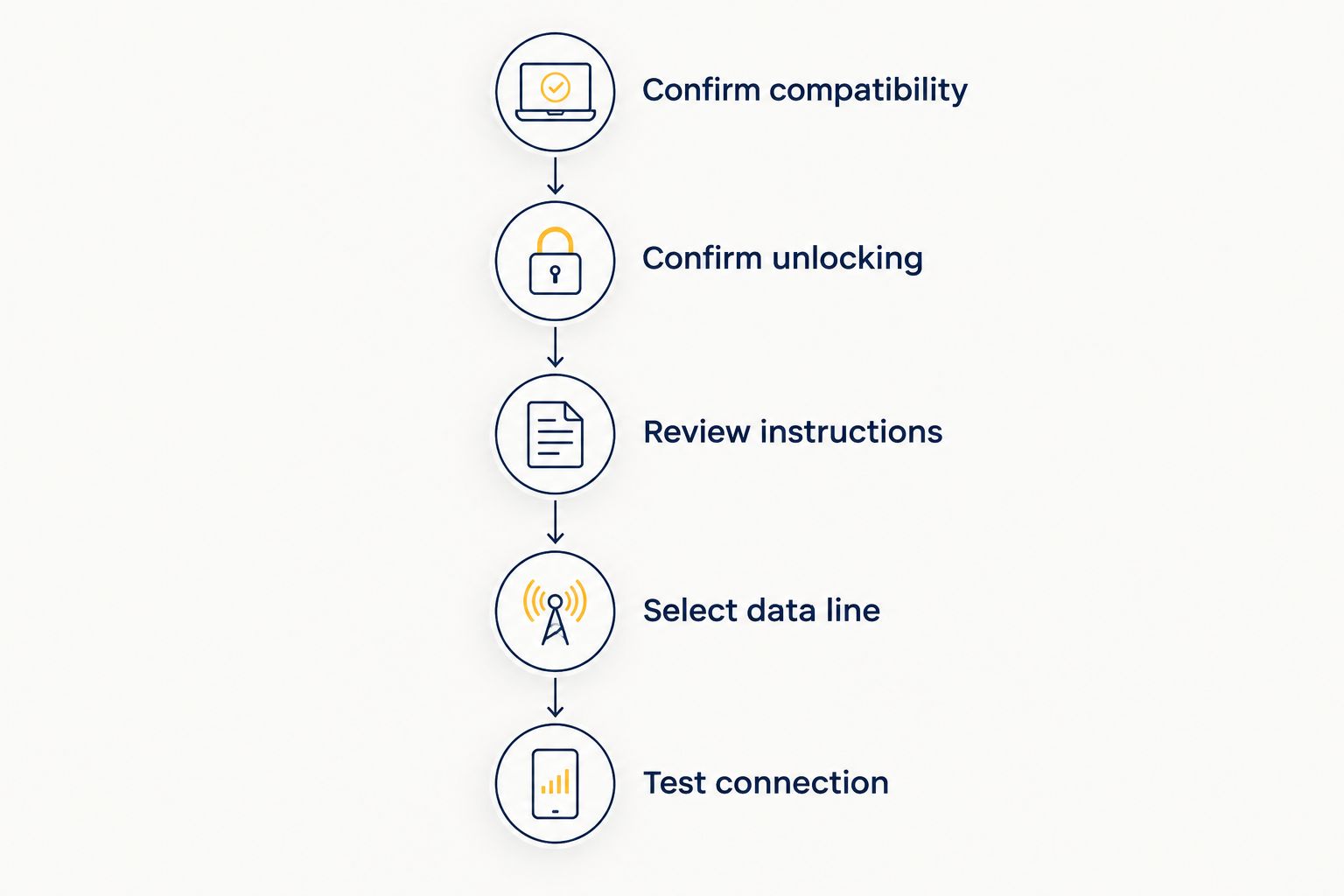
Follow this sequence once you have established that your phone is compatible and unlocked. It keeps device eligibility separate from plan setup.
- Confirm compatibility. Check the exact handset version against the provider’s supported-device information.
- Confirm unlocking. Use the iPhone status screen where available, or obtain confirmation from the carrier.
- Review instructions. Read the installation method, activation conditions and destination coverage before adding the profile.
- Select data line. After installation, choose the travel plan for mobile data when you intend to use it.
- Test connection. When the plan’s activation conditions are met, turn off Wi-Fi briefly and check whether mobile data works.
Installation and activation are not interchangeable. A profile can be present on your phone before it has connected to a supported network, depending on the plan’s terms.
Keep your home line and travel line clearly labelled in the phone’s settings. Before travelling in 2026, decide which line should handle mobile data and whether you need the home line active for calls or messages.
Turning off data roaming on the home line is not the same as disabling all of that line’s services. Review your carrier’s terms if you leave it active abroad, and follow the travel provider’s instructions for the travel line’s roaming setting.
Why eSIM access varies
The same travel plan does not work on every phone. These factors determine which checks you need:
- Carrier-lock status. A handset restricted to one carrier cannot simply accept an unrelated provider’s travel plan.
- Exact device version. eSIM support depends on the handset and its regional configuration, not just the name on the box.
- Device management. An employer’s configuration can restrict changes to mobile plans independently of carrier unlocking.
- Plan compatibility. The provider’s supported devices and installation requirements still apply to an unlocked phone.
- Activation and coverage. The plan must meet its activation conditions and connect to a supported network where you are using it.
These are separate checkpoints. A successful result at one checkpoint does not establish that the remaining requirements are met.
Can my carrier block eSIM without locking my phone?
Yes. A carrier can decline to provide its own service through eSIM while your unlocked phone remains able to use another provider’s compatible plan.
Ask a precise question: does the carrier mean that it does not support eSIM on your account, or that the handset is locked to its network? The answer determines whether you need a different service or an unlock.
For a 2026 trip, keep those questions separate in any support conversation. A statement about your home subscription is not automatically a statement about the phone’s ability to accept a travel plan.
Will turning off my home SIM remove the block?
No. Turning off your home line changes which subscriptions are active; it does not remove a carrier lock from the handset.
Disabling the home line can help you control which service the phone uses after a travel eSIM is installed. It is a usage setting, not an unlocking method.
Removing a physical SIM does not change this distinction either. The restriction belongs to the device’s carrier-lock status, not to whether the original card remains in the tray.
Should I delete an eSIM that will not connect?
Do not delete the profile as your first troubleshooting step. Check the selected data line, the plan’s activation conditions and the provider’s connection instructions first.
Some profiles require provider assistance or a new installation process after deletion. Ask whether reinstallation is supported before removing a profile you still need.
A failed connection is not proof of a carrier block. Tell support whether installation completed, what error appears and where you are trying to connect.
Where A-sim fits after the phone checks
A-sim travel eSIMs are best for international travellers with compatible, unlocked phones who want to manage travel data through an app. The service offers global, regional and single-country options, with access through its website or app.
A-sim lets you manage usage and top up through the app. That is useful once the device can accept the travel plan; it is not an unlocking service.
The limitation is straightforward: A-sim travel eSIMs do not replace the need to confirm device compatibility and resolve a carrier lock. Choose the destination coverage only after those checks are complete.
Choose your travel coverage
Explore global, regional and single-country travel eSIM options after checking your phone.
FAQ
Can I use an eSIM if my carrier does not support eSIM?
Yes, if your phone supports eSIM, is unlocked and meets the other provider’s requirements. Your home carrier’s lack of eSIM service does not automatically prevent a separate travel plan.
Can a travel eSIM unlock my phone?
No, a travel eSIM cannot remove a carrier lock. Contact the carrier associated with the lock and complete its unlocking process before using an unrelated provider’s plan.
How do I know whether my iPhone is unlocked?
Look for No SIM restrictions under Settings, General, About, Carrier Lock. Check eSIM compatibility separately, because an unlocked status does not establish support for every plan.
Can I use a travel eSIM on my work phone?
You can use a travel eSIM only if the work phone supports it and the organisation permits the setup. Ask your administrator about mobile-plan restrictions before changing a managed device.
Does removing my physical SIM let me use a blocked eSIM?
No, removing a physical SIM does not remove a carrier lock. An unlocked, compatible phone can support a separate eSIM without that action serving as an unlock.
Why does my eSIM install but show no service?
An installed eSIM can show no service when connection requirements have not been met. Check the selected data line, activation conditions, destination coverage and the provider’s roaming instructions.
Should I buy another eSIM if the first one is blocked?
Confirm the reason for the block before choosing another plan. A different provider does not fix a carrier lock, missing eSIM support or an administrator’s restriction.
One last thing
Your most useful support detail is not that eSIM failed. It is where it failed: adding the profile or connecting after installation.
For your 2026 travel checklist, save the exact error, phone model and unlocking status. Whether you choose A-sim or another provider, those details point support toward the right problem instead of another unnecessary installation attempt.