An eSIM for TEFL teachers abroad is a downloadable mobile SIM used to connect overseas, with the aim of keeping teaching, school communication and arrival logistics connected. This 2026 guide explains how to choose coverage, protect access to your existing number and test a connection before you depend on it for class.
- Choose an eSIM for TEFL teachers abroad around your placement, teaching workload and need for a local number.
- A-sim travel eSIMs suit educators who want app-based usage management and top-ups.
- Test laptop tethering and teaching apps before treating mobile data as your classroom backup.
- Keep access to your existing number separate from your choice of travel data.
Why this matters for TEFL teachers
Teaching abroad creates two separate connectivity needs: getting settled and doing your job. Maps and messages help you reach your accommodation; dependable access to teaching platforms helps you run lessons and contact your school.
A travel eSIM addresses mobile connectivity, not every requirement of living overseas. A data connection does not automatically include a local telephone number, ordinary SMS or permission to install a plan on a school-managed device.
For your 2026 placement, settle those questions before choosing a data allowance. Start with device eligibility: the guide to whether a locked phone can use an eSIM explains a purchasing constraint that is easy to overlook.
Choose your teaching setup first and your travel data second. A plan that works for directions and messaging is not automatically the right connection for laptop-based lessons.
How to choose and use your teaching eSIM
1. Check compatibility
Start with your phone’s settings and the manufacturer’s documentation. Confirm eSIM support for the exact model and regional version, then check whether your existing carrier restricts other providers. Owning an iPhone or Android phone alone does not establish compatibility.
If your school supplies the device, ask its administrator whether adding a personal mobile plan is permitted. Device management restrictions are separate from carrier restrictions, and neither is resolved by buying an eSIM.
Decide which device actually needs connectivity. A phone connection helps with messages, but your laptop needs its own internet connection or permitted tethering for browser-based teaching.
- Confirm eSIM support for your exact device model.
- Check carrier-lock status before purchasing.
- Ask permission before changing a school-managed phone.
- Confirm that your intended plan permits laptop tethering.
- Save installation instructions somewhere accessible offline.
2. Map destinations
Write down your placement country, arrival route and planned travel outside the placement. Use your itinerary rather than a broad regional label: a regional plan’s included destinations must match the countries you will actually visit.
For a 2026 teaching contract, separate your first arrival from your longer-term routine. You can assess arrival connectivity now without committing to the same arrangement for an entire academic year.
Check the validity rules alongside coverage. Installation, activation and the start of a plan’s validity are not interchangeable terms; read the selected plan’s instructions before installing early. A long stay also requires attention to what happens when the current allowance or validity ends.
- List your placement country and overnight stopovers.
- Mark any planned cross-border school or holiday trips.
- Compare the itinerary against the included-country list.
- Read when validity begins and when it ends.
- Recheck coverage before adding another destination.
3. Choose coverage
Compare single-country, regional and global coverage manually against your itinerary. Start with the narrowest geographic option that covers your actual movements, then assess validity, data allowance and the conditions that matter for teaching.
A-sim offers single-country, regional and global travel eSIMs through its app or website, with usage management and top-ups through the app. That gives you a way to manage travel data without treating every adjustment as a separate purchasing task.
A-sim is best for teachers who want travel eSIM data with in-app usage management and top-ups. Still check the selected plan’s coverage, validity and tethering terms; app-based management does not establish suitability for a particular classroom or lesson platform.
- Choose single-country coverage for a matching placement itinerary.
- Compare regional coverage against every planned border crossing.
- Consider global coverage only against your actual destinations.
- Check whether the plan includes voice or SMS.
- Confirm the conditions for topping up your selected plan.
4. Test teaching apps
Test the complete teaching setup, not just whether a webpage opens. A phone can handle messages while a tethered laptop struggles with a live lesson, screen sharing or simultaneous file transfers.
Run a 10-minute practice call as a practical check, not a guarantee of future performance. Use your usual headset, laptop and teaching platform in the location where you expect to teach. Ask the other participant about speech clarity and interruptions.
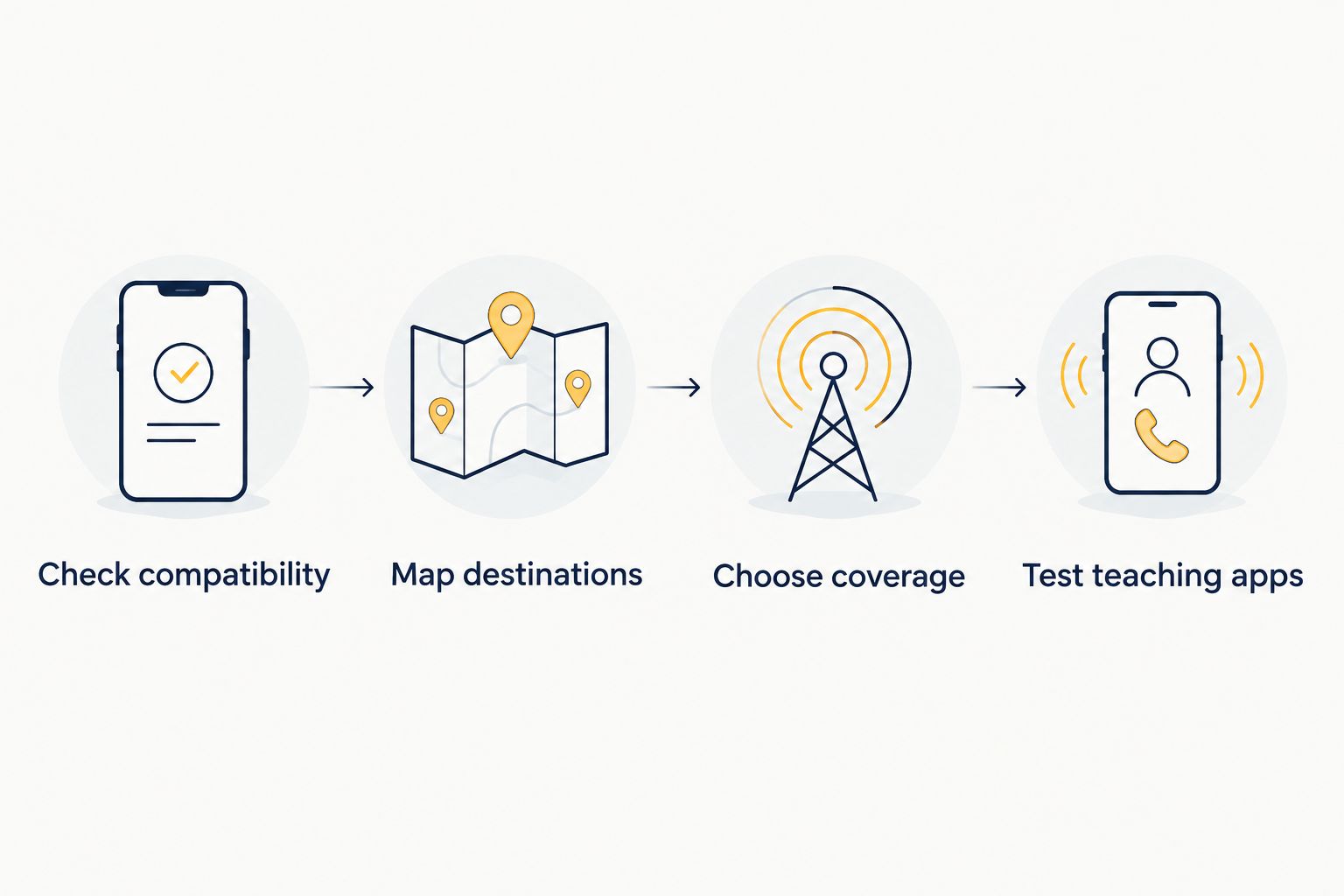
The setup sequence is simple: check compatibility, map destinations, choose coverage, then test teaching apps. Complete it before putting a mobile connection into your lesson plan.
A successful test establishes that the setup worked at that location and time. Repeat it after changing accommodation, teaching location or the device sharing the connection.
- Make a practice call using your normal teaching platform.
- Test screen sharing and microphone quality.
- Open lesson materials while the call is running.
- Test laptop tethering separately from phone browsing.
- Keep an offline activity ready if the connection fails.
5. Measure teaching usage
Build your allowance around observed usage instead of a generic traveller’s estimate. Keep a 3-day usage log covering your normal mix of teaching, commuting and preparation, and compare your phone’s per-app readings with the plan’s usage display.
Separate live teaching from background activity. Cloud backups, operating-system downloads and media syncing can consume an allowance without contributing to your lesson. Check those settings on both your phone and any tethered laptop.
Use the log as a planning sample, not a promise about the whole term. A week of classroom teaching and a week of remote lessons create different demands. Reassess when your timetable changes.
- Record data readings before and after teaching sessions.
- Note whether each session used Wi-Fi or mobile data.
- Restrict large background downloads on mobile connections.
- Download approved lesson materials before leaving reliable Wi-Fi.
- Review remaining allowance before a teaching-heavy day.
6. Protect number access
Treat your telephone number and mobile data as separate decisions. An eSIM is a SIM format, not a guarantee of a local number, ordinary calling or SMS. Check the selected service rather than assuming those features are included.
Before your 2026 departure, review accounts that send verification codes to your home number. Where supported, configure an authenticator or another recovery method while you still have access. Keep backup codes secure and separate from the phone.
On a compatible dual-SIM device, choose the intended line for mobile data and review automatic data-switching settings. Keeping your home line active can involve carrier charges; check the home carrier’s terms for calls, messages and roaming.
- List banking, school and email accounts tied to SMS.
- Configure supported alternatives to SMS verification.
- Label home and travel lines clearly in settings.
- Select the intended line for mobile data.
- Review roaming and automatic data-switching controls.
7. Build a fallback
An eSIM is a connection method, not a guarantee that mobile coverage reaches your classroom. Ask the school about connectivity at the actual teaching site, especially if you will teach away from a main campus.
Keep 2 fallback methods for interrupted lessons: an alternative connection and an offline teaching activity. A second plan using the same underlying mobile network is not an independent network backup, so check that detail rather than counting SIM profiles.
Set expectations with your school before an outage. Agree how to report a lost connection, where to find approved offline materials and whether a phone hotspot is acceptable for school work. Follow school policy when handling student information.
- Test connectivity in your actual teaching location.
- Identify an approved alternative connection.
- Keep an offline lesson activity on your device.
- Save your coordinator’s contact details offline.
- Agree an outage procedure with the school.
Compare connectivity options for teaching abroad
Choose by task rather than assuming one connection must do everything. Arrival data, local telephone access and live teaching are different requirements; combining options is often more practical than forcing them into one plan.
| Option | Best for | Main benefit | Key limitation |
|---|---|---|---|
| A-sim travel eSIM | Educators wanting app-managed travel data | Single-country, regional and global options; in-app usage management and top-ups | Check the selected plan’s coverage, validity and teaching-related requirements |
| Local mobile service with a number | Educators who need local calls or SMS | Supports local telephone needs when included in the service | Registration, device compatibility and service terms need checking |
| Home-carrier roaming | Educators who prefer their existing carrier arrangement | Keeps service management with the home carrier | Overseas allowances and roaming conditions depend on the carrier |
| School or accommodation Wi-Fi | Educators working at a fixed teaching location | Connects teaching devices without using a mobile allowance | Availability, access permission and performance depend on the site |
For live teaching, use a tested connection as your primary service and keep a tested backup. Do not choose mobile data solely because installation is convenient, and do not assume school Wi-Fi performs well without trying your teaching platform.
Common mistakes TEFL teachers make
Buying only for the airport arrival
Arrival maps are only the first task. Before purchasing, account for school messages, commuting, preparation and any online lessons; then revisit the setup once your accommodation and timetable are settled.
Assuming travel data includes a local number
Messaging apps do not replace every telephone requirement. Ask your school whether it needs an ordinary local number for staff contact or administration, and check voice and SMS features explicitly.
Testing the phone but not the laptop
A successful phone call does not test your browser, headset, screen sharing or tethering setup. Practise the lesson on the same equipment and platform you intend to use with students.
Treating a top-up as a complete reset
Extra data and extended validity are different conditions. Read what a top-up changes before relying on it to cover the next part of your placement, and check the updated allowance after purchase.
Leaving student files in unrestricted backups
A tethered laptop can start syncing files without a deliberate upload. Follow your school’s storage rules, review background syncing and use approved systems for student information rather than personal accounts.
FAQ
What’s the best eSIM for TEFL teachers abroad?
The best eSIM for TEFL teachers abroad matches the placement country, device and teaching workload. A-sim suits educators who want travel data with in-app usage management and top-ups; check the selected plan’s terms before relying on it for lessons.
Can I teach online using a travel eSIM?
You can teach online over an eSIM connection when the network performance and plan conditions support your teaching setup. Test your lesson platform, screen sharing and permitted laptop tethering at the location where you will teach.
Do I need a local number as an expat teacher?
You need a local number if your school or other essential services require one. A travel data connection does not automatically supply local calling or SMS, so confirm those requirements separately.
How much data do I need for teaching abroad?
Your data requirement depends on your teaching activities and how much time you spend on mobile data rather than Wi-Fi. Use a short usage log that includes actual lessons, preparation and everyday travel tasks instead of relying on a generic allowance.
Can I keep my Canadian number while using a travel eSIM?
You can keep your Canadian number if you retain the home service, and compatible dual-SIM phones can also use a travel eSIM. Check your carrier’s overseas terms and choose the intended line for mobile data to control which service your phone uses.
Should I choose a local SIM or a travel eSIM for a long contract?
Choose according to your need for local telephone service, data coverage and ongoing account management. A local service with a number addresses different requirements from a travel data plan; compare both against the full placement rather than arrival alone.
Can I install my eSIM before leaving for my teaching placement?
Install before departure only after checking the selected plan’s installation and validity instructions. Installation and activation rules vary, so confirm what starts the validity period before completing setup.
One last thing
Write a connection failure into your first lesson plan. Keep the activity, coordinator’s number and essential arrival details available offline, so losing data does not also mean losing your instructions.
For a 2026 placement, use A-sim for the travel-data role it fits, then verify the rest: classroom connectivity, local-number requirements and account recovery. Those checks matter more than collecting extra SIM profiles.