Yoho Mobile's strength is travel connectivity through an eSIM rather than a replacement physical SIM. That stops being enough when your trip also requires a different account workflow, a local phone number, or continuity with your home carrier. The best Yoho Mobile alternative in 2026 is A-sim if you need app-managed travel data; a local carrier SIM if you need a destination-based mobile service.
- For yoho mobile alternatives, choose A-sim for travel eSIMs with in-app usage management and top-ups.
- Choose a local carrier SIM when a destination phone number is essential; confirm the plan includes calls and texts.
- Keep home-carrier roaming on your shortlist when retaining your existing mobile service matters most.
- Compare destination coverage, activation rules, phone compatibility, and top-up terms before switching travel data providers.
Why this matters
The right alternative solves a specific travel problem. A different provider name does not, by itself, improve reception, add voice service, or make your phone compatible with eSIM.
A-sim offers single-country, regional, and global travel eSIMs, with purchases through its app or website and usage management and top-ups through its app. Start with that workflow if managing travel data is your main reason to switch. Start with a local carrier instead if your priority is a domestic mobile number.
For a 2026 trip, compare the actual plan against your itinerary—not a provider's broad destination category. A regional label is not a substitute for checking every country you will visit.
Yoho Mobile alternatives at a glance
These options solve different problems. The comparison includes Yoho Mobile as your baseline, alongside a travel eSIM alternative and two different ways to arrange mobile service abroad.
| Option | Best for | Standout feature or approach | Difference from Yoho Mobile |
|---|---|---|---|
| Yoho Mobile | Travellers considering a travel eSIM | Digital travel connectivity | Baseline option; assess the specific destination plan |
| A-sim | App-managed international travel data | Single-country, regional, and global options; in-app usage management and top-ups | An alternative travel eSIM account and management workflow |
| Local carrier SIM | Travellers seeking destination-based mobile service | A plan purchased from a carrier in the destination | Changes the service relationship from a travel eSIM provider to a local carrier |
| Home-carrier roaming | Travellers prioritizing their existing mobile service | Uses your home-carrier account abroad, subject to its roaming terms | Keeps service with your current carrier instead of adding a travel provider |
Compare the connection you need before comparing the company selling it. A travel data plan, a local mobile line, and home-carrier roaming are not interchangeable purchases.
1. A-sim: best for app-managed travel data
A-sim travel eSIMs suit travellers who want to purchase through an app or website, then manage usage and top-ups through the app. The service covers global, regional, and single-country travel options for compatible iPhone and Android devices. That makes the management workflow the clearest reason to put it on your shortlist.
Where it shines
- Choice of geographic scope: Match a single-country, regional, or global option to your itinerary.
- App-based management: Check usage and arrange top-ups through the app.
- Purchase flexibility: Get your travel eSIM through the website or app.
- Phone-based connectivity: Use a compatible iPhone or Android device rather than arranging a separate travel router.
Where it falls short
- An eSIM is not a workaround for an incompatible or carrier-restricted phone.
- Choosing a travel eSIM does not establish that your plan includes a local number, conventional calls, or SMS. Confirm those requirements separately.
- Geographic scope alone does not establish performance at a particular hotel, station, or rural stop.
Head-to-head with Yoho Mobile
| Decision point | This alternative | Yoho Mobile |
|---|---|---|
| Service category | Travel eSIM | Travel eSIM |
| Management workflow | In-app usage management and top-ups | Assess the workflow for your intended plan |
| Trip scope | Single-country, regional, and global options | Check the countries included in the selected plan |
| Purchase decision | Choose when the app workflow matches your needs | Stay when your selected plan already meets those needs |
Best for: Travellers who want travel data with app-based usage tracking and top-ups.
Verdict: Buy when the destination plan, device compatibility, and app workflow match your trip. Do not switch solely because a different provider appears first in a list.
2. Local carrier SIM: best for destination-based service
A local carrier SIM changes more than the provider name. You arrange service with a carrier in your destination, using a physical SIM or an eSIM where the carrier and your device support it. This is the option to investigate when you need local mobile service rather than travel data alone.
Where a local carrier SIM shines
- You can assess a destination carrier's own plans for the place you are visiting.
- You can seek a plan that explicitly includes a local number, calls, and SMS.
- A physical SIM is an option for phones that support physical SIMs but not eSIM, subject to carrier compatibility and unlocking requirements.
Where a local carrier SIM falls short
- Registration and identity requirements depend on the destination and carrier.
- A domestic plan does not automatically cover the next country on your route.
- Obtaining and activating service adds another task to your arrival arrangements.
| Decision point | Local carrier SIM | Yoho Mobile |
|---|---|---|
| Service relationship | Destination carrier | Travel eSIM provider |
| Local number | Choose a plan explicitly including one | Confirm the selected plan's voice and SMS features |
| Installation | Physical SIM or supported carrier eSIM | eSIM installation |
| Multi-country travel | Check roaming beyond the destination | Check the travel plan's country list |
Best for: Travellers whose stay requires a destination-based mobile line.
Verdict: Buy when local service is the requirement; skip when obtaining a local line adds work without solving a real need.
3. Home-carrier roaming: best for keeping your existing service
Home-carrier roaming keeps your mobile service with the provider you already use. It deserves a place in a 2026 comparison when account continuity matters more than opening another travel account. Confirm destination eligibility and the treatment of data, calls, and messages separately.
Where home-carrier roaming shines
- You keep the existing carrier relationship.
- You do not need to install a separate travel eSIM to use that roaming service.
- Your carrier provides the applicable roaming rules for your existing line.
Where home-carrier roaming falls short
- Your home plan's domestic allowance does not establish what applies abroad.
- Destination eligibility and usage restrictions require a separate check.
- Account continuity does not guarantee stronger reception than another service.
| Decision point | Home-carrier roaming | Yoho Mobile |
|---|---|---|
| Account | Existing home-carrier account | Separate travel-provider account |
| Setup | Configure the existing line for permitted roaming | Install and configure a travel eSIM |
| Terms to inspect | Home carrier's destination-specific roaming rules | Selected travel plan's destination and usage rules |
Best for: Travellers who prioritize keeping service under their existing carrier account.
Verdict: Hold if your current roaming arrangement already meets the trip's requirements.
Why people switch from Yoho Mobile
A useful switching decision starts with an unmet requirement, not an accusation against the current provider. The reasons below are decision criteria—not claims about Yoho Mobile's reliability or customer behaviour.
You want a different management workflow
If you want to check usage and top up inside an app, assess that complete process before purchasing. Look beyond installation: finding the remaining allowance and adding data are tasks you will perform during the trip.
Read the guide to checking how much eSIM data you have left before departure. Knowing where to inspect usage makes it easier to distinguish an exhausted allowance from a connection problem.
Your route needs a different geographic scope
A single-country stay and a multi-country itinerary need different checks. For a 7-day stay in one destination, start with that country's inclusion and the plan's validity rules. For a 14-day route across several destinations, verify every stop and the full travel period.
Those durations are planning examples, not recommendations for a particular allowance. Neither trip length nor a regional plan name tells you how much data you will use.
You need service beyond mobile data
A local number, conventional calls, or incoming verification texts can change the shortlist. Write those requirements down before selecting a travel plan. Internet access for messaging apps is not the same service as receiving SMS on a mobile number.
Check your phone before changing providers
Switching providers cannot remove a device restriction. Before buying a replacement plan in 2026, separate the travel service from the technology your phone uses to install it.
Comparing SimplyESIMs alternatives also requires separating the travel data plan from the hardware used to install it. A different plan does not make an incompatible phone natively support eSIM; device support remains a separate decision.
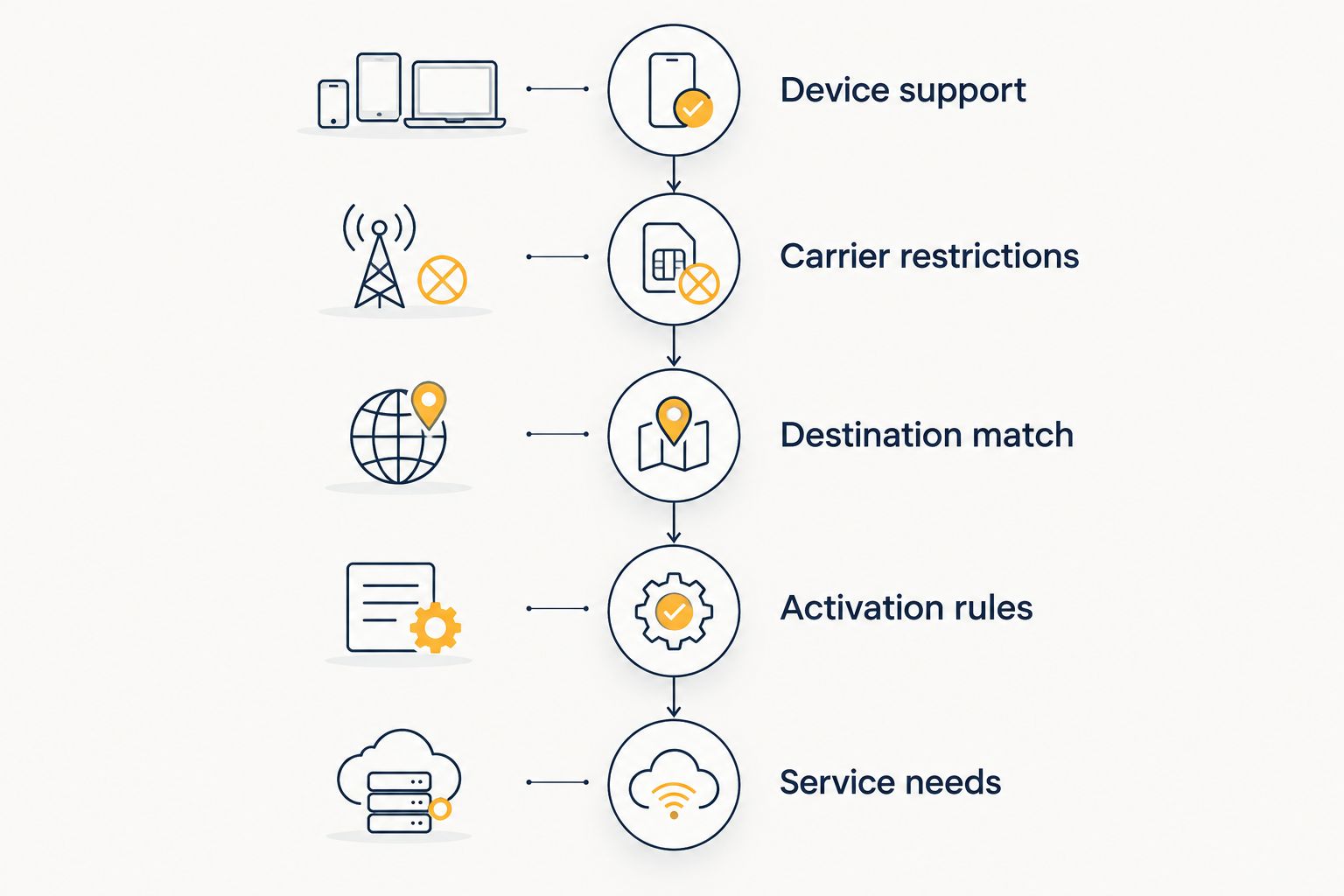
Use this sequence before committing:
- Device support: Check the exact phone model and its regional variant for eSIM support.
- Carrier restrictions: Confirm that the device can accept service from another provider.
- Destination match: Check every country on your itinerary against the selected plan.
- Activation rules: Identify what starts the validity period and what installation requires.
- Service needs: Confirm any requirements for hotspot use, calls, SMS, or a local number.
Keep installation and activation distinct. Downloading an eSIM profile and starting a plan's validity are not necessarily the same event; the selected provider's instructions determine the sequence. Do not apply instructions from an old purchase to a new plan without checking them.
How to make the final choice in 2026
Use a short written brief rather than another long provider shortlist. Record your destinations, travel dates, phone model, and essential services. Then eliminate any option that fails a requirement.
For example, a traveller spending 10 days in one country and needing a local number should assess local mobile plans first. A traveller crossing borders who needs app-managed travel data should assess the countries included in the relevant regional or global option. These are different jobs, even when both travellers use the same phone.
Before departure, save the installation instructions somewhere accessible without mobile data. Confirm which line will handle data and whether your home line should remain active for your intended use. On dual-SIM devices, review data switching and roaming settings rather than assuming the phone will make the intended choice.
Your final comparison should answer these questions:
- Does the plan cover the full itinerary and travel period?
- Can the exact phone accept and use it?
- Does it provide the services you actually need?
- Can you understand the usage and top-up process before departure?
A missing answer is a reason to investigate, not a reason to assume two providers are equivalent.
When staying with Yoho Mobile is the right call
Stay with Yoho Mobile when the selected plan meets your destination, device, and service requirements. Switching introduces another account, another installation process, and another set of instructions to learn.
For 2026 travel, a familiar setup is a valid advantage when it already works for your needs. Change providers to solve a defined problem—not to replace a satisfactory arrangement with an unverified promise.
FAQ
What's the best Yoho Mobile alternative in 2026?
A-sim is a Yoho Mobile alternative for travellers who want single-country, regional, or global travel eSIMs with in-app usage management and top-ups. Choose a local carrier plan instead when destination-based mobile service is your main requirement.
Is another travel eSIM automatically better than Yoho Mobile?
No. Compare the selected plans against your destination, phone, validity period, and required services. A different provider name does not establish better reception or a better fit.
Should I choose a local SIM instead of a travel eSIM?
Choose a local SIM when a destination carrier's service matches your needs, particularly when you require a local number. Confirm that the specific plan includes the calls and texts you need.
Can I keep my home phone number while using a travel eSIM?
Yes, on a compatible dual-SIM phone, you can keep your home line installed while using another line for travel data. Receiving calls or messages on the home line depends on your carrier's roaming service and your settings.
Will switching eSIM providers fix weak signal?
Switching providers does not guarantee stronger signal. Coverage depends on the network used, your location, device compatibility, and local conditions; compare the selected plan's network information before changing.
Can a locked phone use a different travel eSIM?
A carrier lock can prevent a phone from accepting another provider's service. Check the device's unlock status with the home carrier before purchasing a replacement travel plan.
What should I check before installing a replacement travel eSIM?
Check device compatibility, carrier restrictions, destination inclusion, and activation instructions first. Then confirm data-line settings and any requirements for hotspot use, calls, or SMS.
One last thing
Do not delete an installed eSIM as your first troubleshooting step. Removing a profile and turning a line off are different actions, and reinstallation depends on the provider's rules. Keep the profile in place while checking the selected data line, remaining allowance, and connection instructions.